Choosing between AWeber and GetResponse comes down to a few questions:
- Do you want a focused email tool or a full marketing platform with webinars, courses, and funnels?
- Is 24/7 phone support on every plan a priority, or will chat and email support do?
- Do you need multi-channel automation workflows, or are basic behavioral sequences enough?
- Are you sending newsletters and promotions, or do you also want to sell courses and host webinars from the same account?
- Do you have a plan for keeping your email list clean as it grows, and do you understand why that matters more than which platform you pick?
Here's what we recommend:
👉 AWeber is the straightforward choice for small businesses and creators who want email marketing that works without a learning curve. Founded in 1998, AWeber has spent 27 years building deliverability infrastructure and what may be the best customer support in the ESP category: 24/7 phone, chat, and email support on every plan, including the free tier.
Its Newsletter Assistant drafts emails in your voice, and the Campaign Marketplace offers pre-written sequences you can deploy the same day. The trade-off: AWeber's templates feel dated, its automation lacks depth, and reporting is basic.
👉 GetResponse serves businesses that need email marketing plus everything else: automation, webinars, online courses, conversion funnels, and web push notifications under one roof. Its visual automation builder handles multi-channel workflows with behavioral triggers, and AI tools speed up content creation across the platform.
GetResponse claims a 99% deliverability rate and serves 400,000+ customers in 183 countries. More features mean more complexity, though: the interface can feel dense, segmentation is limited, and some users find the templates outdated.
Both platforms handle the sending side well. But neither solves a problem that quietly undermines every email program: list decay. Email lists lose roughly 2.1% of their addresses every month to job changes, abandoned accounts, and domain shutdowns. That degradation hits your sender reputation whether you use AWeber or GetResponse.
👉 mailfloss is the automated email verification service that connects natively to both AWeber and GetResponse (plus 40 ESP platforms total) to clean your list daily without manual effort or technical setup. No Zapier or third-party connectors required.
It identifies invalid, fake, and risky addresses and removes them before they cause bounces that damage your reputation. Its Instafloss feature verifies new subscribers in real time as they sign up, which matters most for e-commerce businesses running paid ads where a signup typo means a lost customer who never receives their coupon.
The Auto Typo Fixer catches misspelled domains (gmial.com → gmail.com) and writes the corrected address back to your ESP, recovering 80–90% of misspelled addresses that would otherwise be lost. mailfloss isn't a replacement for AWeber or GetResponse. It's the maintenance layer that makes either platform perform at its best.
If automated list hygiene sounds like the missing piece of your email stack, see how mailfloss works with your platform.
AWeber vs GetResponse at a glance
| AWeber | GetResponse | mailfloss | |
|---|---|---|---|
| Primary focus | Email marketing for small businesses | All-in-one marketing platform | Automated email list verification |
| Founded | 1998 (Chalfont, PA) | 1997 (Gdańsk, Poland) | 2018 (Niagara Falls, ON) |
| Starting price | $12.50/mo (Lite, annual) | $15.58/mo (Starter, annual) | $29/mo (Lite) |
| Free plan | Yes (limited features) | Yes (500 contacts, 2,500 sends/mo) | 7-day free trial (full platform access) |
| Email automation | Visual workflows with split paths | Multi-channel workflows | N/A |
| SMS marketing | No | Enterprise only | N/A |
| Webinars | No | Built-in (up to 1,000 attendees) | N/A |
| Course creation | No | AI Course Creator included | N/A |
| Integrations | 750+ | 170+ | 40 native ESP integrations |
| Support | 24/7 phone, chat, email (all plans) | 24/7 email; live chat (limited hours) | Personalized email support + AI chatbot |
| Deliverability | In-house team, 50+ years combined experience | 99% deliverability rate claimed | Directly improves deliverability |
| List hygiene | Basic bounce handling | Bot filtering in automation | Daily automated cleaning + real-time verification + typo fixing |
AWeber keeps email marketing simple
AWeber's pitch is straightforward: "easy-to-use marketing solutions for quicker success and at a fraction of the cost."
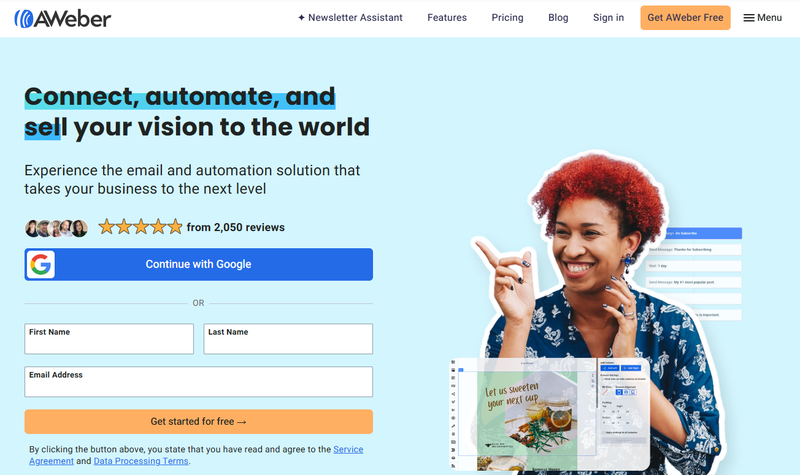
For a platform approaching its 28th year, this focus on simplicity has held steady.
The simplicity shows in the product.
AWeber's Smart Designer analyzes your website and generates branded email templates in seconds. The Campaign Marketplace offers pre-written email sequences (welcome series, lead magnet delivery, Black Friday campaigns) that you can import and activate the same day with minor edits.
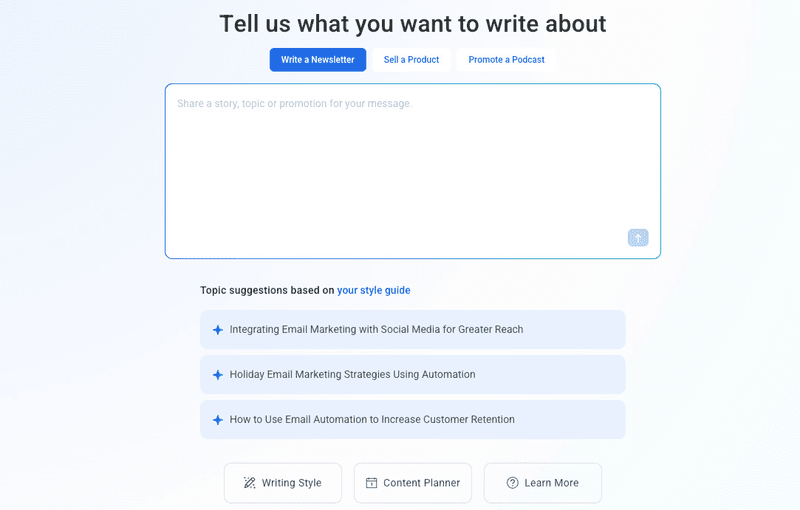
The Newsletter Assistant learns your writing style from your website and past emails, then drafts a weekly newsletter delivered to your inbox for review.
Source: AWeber
Where AWeber stands apart from nearly every competitor is support. 24/7 phone, live chat, and email support comes with every plan, including the free tier. If you're a solo creator who needs help at 2 AM, this matters.
AWeber's automation has improved recently. The 2025 Workflows overhaul added a visual builder with split paths based on opens, clicks, tags, and purchases, timezone-controlled sending, and in-builder performance metrics so you can spot drop-off points without leaving the canvas.
Each workflow supports up to 500 steps, with tag-based chaining for longer sequences. For welcome series, lead magnet delivery, and basic behavioral branching, it covers the essentials.
The limitations are real, though. Multiple reviewers on Capterra describe AWeber's email templates as "quite dated" and the editor's customization ceiling as lower than competitors. Reporting lacks native UTM tracking, revenue attribution per email, and A/B test reporting beyond open-rate comparisons.
The list architecture is siloed, making cross-list segmentation and unified subscriber profiles difficult. There's no native SMS, no webinars, no course creation.
AWeber is the tool for people who want email marketing to be the simplest part of running their business.
GetResponse goes wider with automation and channels
GetResponse takes the opposite approach: build everything into one platform so businesses never need to leave.

The automation builder is where GetResponse pulls ahead of AWeber. Its visual workflow canvas supports conditions triggered by email opens, link clicks, URL visits, purchases, abandoned carts, tag assignments, and custom events, with both email and web channels in a single workflow.
A single automation can respond to anonymous website visitors with popups and push prompts, then shift to personalized email nurture once they subscribe. Contact scoring, unlimited tags, and dynamic segmentation give marketers the tools to route contacts through complex journeys.
The platform extends well beyond email. Built-in webinars support up to 1,000 live attendees with screen sharing, whiteboards, polls, and YouTube live streaming.
The AI Course Creator generates course structures from topic prompts and supports seven module types including video, audio, quizzes, and embedded webinars. Premium newsletter subscriptions let creators charge for content. The Conversion Funnel builder strings together ads, landing pages, popups, email sequences, sales pages, and upsell pages with 30+ prebuilt scenarios.

Source: GetResponse
GetResponse's send-time optimization deserves attention.
Perfect Timing analyzes each subscriber's engagement patterns across the entire GetResponse platform (not just your account) and delays delivery up to 23 hours to hit each person's calculated best window. Time Travel delivers at the same local clock time regardless of time zone. AWeber offers timezone-controlled sending but nothing matching this per-subscriber behavioral approach.
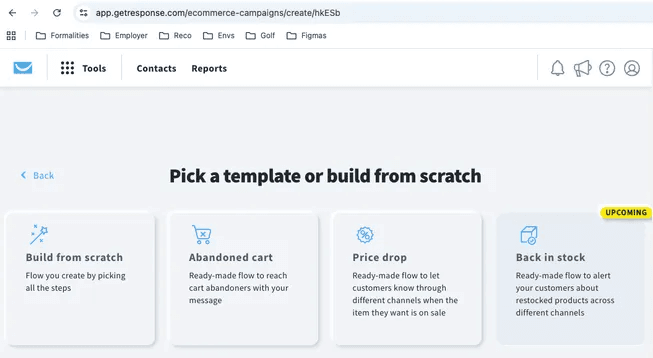
The ecommerce tools deserve mention. GetResponse integrates with Shopify, WooCommerce, Magento, PrestaShop, and BigCommerce for store-connected automation, including abandoned cart recovery that works even for non-subscribers, AI product recommendations on both email and website, and price drop campaigns that automatically target browsers when products go on sale.

Source: GetResponse
Where GetResponse shows cracks: G2 reviewers note the automation builder handles mid-complexity well but falls short on branched sequences compared to ActiveCampaign.
Segmentation is reportedly limited to around 7 filters. Multiple Capterra reviewers describe routine tasks requiring "too many screens and too many clicks." And while GetResponse offers SMS marketing, it's Enterprise only, not available on self-serve plans.
GetResponse is the tool for businesses that want automation, content monetization, and email sending from a single dashboard.
The deliverability problem neither platform fully solves
Both AWeber and GetResponse invest in deliverability infrastructure.
AWeber operates an in-house deliverability team with over 50 years of combined experience and strict anti-spam policies that prohibit sending to purchased or co-registered lists.

Source: AWeber
GetResponse claims a 99% deliverability rate across 160+ countries backed by 25+ years of sender reputation history. Both platforms support SPF, DKIM, and DMARC authentication and manage bounces at the infrastructure level.
But deliverability is a two-sided equation. The platform handles the sending infrastructure. You're responsible for the quality of your list.
Email lists decay at roughly 2.1% per month. People change jobs. Companies shut down domains. Subscribers abandon old email accounts. Over a year, that's roughly a quarter of your list turning into dead weight. Each invalid address generates a hard bounce when you send to it, and ISPs track bounce rates to decide whether you're a legitimate sender or a spammer.
AWeber handles basic bounce processing and offers some list cleaning features, but its siloed list architecture makes unified subscriber hygiene difficult.
GetResponse recently added bot filtering for automation workflows to remove false engagement signals, which helps keep automation logic clean but addresses only one piece of the problem. Neither platform verifies whether your existing subscribers' addresses are still valid on an ongoing basis.

Source: GetResponse
This is where most email marketers make a costly mistake. They invest time choosing between AWeber and GetResponse, set up automation, write good content, then watch open rates decline and wonder what happened. The answer is often straightforward: a growing percentage of their sends bounce off invalid addresses, training ISPs to treat their emails as unreliable.
mailfloss keeps both platforms performing
mailfloss approaches email marketing from a different angle. Instead of helping you send emails, it ensures the emails you send reach real people.
The core mechanism is Autofloss: once connected to your AWeber or GetResponse account (or any of its 40 supported ESP integrations), mailfloss scans your list daily for newly added invalid addresses.
When it finds problems, it takes whatever action you've configured (delete, unsubscribe, or tag) without requiring you to log in, run a report, or make decisions. Setup takes about 60 seconds and requires no IT team or technical knowledge. After that, it runs in the background indefinitely.
For e-commerce businesses running paid ads, the Instafloss feature adds real-time verification of new subscribers the moment they sign up.
Source: mailfloss
When a shopper enters their email to claim a coupon or discount code, Instafloss checks the address and catches typos before the subscriber ever enters your list. That means fewer wasted ad dollars on leads who signed up with a misspelled address and never received the offer.
What sets mailfloss apart from one-time verification tools is continuous automation combined with native ESP connections that don't require Zapier or any third-party middleware.
As mailfloss's documentation explains: "Other services, even those that integrate with email service providers, still require you to remember to use them, go through the results, decide what to do." mailfloss removes that recurring obligation entirely.
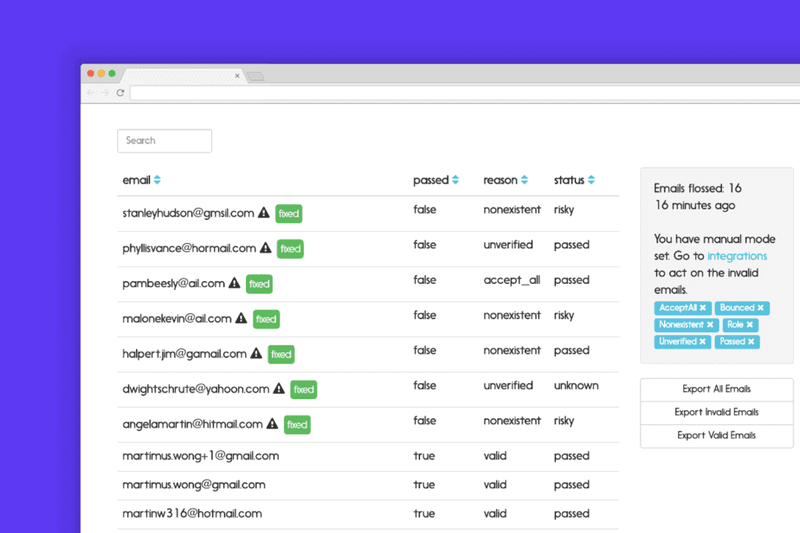
The Auto Typo Fixer catches misspelled email domains (gmial.com, yahooo.com, hotmial.com) and syncs the corrected address back to your ESP, recovering 80–90% of misspelled addresses.
Most verification tools flag typos passively or discard the address. mailfloss converts what would be a lost subscriber into an active one. For e-commerce businesses paying several dollars per acquired lead, that's direct revenue recovery.
The verification engine also goes deeper than most competitors on hard-to-verify providers. Most email verification tools mark Yahoo and AOL addresses as accept-all because they're difficult to verify at the mailbox level.
mailfloss's Deep Clean technology runs additional proprietary tests beyond the basic regex validation and server pinging that all services perform, providing more thorough verification for these domains.
Source: mailfloss
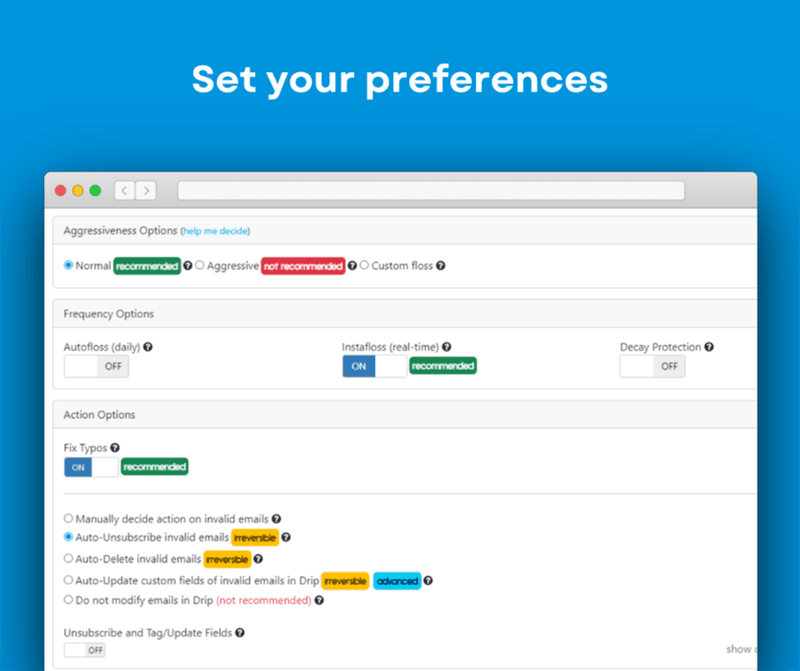
mailfloss also gives users control over verification aggressiveness through adjustable settings. Businesses dealing with bounce rate warnings can ramp up aggressiveness, while those focused on subscriber retention can use standard settings to balance list quality against list size.
Rather than claiming inflated accuracy numbers, mailfloss focuses on the right balance between thorough verification and keeping valuable subscribers.
For AWeber users running behavioral automations, clean data means split paths fire correctly and engagement-based tags stay accurate. For GetResponse users with multi-channel workflows, verified addresses prevent false bounces from polluting automation logic and skewing contact scores.
On both platforms, clean lists translate directly to better inbox placement, more accurate analytics, and lower costs.
After deploying mailfloss to clean 647 spam traps, NAMS achieved a 99% Sender Score, a recovery the CMO described as possible because mailfloss is "the only piece of software that I use every single month that I don't even have to think about." (NAMS Case Study)
Feature depth comparison
A few areas where AWeber and GetResponse diverge most sharply:
- AI tools.
AWeber offers an AI Writing Assistant for email drafting, an AI Subject Line Generator informed by performance data, and the Newsletter Assistant that drafts weekly newsletters in your voice.

Source: AWeber
GetResponse counters with an AI Email Generator powered by OpenAI, an AI Landing Page Builder, an AI Website Builder, an AI Course Creator, and an AI Web Push Generator.

Source: GetResponse
GetResponse has spread AI across more surfaces. AWeber's Newsletter Assistant, which delivers ready-to-send drafts to your inbox weekly without any prompting, is more hands-off for newsletter creation specifically.
- Landing pages.
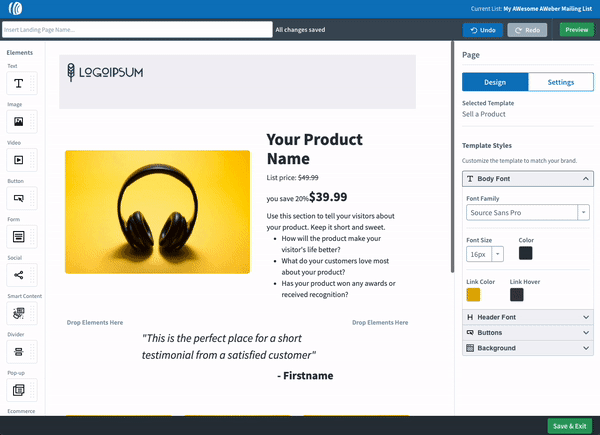
Both platforms include drag-and-drop landing page builders with templates, custom domains, and tracking pixel support. AWeber's builder includes a Canva integration inside the editor and a Link in Bio page for social creators. GetResponse offers 200+ templates with AI generation, plus a separate Website Builder for full multi-page sites, something AWeber doesn't provide.
- Web push notifications.
Both include web push. AWeber includes it on all plans at no extra cost, up to 50,000 subscribers on Lite and unlimited on Plus. GetResponse includes it on Marketer, Creator, and Enterprise plans but not on Starter.
- Ecommerce.
AWeber's ecommerce is a landing page element with Stripe integration for one-time, subscription, and split payments at a 0.6% transaction fee on Plus.
Source: AWeber
GetResponse integrates with Shopify, WooCommerce, Magento, PrestaShop, and BigCommerce for store-connected automation including abandoned cart recovery, AI product recommendations, and price drop campaigns. For dedicated ecommerce businesses, GetResponse offers more depth.
Source: GetResponse
- Integrations.
AWeber claims 750+ integrations spanning content management, CRM, ecommerce, and more. GetResponse lists 170+ integrations with native connectors plus Zapier. AWeber's broader integration directory is an advantage for businesses with specialized tool stacks.
Pricing reflects different strategies
AWeber and GetResponse price their products differently, and the differences reveal what each company values.
AWeber uses subscriber-count-based pricing with two paid tiers.
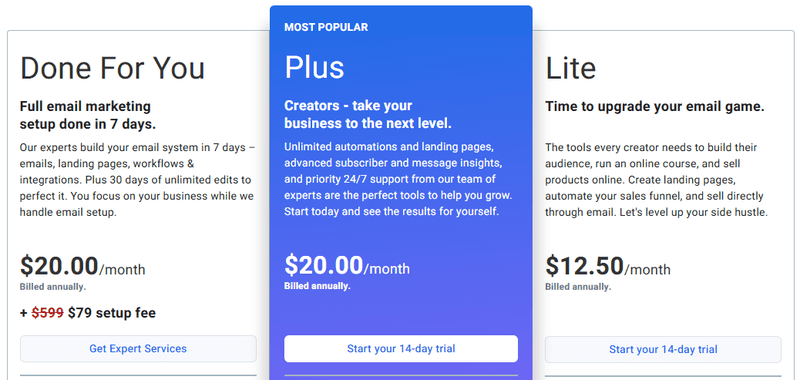
The Lite plan starts at $12.50/month (annual billing) for up to 500 subscribers but limits you to 1 email list, 3 automations, and 3 landing pages. The Plus plan starts at $20/month (annual) for 500 subscribers and removes all limits: unlimited lists, automations, landing pages, and users.
Monthly sends are capped at 10x (Lite) or 12x (Plus) your subscriber count. At 10,000 subscribers on Plus, you'll pay $135/month on monthly billing. AWeber also offers a free account migration service for customers switching from other ESPs.
GetResponse uses contact-list-based pricing with all paid plans including unlimited monthly email sends.
Starter at $15.58/month (annual) for 1,000 contacts covers basic email marketing. Marketer at $48.38/month (annual) adds automation, segmentation, abandoned cart recovery, A/B testing, and web push. Creator at $56.58/month (annual) adds webinars, courses, premium newsletters, and website builder. Enterprise is custom-priced.
GetResponse positions itself as "the only email marketing and automation tool that stays affordable as you get more successful." At the entry level, GetResponse Starter typically costs less than AWeber Lite for basic email at the same list size. The full-featured comparison (AWeber Plus vs. GetResponse Marketer or Creator) depends on list size and which capabilities matter to your business.
One pricing detail worth noting: GetResponse counts the same email address on two lists as two contacts, which can push accounts into higher tiers unexpectedly. AWeber has a similar siloed list structure but recommends maintaining one list with tag-based segmentation to avoid duplicate counting.
mailfloss operates on a separate pricing axis.
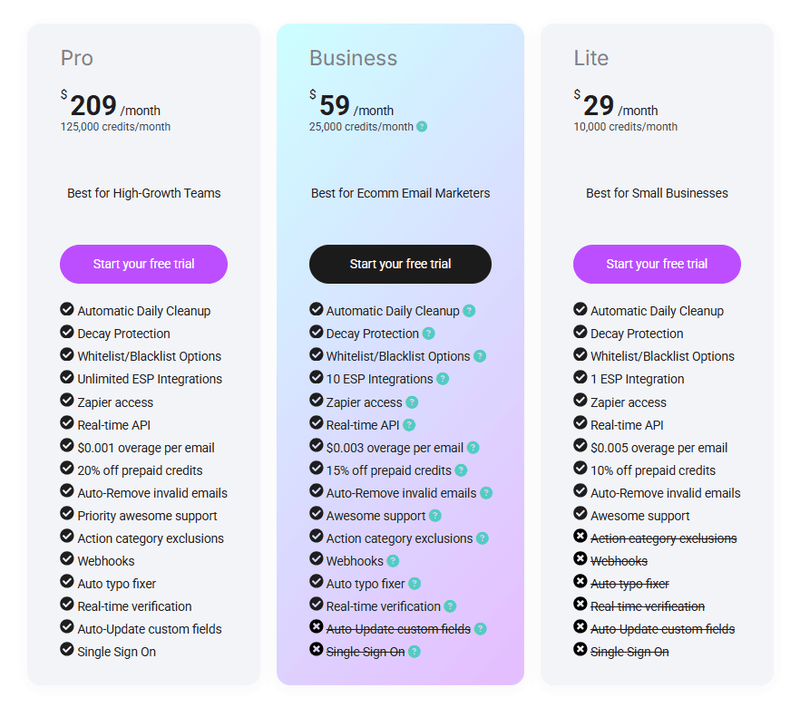
At $29/month for 10,000 verifications, it's an additional line item on top of your ESP subscription. But the math often works in its favor: if 20% of a 10,000-subscriber list consists of invalid addresses, you're overpaying your ESP for 2,000 ghost subscribers while those bouncing addresses damage your deliverability for the other 8,000.
With each recovered subscriber worth roughly $8 in lifetime value for a typical e-commerce business, recovering even a handful of typo addresses per month can cover the subscription cost. mailfloss also offers a 7-day free trial with full platform access (not limited verification credits like most competitors) so you can evaluate the impact on your list before committing.
How businesses actually use these platforms
The best way to understand AWeber vs GetResponse is to look at who thrives on each.
AWeber fits the solo creator or small business owner who needs to build an email audience and send regularly without becoming a marketing technician.
AWeber's success stories feature a comedy club, a cheese-making instructor, a Zumba teacher, a dog trainer, a travel blogger, and a wine concierge: non-technical people running niche operations who value reliability and support over feature count.
GetResponse fits the growing business that needs multiple marketing channels coordinated from one dashboard.
Ecommerce brands running abandoned cart sequences, product recommendations, and seasonal campaigns. Coaches selling courses and hosting webinars with automated follow-up. Mid-sized companies orchestrating email, web push, and paid ads in coordinated workflows.
mailfloss works for both profiles and is especially valuable for e-commerce and D2C businesses with large subscriber lists where consumers sign up through coupons, content upgrades, and deals using personal @gmail and @yahoo addresses prone to typos.
Whether you're sending 5,000 emails a month from AWeber or running GetResponse automations reaching hundreds of thousands of contacts, the list decay problem is identical. The only variable is scale.
After connecting mailfloss, one user reported open rates increased by 4% on average, a direct result of removing invalid addresses that were dragging down deliverability metrics. (Fred Owen, mailfloss Reviews)
AWeber vs GetResponse plus mailfloss: Building your complete email stack
The question isn't really AWeber or GetResponse. It's understanding which platform matches your business model, and recognizing that neither provides complete email marketing infrastructure alone.
Choose AWeber if:
- Email marketing is your primary need and you want it simple
- 24/7 phone support on every plan matters to your workflow
- You're a solo creator, blogger, or small business without complex automation needs
- You want pre-written campaign templates and AI-drafted newsletters to start fast
- You value a 27-year track record of deliverability
Choose GetResponse if:
- You need multi-channel behavioral automation workflows
- Built-in webinars and course creation would replace separate tools you're paying for
- You run an ecommerce store and want abandoned cart recovery, product recommendations, and price drop campaigns
- Per-subscriber send-time optimization matters to your engagement strategy
- You want a conversion funnel builder with native payment processing
Add mailfloss to either if:
- You're serious about maintaining inbox placement as your list grows
- You want daily automated cleaning and real-time verification without manual effort or IT involvement
- Typo recovery sounds like revenue you're currently losing
- You run an e-commerce or D2C business where every recovered subscriber has direct lifetime value
- You'd rather prevent deliverability problems than react to them
One mailfloss user described the impact: domain and IP reputation in Google Postmaster tools "quickly started to climb back to high" after enabling daily cleaning. (Nick James, mailfloss Reviews)
The most effective email marketers don't see these as competing choices. They build complete stacks. AWeber or GetResponse handles the sending and engagement layer. mailfloss handles the quality and deliverability layer. Together, they create a system where good content actually reaches the audience it was written for.
Your choice of ESP matters. But so does the quality of the list you're sending to. Investing in one without the other is building on an unstable foundation.
AWeber vs GetResponse + mailfloss FAQ
What is the core difference between AWeber, GetResponse, and mailfloss?
AWeber is an email marketing platform built for simplicity and reliability for small businesses, with a 27-year track record and 24/7 phone support on every plan.
GetResponse is a broader marketing platform that combines email, automation, webinars, course creation, and conversion funnels in a single dashboard. mailfloss is not an ESP. It is an automated email verification service that integrates natively with both AWeber and GetResponse (40 ESP platforms total) to continuously clean invalid addresses from your list and protect your sender reputation.
Which is cheaper: AWeber or GetResponse?
At the entry level, GetResponse Starter costs $15.58/month (annual) for 1,000 contacts, while AWeber Lite costs approximately $20.83/month (annual) for 1,000 subscribers.
For full-featured plans, AWeber Plus runs about $37.50/month (annual) for 1,000 subscribers with unlimited automations, while GetResponse Marketer costs $48.38/month (annual) for 1,000 contacts with automation and segmentation. Both platforms scale pricing with list size.
Do I need mailfloss if I already use AWeber or GetResponse?
Both AWeber and GetResponse handle basic bounce processing, but neither continuously verifies whether existing subscribers' addresses are still valid. Email lists decay at roughly 2.1% per month.
mailfloss scans your list daily and removes invalid addresses before they cause bounce-rate damage. Its Instafloss feature verifies new subscribers in real time as they sign up, catching problems before they ever enter your list. The Auto Typo Fixer recovers 80–90% of misspelled addresses that both platforms would otherwise count as permanently lost.
Which platform has better marketing automation?
GetResponse has more advanced automation. Its visual workflow builder supports multi-channel triggers (email opens, URL visits, purchases, abandoned carts), contact scoring, dynamic segmentation, and both email and web channel workflows in a single canvas.
AWeber's Workflows cover split paths, behavioral triggers, and timezone sending, but lack the depth for complex multi-conditional sequences, site-behavior-based triggers, or contact scoring.
Which platform is better for selling courses or hosting webinars?
GetResponse is the clear choice. It includes a native AI Course Creator and built-in webinar platform supporting up to 1,000 live attendees on the Creator plan at $56.58/month (annual). AWeber does not offer webinars or course creation on any plan. Using AWeber for these use cases would require separate third-party tools.
Can mailfloss fix email typos automatically?
Yes. The Auto Typo Fixer detects common misspellings of major email providers (Gmail, Yahoo, Hotmail, AOL) and syncs the corrected address back to your connected ESP, recovering 80–90% of misspelled addresses. This feature is available on Business and Pro plans. Most verification tools only flag typos passively. mailfloss applies the correction and recovers the subscriber.
Which platform has better customer support?
AWeber offers 24/7 phone, live chat, and email support on all plans including the free tier, and has won Silver Stevie Awards for customer service six years running. GetResponse offers 24/7 email support in 7 languages and live chat during limited hours, with a 24/7 chatbot outside those hours.
Enterprise customers receive a dedicated Customer Experience Manager. For non-enterprise users who value phone access and round-the-clock human support, AWeber has a clear advantage. mailfloss, as a smaller company, provides personalized support with hands-on assistance for businesses that need help with setup or configuration.
Does GetResponse include SMS marketing?
SMS marketing is available only on GetResponse Enterprise at custom pricing. It is not included on the self-serve Starter, Marketer, or Creator plans. AWeber does not offer native SMS on any plan. Both platforms include web push notifications on their higher-tier plans.

No comments:
Post a Comment