Email data synchronization connects your email platform and CRM system so customer data stays identical across both tools. When someone updates their email address in your CRM, email sync pushes that change to your email service provider automatically. When a contact unsubscribes through an email campaign, that preference syncs back to your CRM instantly.
This two-way data flow eliminates the manual export-import dance that eats up hours and introduces errors. You get real-time visibility into email engagement directly in your CRM contact records. Your sales team sees which emails prospects opened. Your marketing team sees which CRM segments converted best.
The business impact shows up fast. Email marketing delivers an average return of $36-42 per dollar spent in 2026, but only when your data stays clean and synchronized. Poor synchronization means sending emails to outdated addresses, missing unsubscribe requests, and annoying customers with irrelevant content.

Email marketing ROI averages $36–$42 per $1 in 2026 when data stays synchronized.
We're going to walk through the technical mechanisms that make email sync work, compare the major synchronization protocols, and show you how to implement server-side synchronization that keeps your data consistent without constant manual intervention. You'll also learn how to troubleshoot the most common sync failures and maintain data quality as your email list grows.
What Email Synchronization Actually Does
Email synchronization keeps your email messages, contact data, and engagement metrics identical across your email client, mail server, and CRM system. When you read an email on your phone, that read status synchronizes to your desktop client and your web interface instantly.
The synchronization process copies data changes from one system to another. Your email client connects to your mail server using a protocol like IMAP. The protocol defines how devices request updates, how servers respond, and which data gets transferred.
Two-way sync means changes flow in both directions. Update a contact's email address in your CRM, and email sync pushes that change to Mailchimp, ActiveCampaign, or whichever email service provider you use. Someone clicks a link in your email campaign, and that engagement data syncs back to your CRM contact record.
This differs completely from one-way sync where data only moves in a single direction. POP3 email protocol downloads messages from the server to your device but doesn't sync changes back. Delete an email on your laptop, and it still appears on your phone.
Server-Side vs Client-Side Synchronization
Server-side synchronization happens on the mail server before data reaches your devices. Your email provider processes sync operations between your CRM and email platform automatically. You never touch the data transfer process.
Client-side sync requires software running on your computer or phone to handle synchronization. Your email client connects to multiple servers, downloads data, and manages the sync process locally. This approach consumes device resources and only syncs when your device is online.
Most businesses choose server-side synchronization because it runs continuously regardless of which devices are active. Direct database synchronization represents the most tightly coupled integration approach, creating real-time data consistency across platforms.
Data Consistency Across Multiple Devices
Data consistency means identical information appears everywhere you access it. Check your email on your laptop, phone, and web browser. All three show the same messages, folders, and read statuses.
Email sync protocols maintain consistency by designating a single source of truth, usually the mail server. Every device synchronizes against that central server. When conflicts occur, the server's version wins.
Consistency breaks down when synchronization fails. Network timeouts interrupt data transfers. Authentication expires. Rate limits prevent too many simultaneous connections. Each failure creates data divergence across your devices.
Organizations using CRM integration face additional consistency challenges. Your CRM contact record might show an email address that differs from your email service provider's database. Poor data quality costs U.S. businesses $3.1 trillion annually, much of it from synchronization failures between marketing tools.
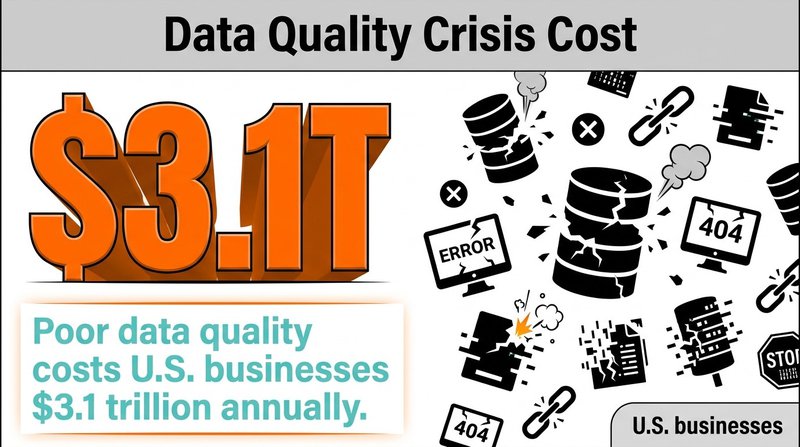
Poor data quality costs U.S. businesses $3.1 trillion annually—often rooted in sync failures.
How Email Sync Protocols Work
Email sync protocols define the technical rules for transferring email data between servers and clients. Each protocol handles authentication differently, transfers different types of data, and maintains folders using unique mechanisms.
IMAP (Internet Message Access Protocol) manages email synchronization for most modern email systems. IMAP keeps all messages stored on the mail server. Your email client displays those messages but doesn't permanently download them.
The protocol tracks message state across devices. Mark an email as read on your phone, and IMAP updates that flag on the server. Your desktop email client checks the server and displays the same read status.
IMAP organizes emails into folders that exist on the server. Create a folder called "Clients" in your webmail interface, and that folder appears in your desktop email client automatically. Move messages between folders on any device, and IMAP synchronizes those changes everywhere.
Two-Way Sync With IMAP Protocol
Two-way sync with IMAP means both your email client and mail server can initiate changes. Delete a message in your email client, and that deletion syncs to the server. The server then pushes that deletion to your other connected devices.
IMAP IDLE extends basic two-way sync with push notifications. Your email client maintains an open connection to the mail server. When new mail arrives, the server immediately notifies your client without waiting for the next scheduled check.
This creates near-instant synchronization. Someone sends you an email, and you see it on your phone within seconds. No manual refresh required. No five-minute polling intervals.
Real-time sync matters more for CRM integration than basic email access. Your sales team needs to see email engagement data the moment a prospect clicks a link. Delayed sync means outdated contact records and missed follow-up opportunities.
POP3 and Why It Breaks Synchronization
POP3 (Post Office Protocol 3) downloads email messages from the server to your device, then typically deletes them from the server. This one-way transfer prevents synchronization across multiple devices.
Check email on your work computer using POP3, and those messages download to that computer only. Check email on your phone later, and you won't see any messages that your work computer already downloaded.
Some email clients configure POP3 to leave copies on the server temporarily. This helps but doesn't create true synchronization. You still can't delete a message on one device and have that deletion appear on other devices.
POP3 also fails to synchronize folders, sent mail, or message flags. Everything downloads into a single inbox. Your carefully organized folder structure exists only on the device that created it.
Exchange ActiveSync and MAPI for Enterprise
Exchange ActiveSync (EAS) synchronizes email, calendar, contacts, and tasks between Microsoft Exchange servers and mobile devices. EAS was designed specifically for wireless synchronization with push notification support built in.
The protocol optimizes for mobile networks by compressing data and supporting delta sync. Only message changes get transferred, not entire messages. This reduces bandwidth usage and speeds up synchronization on cellular connections.
MAPI (Messaging Application Programming Interface) provides the synchronization protocol for Outlook desktop clients connecting to Exchange servers. MAPI offers richer features than IMAP, including full access to Exchange server functionality.
Large organizations often use both protocols simultaneously. Mobile devices connect via EAS while desktop Outlook clients use MAPI. Both protocols synchronize against the same Exchange server, maintaining data consistency across all devices.
Authentication Requirements for Email Sync
Email authentication verifies your identity before allowing server access. Sync operations require continuous authentication to maintain secure connections between your email client and mail server.
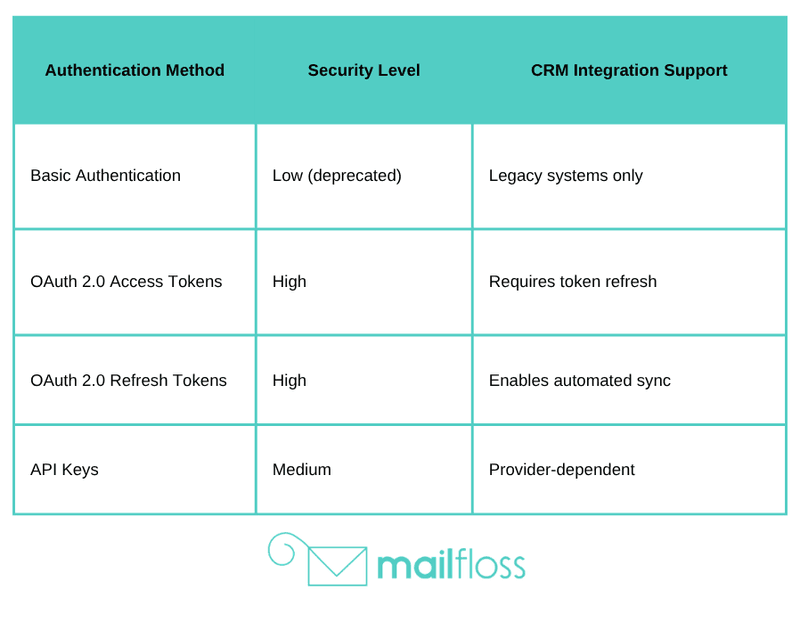
Most email providers now require OAuth 2.0 authentication instead of basic username-password credentials. OAuth generates temporary access tokens that grant limited permissions without exposing your actual password.
The authentication flow starts when your email client requests access to your account. You get redirected to your email provider's login page. After entering credentials, the provider generates an access token and sends it to your client.
Your email client includes this token with every synchronization request. The mail server validates the token before processing any data transfers. Tokens expire after a set period, requiring reauthentication to maintain sync operations.
OAuth 2.0 vs Basic Authentication
Basic authentication sends your username and password with every server request. This creates security vulnerabilities because credentials travel across the network repeatedly. Compromised credentials give attackers full account access.
OAuth 2.0 separates authentication from authorization. You authenticate once through your email provider's secure login page. The provider issues a limited-scope token that grants specific permissions without revealing your password.
Token-based authentication enables granular permission control. An email sync application might receive read-only access to your messages without the ability to delete emails or modify account settings. Revoke the token, and the application loses all access immediately.
Gmail, Outlook, and Yahoo now mandate OAuth 2.0 for IMAP and SMTP connections. Basic authentication stopped working for most consumer email accounts in 2024. This affects email synchronization because older CRM integrations built on basic auth credentials no longer function.
Managing Authentication Across CRM Integrations
CRM systems connecting to email platforms need ongoing authentication without manual intervention. Your CRM can't stop syncing every time an OAuth token expires.
Refresh tokens solve this problem. When your CRM first authenticates with your email provider, it receives both an access token and a refresh token. The access token expires quickly, but the refresh token lasts much longer.
Before the access token expires, your CRM uses the refresh token to automatically request a new access token. This happens in the background without requiring you to log in again.
Some email providers rotate refresh tokens with each use. Your CRM receives a new refresh token every time it requests a new access token. Storing and managing these rotating tokens adds complexity to the integration.
Real-Time Sync vs Scheduled Synchronization
Real-time sync transfers data immediately when changes occur. Update a contact's email address in your CRM, and that change reaches your email service provider within seconds. Someone unsubscribes from your mailing list, and their preference updates in your CRM instantly.
Scheduled synchronization runs at fixed intervals. Your systems might sync every hour, every six hours, or once daily. Changes accumulate between sync operations, creating temporary data inconsistencies.
The synchronization frequency you need depends on how quickly you act on email data. Sales teams following up on email engagement need real-time sync so they can call prospects while emails are still fresh. Marketing teams analyzing campaign performance can often work with hourly or daily sync schedules.
Push Notifications and IMAP IDLE
IMAP IDLE enables real-time email notifications without constant polling. Your email client opens a connection to the mail server and waits. The server pushes notifications through that open connection whenever new messages arrive.
This differs from traditional polling where your client checks for new mail every few minutes. Polling wastes server resources and battery life checking for updates that usually don't exist.
IDLE connections stay open for 29 minutes by default. Before the connection times out, your client sends a keep-alive signal to maintain the session. The server responds, resetting the timeout timer.
CRM systems rarely use IMAP IDLE directly because they sync more than just email messages. They need contact data, custom fields, tags, and campaign metrics. Most CRM integrations use the email provider's API with webhook notifications for real-time updates instead.
Batch Sync and Delta Synchronization
Batch synchronization processes multiple changes in a single operation. Instead of syncing each contact update individually, your system accumulates changes and transfers them together. This reduces server load and API call consumption.
Delta sync transfers only the data that changed since the last synchronization. Your CRM tracks which contacts were modified after the previous sync operation. The next sync only processes those modified records.
This approach becomes critical as your email list grows. Syncing 100,000 contacts takes significantly longer than syncing the 200 contacts that changed since yesterday. Delta sync makes large-scale email synchronization practical.
Most email service providers track modification timestamps for contacts and campaigns. Your CRM queries for all records modified after a specific timestamp. The provider returns only changed data, minimizing transfer volume.
Connection Limits and Rate Limiting
Email providers restrict how many simultaneous connections each account can maintain. Gmail allows 15 simultaneous IMAP connections per account. Exceed that limit, and new connection attempts fail.
Rate limiting controls how many API requests you can make per hour or per day. Mailchimp allows 10 simultaneous connections and limits requests to prevent server overload. Hit the rate limit, and your sync operations pause until the limit resets.
These restrictions affect CRM synchronization because multiple sync processes might run simultaneously. Your marketing automation syncs campaign data. Your sales CRM syncs contact updates. Your customer support system syncs conversation history. Each process consumes connections and API calls.
Smart integration design queues sync operations to stay within limits. Instead of starting five sync jobs simultaneously, your system runs them sequentially or staggers the start times. Monitor your API usage to identify when you're approaching provider limits.
Implementing Email Sync Between CRM and Email Platforms
CRM integration with email platforms requires connecting two separate systems so data flows automatically between them. The integration copies contact information, email engagement data, and campaign metrics in both directions.
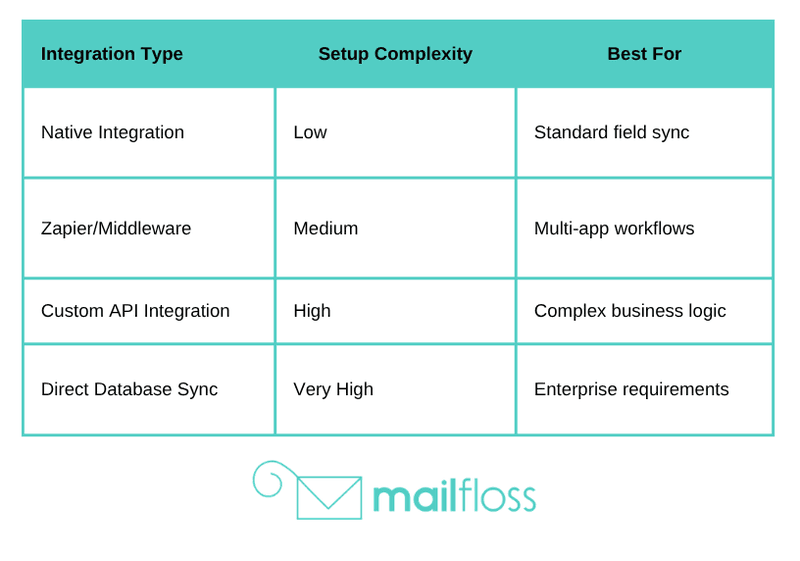
Most modern email service providers offer native CRM integrations through their app marketplaces. Mailchimp integrates with Salesforce, HubSpot, and dozens of other CRMs with pre-built connectors. These native integrations handle authentication, field mapping, and synchronization scheduling automatically.
When native integrations don't exist, you'll build custom synchronization using email provider APIs. The API provides programmatic access to contacts, campaigns, and engagement data. Your integration code authenticates with both systems, reads data from one, and writes it to the other.
Choosing Your Integration Approach
Native integrations install through your email provider's app marketplace. Click install, authenticate with your CRM, map a few fields, and synchronization starts. Setup takes minutes instead of weeks.
The downside is limited customization. Native integrations sync predefined fields on fixed schedules. You can't sync custom data attributes or implement complex business logic without API access.
API-based custom integrations give you complete control. Sync any data field. Implement custom transformation rules. Run synchronization on your own schedule. The tradeoff is development time and ongoing maintenance.
Most businesses start with native integrations and only build custom sync when they encounter specific limitations. Native integrations handle 80% of common use cases without any coding required.
Field Mapping and Data Transformation
Field mapping connects CRM fields to corresponding email platform fields. Your CRM stores contact first name in a field called "FirstName." Your email platform stores it in "FNAME." Field mapping tells the sync process which fields match.
Data transformation converts values between different formats. Your CRM stores phone numbers as "+1-555-555-5555" with dashes and country code. Your email platform expects "5555555555" with no formatting. Transformation rules strip out dashes and special characters during sync.
Some transformations combine multiple fields. Your email platform might have a single "FullName" field while your CRM separates first and last names. The sync process concatenates "FirstName" and "LastName" during data transfer.
Build transformation rules that handle missing data gracefully. What happens when a contact has no last name? Does the sync fail, use a default value, or leave the field blank? Document these decisions because they affect data quality.
Configuring Sync Direction and Conflict Resolution
Sync direction determines which system wins when data conflicts occur. One-way sync from CRM to email platform makes your CRM the authoritative source. Changes in your email platform get overwritten by CRM data.
Two-way sync allows changes in either system to flow to the other. Update a contact's email address in your CRM, and it syncs to your email platform. Update the same contact in your email platform, and it syncs back to your CRM.
Conflicts happen when both systems modify the same field between sync operations. You change a contact's job title in your CRM. Someone else changes the same contact's job title in your email platform. Which value should the sync process keep?
Common conflict resolution strategies include timestamp-based wins (most recent change wins), source-based priority (CRM always wins), or manual review queues for conflicts. Choose the strategy that matches how your team uses each system.
Maintaining Data Quality During Synchronization
Data quality degrades every time you move information between systems. Email addresses accumulate typos. Contact records duplicate. Invalid data propagates from one platform to another.
Email synchronization amplifies these problems because it automates data transfer. A single invalid email address in your CRM can sync to your email platform and generate hard bounces. The average email deliverability rate across all platforms and providers reaches only 83.1%, and much of that failure stems from poor data quality.
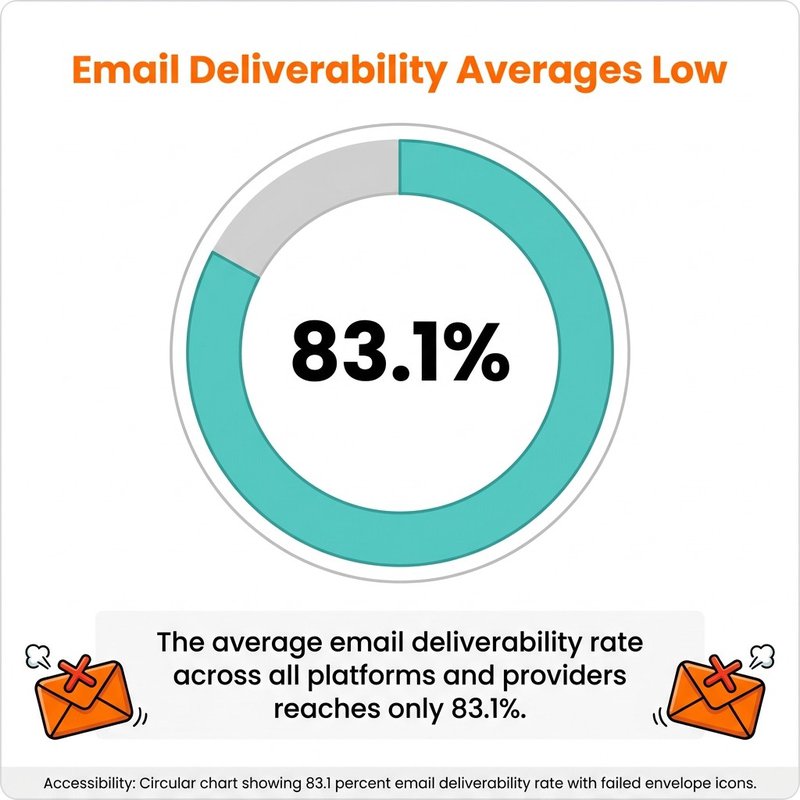
Average deliverability is only 83.1%; verification and clean sync can improve results.
Build validation into your sync process before data transfers. Check email address formats using regular expressions. Verify phone numbers match expected patterns. Flag contacts missing required fields.
Duplicate Detection and Deduplication
Duplicates emerge when multiple contact records represent the same person. Your CRM might have john.smith@example.com and jsmith@example.com as separate contacts. Email sync treats them as different people.
Run deduplication before synchronization starts. Compare email addresses, phone numbers, and names to identify potential duplicates. Many CRM systems include built-in duplicate detection that flags similar records.
Merge duplicates in your CRM before they sync to your email platform. Combining records manually ensures you keep the most complete and accurate data. Automated merging often picks the wrong values or loses information.
Prevent future duplicates by implementing unique constraints. Configure your CRM to reject new contacts with email addresses that already exist. This stops duplicates at creation instead of finding them later.
Email Verification Integration
Email verification checks whether email addresses actually exist before you send campaigns. Verification services connect to mail servers and confirm addresses can receive mail without sending actual messages.
At mailfloss, we've built verification directly into the synchronization workflow. When contacts sync from your CRM to your email platform, we automatically verify each email address. Invalid addresses get flagged before they cause deliverability problems.
Real-time verification happens as data syncs. Add a new contact to your CRM, and the sync process verifies their email address before creating them in your email platform. Catch typos immediately instead of discovering them after a campaign bounces.
We also fix common email typos automatically. Someone enters "john@gmal.com" instead of "john@gmail.com," and our system corrects it during sync. This works for Gmail, Hotmail, Yahoo, AOL, and other popular email providers.
Handling Unsubscribes and Consent
Unsubscribe preferences must sync immediately to maintain compliance with email regulations. Someone clicks unsubscribe in your email campaign, and that preference needs to reach your CRM before anyone attempts another contact.
Bidirectional unsubscribe sync prevents compliance violations. Your CRM tracks opt-out preferences. Your email platform tracks unsubscribes. Synchronization keeps both systems consistent so marketing and sales teams see the same consent status.
The General Data Protection Regulation (GDPR) mandates that organizations must secure people's data with non-compliance fines up to €20 million or 4% of global revenue. Proper consent synchronization isn't optional when you operate in regulated markets.
Document your sync frequency for unsubscribe data specifically. Even if you sync contact updates daily, unsubscribe preferences should sync within hours. Some organizations implement separate real-time sync just for consent status.
CRM Integration Benefits for Marketing Teams
Email synchronization eliminates manual data entry between your CRM and email platform. Marketing teams spend less time exporting contact lists and more time creating campaigns that actually convert.
Automated list segmentation becomes possible when CRM data flows to your email platform automatically. Create segments based on purchase history, lead score, or any custom field in your CRM. Those segments update automatically as CRM data changes.
Email marketing delivers an average return of $36-42 per dollar spent in 2026, but only when you send relevant messages to properly segmented audiences. CRM sync makes that segmentation accurate and effortless.
Behavioral Email Automation With CRM Data
Behavioral automation triggers email campaigns based on customer actions tracked in your CRM. Someone views a product page but doesn't purchase. Your CRM records that behavior. Email sync enables an automated follow-up campaign.
The synchronization happens in near real-time. A prospect downloads a whitepaper on your website. That action updates their CRM record. The change syncs to your email platform. An automated nurture sequence starts within minutes.
This level of automation requires tight integration between systems. Behavioral email campaigns depend on accurate, timely data transfer. Delayed sync means prospects receive outdated recommendations or miss time-sensitive offers entirely.
AI-generated subject lines increase open rates by up to 22%, and combining that with CRM-driven personalization creates even stronger engagement. Sync the data that powers these AI tools automatically instead of updating it manually.
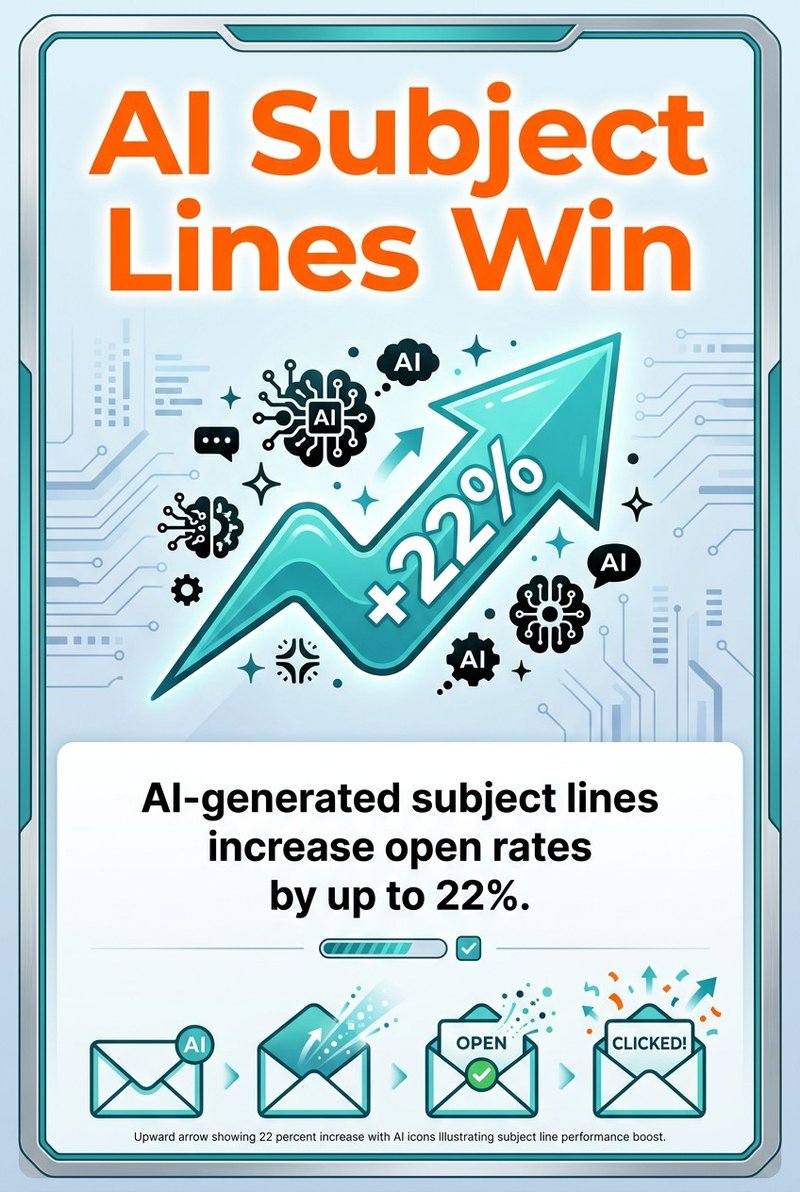
AI-generated subject lines can lift open rates by up to 22%—amplified by CRM-driven personalization.
Unified Reporting Across Email and CRM
Unified reporting combines email engagement metrics with CRM data in a single dashboard. See which customer segments have the highest open rates. Track campaign performance by lead source or industry vertical.
Email sync makes this reporting possible by copying engagement data back to your CRM. Opens, clicks, bounces, and unsubscribes appear as activities on contact records. Your CRM reports now include email performance without switching between platforms.
Marketing attribution becomes more accurate when email data lives in your CRM. Track which email campaigns contributed to closed deals. Calculate the actual revenue impact of email marketing instead of just measuring open rates.
Reports show different values for the same metric when data doesn't sync properly between systems. One report pulls from your CRM. Another pulls from your email platform. The numbers don't match because synchronization failed.
Security Considerations for Email Synchronization
Email synchronization creates security vulnerabilities by connecting multiple systems and transferring sensitive customer data between them. Each integration point represents a potential attack surface.
Google's Threat Intelligence Group (GTIG) revealed a significant breach caused by a third-party email integration in August 2025. The integration had excessive permissions and became the entry point for attackers to access Google Workspace data.
Minimize integration permissions to only what's actually required. If your sync only needs to read contact data, don't grant permission to delete emails or modify account settings. Follow the principle of least privilege.
Encryption for Data in Transit
Data in transit moves across networks between your CRM and email platform. Without encryption, anyone intercepting that traffic can read contact information, email addresses, and engagement data.
All modern email sync implementations use TLS (Transport Layer Security) to encrypt data during transfer. Verify your CRM integration uses HTTPS for API calls and secure IMAP/SMTP connections for email protocol communication.
Check encryption settings in your email client and CRM platform. Some systems allow you to disable encryption for troubleshooting. Never leave encryption disabled in production environments.
Certificate validation prevents man-in-the-middle attacks. Your systems should verify SSL certificates match the expected server identity. Accepting invalid certificates creates security holes even when encryption is enabled.
Access Control and API Key Management
API keys grant applications access to your email platform and CRM data. Treat these keys like passwords because anyone with the key can read or modify your data.
Store API keys in secure credential management systems, not in configuration files or source code repositories. Use environment variables or dedicated secret managers like AWS Secrets Manager or HashiCorp Vault.
Rotate API keys regularly even when you haven't detected any security issues. Many email providers allow you to generate new keys without invalidating old ones immediately. This enables zero-downtime key rotation.
Monitor API key usage for unusual patterns. Sudden spikes in API calls might indicate compromised credentials. Set up alerts that notify you when usage exceeds normal thresholds.
Audit Logs and Sync Monitoring
Audit logs track every synchronization operation. When did the sync run? Which records changed? Who initiated the operation? Logs answer these questions when you investigate data inconsistencies or security incidents.
Enable detailed logging in both your CRM and email platform. Most systems support different log levels. Set the verbosity high enough to capture sync operations but not so high that logs become unmanageable.
Monitor synchronization failures actively. Failed syncs often indicate authentication problems, network issues, or data quality errors. Set up alerts that notify your team when sync operations fail repeatedly.
Review sync logs periodically for unexpected changes. Bulk deletions, mass unsubscribes, or sudden contact count drops might indicate security breaches or configuration errors affecting your data.
Troubleshooting Common Email Sync Problems
Authentication failures represent the most frequent email sync issue. OAuth tokens expire, passwords change, or API keys get revoked. The sync process loses access and stops transferring data.
Check authentication status first when synchronization stops working. Most email platforms and CRMs show connection status in their integration settings. Look for "disconnected" or "authentication required" messages.
Reauthenticate the connection by removing and reinstalling the integration. This generates new OAuth tokens with fresh expiration dates. Some platforms offer a "reconnect" button that handles reauthentication without removing the entire integration.
Sync Timeout and Performance Issues
Sync operations timeout when they take longer than the configured timeout limit. Large contact lists or complex field mappings cause slow synchronization that exceeds timeout thresholds.
Reduce timeout errors by decreasing batch sizes. Instead of syncing 10,000 contacts at once, process 1,000 contacts per batch. More batches run faster individually even though total sync time might increase slightly.
Schedule sync operations during off-peak hours when server load is lower. Synchronization runs faster when email providers aren't handling peak traffic from millions of users simultaneously.
Monitor sync performance over time. Gradually increasing sync duration might indicate growing contact lists that need larger infrastructure or more efficient sync logic.
Data Mapping and Field Mismatch Errors
Field mismatch errors occur when your CRM and email platform expect different data formats. Your CRM sends a date as "2026-04-27" but your email platform expects "04/27/2026." The sync fails because formats don't match.
Review field mapping configuration when you encounter data errors. Verify each CRM field maps to the correct email platform field. Check that data types match between systems.
Add data transformation logic for fields that require format conversion. Most integration platforms include built-in transformers for common conversions like date formats, phone numbers, and currency values.
Test field mappings with sample data before syncing your entire database. Create a test contact in your CRM with known values. Run a manual sync. Verify the contact appears correctly in your email platform with all fields populated accurately.
Handling Provider Infrastructure Changes
Email providers update their infrastructure regularly. Organizations face unprecedented infrastructure changes that have disrupted email systems throughout 2025 and into 2026. These changes often break existing synchronization configurations.
Subscribe to your email provider's status updates and developer notifications. Providers usually announce breaking changes months in advance. Use that time to update your integration before old endpoints stop working.
Implement retry logic with exponential backoff in your sync code. Temporary server issues resolve themselves within minutes. Automatic retries handle transient failures without manual intervention.
Maintain a rollback plan for integration updates. Test new API versions in a staging environment before deploying to production. Keep the old integration code available in case the new version causes unexpected problems.
Advanced Email Sync Strategies
Standard email synchronization handles contacts and basic engagement metrics. Advanced strategies extend sync to custom objects, complex workflows, and multi-directional data flows between more than two systems.
Custom object synchronization copies specialized CRM data structures to your email platform. Your CRM might track customer subscriptions, support tickets, or product inventory. Syncing these objects enables email campaigns based on subscription renewal dates or inventory availability.
Most email platforms support custom fields for this data. Map your CRM custom objects to email platform custom fields. Use those fields in segmentation rules and email content personalization.
Multi-Platform Synchronization Architecture
Multi-platform sync connects more than two systems simultaneously. Your CRM syncs to your email platform, customer support system, and analytics platform. Changes in any system propagate to all others automatically.
This creates complex synchronization challenges. Which system is the source of truth for each data type? How do you prevent circular sync loops where data bounces between systems indefinitely?
Designate a master data system for each data type. Contact information originates in your CRM. Email engagement data originates in your email platform. Support tickets originate in your support system. Each system owns specific data and pushes changes to other platforms.
Use a central integration hub to coordinate multi-platform sync. Tools like Zapier or custom middleware receive data from all systems, apply transformation rules, and route updates to the appropriate destinations. This centralizes sync logic instead of building point-to-point integrations between every system pair.
Event-Driven Synchronization With Webhooks
Event-driven sync uses webhooks to trigger immediate data transfer when specific events occur. Someone fills out a form on your website. A webhook fires. Your integration receives that webhook and creates the contact in both your CRM and email platform instantly.
Webhooks eliminate polling delays. Instead of checking for changes every hour, your systems receive notifications the moment changes happen. This enables true real-time synchronization without constant server queries.
Configure webhook endpoints that receive event notifications from your email platform and CRM. These endpoints need to authenticate incoming requests to prevent spoofing. Process the webhook payload to extract relevant data. Execute the appropriate sync operation.
Handle webhook failures gracefully. Networks are unreliable. Your webhook endpoint might be temporarily unavailable when an event fires. Implement retry logic on the sending side or maintain a queue of failed webhooks for manual reprocessing.
Compliance-Focused Sync for Regulated Industries
Healthcare, finance, and other regulated industries face strict data handling requirements. Email synchronization must maintain audit trails, support data deletion requests, and enforce geographic data residency rules.
Log every sync operation with timestamps, user identities, and data change details. These logs prove compliance during audits and help you respond to data subject access requests.
Implement data deletion sync for GDPR and CCPA compliance. When someone requests data deletion from your CRM, that deletion must propagate to your email platform and any other connected systems. Automate this propagation to ensure consistency.
Consider geographic restrictions when syncing data internationally. Some countries require customer data to remain within national borders. Configure your sync to route data through appropriate servers or maintain separate regional databases.
Measuring Email Sync Success
Sync success metrics tell you whether your integration is working correctly and delivering business value. Technical metrics measure reliability. Business metrics measure impact.
Sync completion rate measures what percentage of sync operations finish successfully. Track this daily. A sudden drop indicates authentication failures, network problems, or data quality issues breaking the sync process.
Data consistency percentage compares records between systems. Pull a sample of contacts from both your CRM and email platform. What percentage have matching email addresses, names, and other key fields? High consistency means your sync works well.
Performance and Reliability Metrics
Sync duration measures how long synchronization takes to complete. Monitor this over time. Gradually increasing duration might mean your contact list is growing faster than your infrastructure can handle.
Error rate tracks what percentage of individual record updates fail during sync. Zero errors is unrealistic. Aim for error rates below 1%. Higher rates indicate data quality problems or field mapping issues.
Recovery time measures how quickly sync operations resume after failures. Fast recovery minimizes data inconsistency windows. Slow recovery means prolonged periods where your systems show different data.
Automated workflows scale effortlessly as lists grow only when synchronization keeps pace with list growth. Monitor whether sync performance degrades as your contact database expands.
Business Impact Metrics
Time saved from automation quantifies the productivity gain from eliminating manual exports and imports. Calculate hours previously spent on manual data transfer. Compare against current time spent managing automated sync.
Campaign accuracy improvement measures how often you send emails to outdated addresses. Email validation integrated with sync reduces bounce rates and improves deliverability.
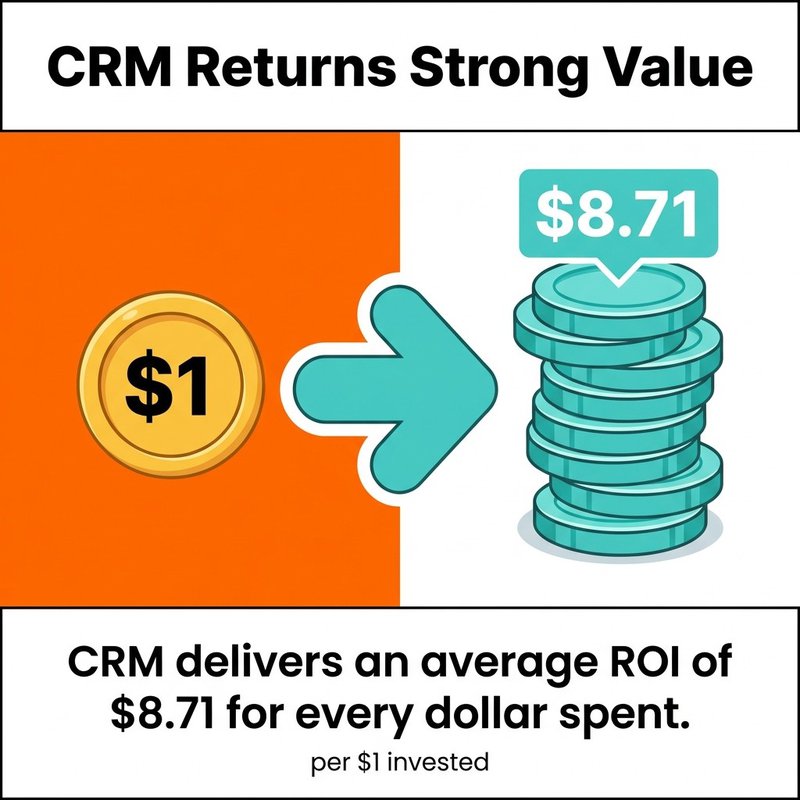
CRM delivers an average ROI of $8.71 for every dollar spent, but only when CRM data stays synchronized with the systems that actually use it. Track revenue attributed to email campaigns before and after implementing CRM sync to measure the business impact.
Email data synchronization transforms disconnected marketing tools into a unified system where customer data flows automatically between platforms. You've seen how IMAP protocol enables two-way sync across devices, how OAuth 2.0 secures those connections, and how proper field mapping maintains data quality during transfer.
The technical complexity matters less than the business outcome. Clean, synchronized data means your marketing campaigns reach real people with relevant messages. Your sales team sees email engagement without switching between systems. Your reporting shows accurate metrics instead of conflicting numbers from different platforms.
Start with native integrations between your CRM and email platform if they exist. Most handle standard synchronization without custom development. Add email verification to catch invalid addresses before they sync. Monitor your sync operations daily to catch failures before they create data inconsistencies.
At mailfloss, we've built email verification that integrates directly with 35+ email platforms. When your CRM syncs contacts to Mailchimp, ActiveCampaign, or any other provider we support, we verify those email addresses automatically. Invalid emails get flagged. Typos get fixed. Your synchronized data stays clean without manual intervention.
The combination of proper synchronization and continuous verification creates email lists that actually perform. Higher deliverability rates. Lower bounce rates. Better engagement metrics. All from ensuring the right data reaches the right systems at the right time.

No comments:
Post a Comment