Email automation software goes way beyond those initial welcome sequences you set up and forgot about months ago. We're talking about triggered workflows that respond to specific customer behaviors, abandoned cart sequences that convert at over 10 percent, and AI-powered campaigns that generate 41 percent more revenue than traditional batch sends. While your welcome emails might be humming along nicely, you're leaving serious money on the table if that's where your automation journey ends.
Most marketing teams we talk to have their welcome series dialed in (and that's great!). But when we ask about behavioral triggers, post-purchase sequences, or lifecycle automation, the conversation gets quieter. That's a problem, especially when automated email flows generate 41 percent of total eCommerce revenue despite accounting for just 5.3 percent of send volume.
This guide walks you through the full spectrum of email campaign automation. We'll cover the essential workflows that drive revenue, the platforms that actually deliver on their promises, and the practical steps to build automation that works while you sleep.
By the end, you'll know exactly which automated campaigns to prioritize, how to set them up without a developer, and why your email list hygiene matters more than you think when automation scales up.
What Email Campaign Automation Actually Means in 2026
Email campaign automation means sending targeted messages based on triggers, not manual effort. A customer abandons their cart? An automated email sends within an hour. Someone clicks a specific link? A follow-up sequence starts automatically. Someone makes their first purchase? A post-purchase workflow kicks in.
The difference between basic email marketing and automation comes down to one thing: triggers. Instead of sending the same message to everyone on Tuesday at 10am, automation software responds to individual actions and behaviors.
Here's what sets modern automation apart from those old-school email blasts. Triggered emails achieve 76 percent higher open rates than regular emails because they're timely, relevant, and expected.
The automation platform market hit $8.08 billion in 2026, according to recent industry analysis. That growth reflects how essential these tools have become for businesses of all sizes.
The Core Components of Email Automation
Every automation system needs three things: triggers, workflows, and personalization capabilities.
Triggers are the events that start your automated sequences. Someone subscribes to your list, makes a purchase, clicks a link, or abandons a cart. Each trigger launches a specific workflow designed for that behavior.
Workflows are the sequences themselves. A welcome series might include three emails over five days. An abandoned cart workflow might send three reminders over 48 hours. A re-engagement campaign might span two weeks with progressively stronger offers.
Personalization makes automation feel human. Instead of "Dear Customer," your emails reference actual names, past purchases, browsing history, and specific interests. Emails with personalized copy generate 14 percent more profit than generic communications.
Why Basic Welcome Series Aren't Enough Anymore
Welcome emails still perform well. Welcome series continue to demonstrate exceptional performance, with open rates exceeding 80 percent and click rates reaching 5 to 7.8 percent. But they only capture one moment in the customer journey.
What happens after someone completes that welcome sequence? If your automation stops there, you're missing the behavioral signals that indicate purchase intent, feature interest, or churn risk.
The businesses crushing it with email automation have workflows for every stage. New subscriber onboarding flows into product education sequences. First purchase triggers loyalty workflows. Inactive subscribers enter re-engagement campaigns automatically.
That's the difference between automation as a feature and automation as a revenue engine. One sends welcome emails. The other builds relationships that compound over time.
The Email Automation Workflows That Actually Drive Revenue
Now that you understand what separates basic automation from sophisticated workflows, we can dig into the specific sequences that generate measurable returns. These aren't theoretical best practices. They're proven campaigns with hard data behind their performance.
The workflows below represent the foundation of successful email automation programs across industries. Some focus on ecommerce, others work for SaaS or services, but the principles apply universally.
Abandoned Cart Recovery Sequences
Cart abandonment emails convert because they target people who already wanted to buy. They just needed a reminder or a small incentive to complete the transaction.
The numbers back this up. Abandoned cart email automation conversion rates frequently exceed 10 percent. That's significantly higher than general promotional emails.
Here's how to build an effective abandoned cart workflow:
- Send the first email within one hour of cart abandonment while the products are still fresh in their mind
- Include product images and details so they remember exactly what they left behind
- Send a second reminder after 24 hours with social proof or urgency elements
- Follow up at 48 hours with a small discount if they still haven't converted
The key is timing. Wait too long and they've already bought from a competitor or lost interest. Send too many and you annoy people who intentionally abandoned.
Connect your automation platform to your ecommerce system so cart data flows automatically. Most platforms like Klaviyo, Shopify Email, or Omnisend integrate directly with major ecommerce platforms.

Post-Purchase and Customer Lifecycle Workflows
The sale isn't the end of your email relationship. It's the beginning of a different conversation focused on retention, repeat purchases, and referrals.
Post-purchase workflows should start immediately after someone buys. Send an order confirmation (transactional, yes, but still part of the experience). Follow with shipping updates, delivery notifications, and a request for feedback once the product arrives.
Then the real lifecycle automation begins. For ecommerce, that might mean:
- Product usage tips delivered over the first 30 days to maximize satisfaction
- Complementary product recommendations based on what they bought
- Replenishment reminders for consumable products at the right time
- VIP program invitations after their third purchase
For SaaS or service businesses, lifecycle workflows look different but follow the same principle. Onboarding sequences teach new users how to get value. Feature adoption campaigns highlight underused capabilities. Renewal sequences start 60 days before contracts expire.
The automation platform you choose needs strong segmentation capabilities to build these lifecycle workflows. Tools like ActiveCampaign, HubSpot, and Drip excel at this because they combine email with CRM data.

Behavioral Trigger Campaigns Based on Customer Actions
Behavioral automation responds to what people actually do, not assumptions about what they might want. Someone visits your pricing page five times? That's a buying signal worth following up on. They download a specific resource? Send related content automatically.
These triggers work because they're contextual. You're responding to demonstrated interest with relevant information at exactly the right moment.
Common behavioral triggers include:
- Website page visits that indicate intent (pricing, features, comparisons)
- Email link clicks that show interest in specific topics or products
- Content downloads that reveal where someone is in the buying journey
- Product browsing patterns that suggest preferences or needs
- Shopping cart additions without purchase completion
Setting up behavioral triggers requires integration between your email platform and website analytics. Most modern automation tools offer JavaScript tracking that monitors visitor behavior and triggers emails based on specific actions.
Customer.io and Autopilot specialize in this kind of event-based automation. They're built around the idea that email should respond to what people do, not just who they are.
For detailed strategies on implementing behavioral triggers, check out our guide to behavioral email automation and user journey mapping.
Re-engagement and Win-Back Sequences
Email lists decay naturally. Email lists naturally decay by 20 to 30 percent per year as people change jobs, abandon old addresses, or simply lose interest.
Re-engagement workflows identify subscribers who've gone quiet and attempt to win them back before removing them from your list. This matters for two reasons: deliverability and data quality.
Sending emails to consistently inactive subscribers hurts your sender reputation. Email providers notice when recipients never open or click your messages. That damages deliverability for everyone on your list, even engaged subscribers.
A good re-engagement sequence runs over 30 to 45 days with progressively stronger hooks:
- Week one sends a "we miss you" email highlighting what they've been missing
- Week two offers a special discount or exclusive content to reignite interest
- Week three asks directly if they still want to hear from you with a clear preference center link
- Week four sends a final "last chance" message before removal
Track who re-engages at each stage. Anyone who opens, clicks, or updates preferences should exit the win-back sequence and re-enter your regular automation workflows.
Anyone who stays completely inactive through all four stages should be suppressed from future sends. This improves your list quality and protects deliverability for engaged subscribers.
This is where email verification becomes crucial. Tools like mailfloss automatically remove invalid addresses before they hurt your sender reputation, complementing your re-engagement efforts with ongoing list hygiene.
Comparing the Best Email Automation Platforms for 2026
Platform selection determines what's actually possible with your email automation. Some tools excel at ecommerce workflows but struggle with B2B lead nurturing. Others offer powerful features that require technical expertise most small teams don't have.
95 percent of enterprise marketing teams now operate at least one marketing automation platform. But adoption doesn't mean satisfaction. Choosing the right platform for your specific needs matters more than picking the most popular option.
Here's what to evaluate when comparing automation platforms.
What to Actually Look for in Automation Software
Platform selection should begin with operational challenges rather than tool features. Start by listing your biggest email marketing pain points, then find the tool that solves those specific problems.
Do you need sophisticated ecommerce workflows with product recommendations? Focus on platforms built for online stores. Struggling with lead scoring and sales handoff? Prioritize tools with strong CRM integration.
The core capabilities to evaluate include:
- Visual workflow builders that let you create automations without coding knowledge
- Trigger options that match the customer behaviors you want to respond to
- Segmentation depth that allows targeting based on multiple criteria simultaneously
- Integration ecosystem that connects with your existing tools and platforms
- Deliverability performance and sender reputation management features
Don't overlook email verification capabilities. Invalid addresses accumulate quickly, especially when automation scales up your sending volume. Platforms that integrate with verification tools like mailfloss maintain list quality automatically.
Platform Comparison: Features, Pricing, and Best Use Cases
Here's how the leading email automation platforms stack up across the criteria that actually matter for implementation success.
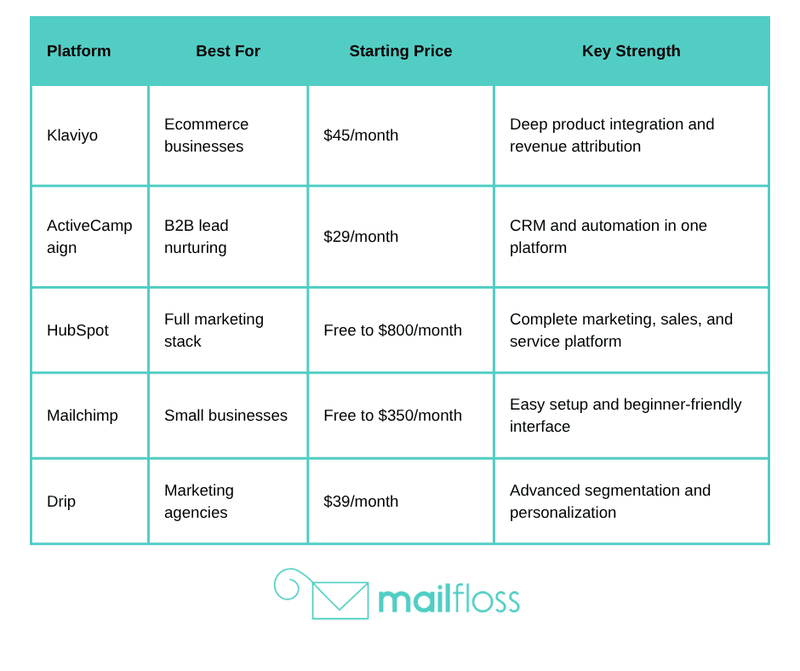
Each platform serves different needs. Klaviyo dominates ecommerce automation because it tracks revenue per email, product affinities, and customer lifetime value automatically. If you run an online store, the deep Shopify, WooCommerce, and BigCommerce integrations make it worth the higher price.
ActiveCampaign wins for B2B companies that need lead scoring, sales automation, and CRM functionality alongside email workflows. The automation builder is powerful enough for complex sequences but still visual and intuitive.
HubSpot makes sense when you want everything in one place. Email automation, landing pages, forms, CRM, sales tools, and customer service all integrate natively. The free tier is genuinely useful for small teams just starting with automation.
Mailchimp remains the easiest platform for beginners. The interface is clean, the automation templates cover common use cases, and the free plan includes basic automation features. It's not the most powerful option, but it's the fastest to implement.

Drip targets agencies and advanced marketers who need sophisticated segmentation. You can build audience segments based on dozens of criteria, then personalize every element of your emails based on those segments.

For more platform options and detailed comparisons, see our roundup of email marketing services for small businesses.
Integration Requirements and Technical Considerations
Your automation platform needs to connect with the tools you already use. Otherwise you're manually importing data, which defeats the entire purpose of automation.
Essential integrations to verify before choosing a platform:
- Ecommerce platforms (Shopify, WooCommerce, Magento, BigCommerce)
- CRM systems (Salesforce, Pipedrive, Zoho, your custom database)
- Analytics tools (Google Analytics, Mixpanel, Amplitude)
- Payment processors (Stripe, PayPal, Square)
- Landing page builders (Unbounce, Leadpages, Instapage)
Most platforms offer native integrations for popular tools plus Zapier connectivity for everything else. Native integrations sync data faster and more reliably than third-party connections, so prioritize platforms with direct integration to your core systems.
Email verification integration matters too. Platforms that work with services like mailfloss automatically clean your list as automation scales up your sending volume. This protects deliverability without manual list management.
Technical requirements vary by platform. Some require JavaScript snippet installation for behavioral tracking. Others need API access to sync custom data. Make sure your team has the resources to implement what the platform requires.
How AI-Powered Email Automation Changes the Game
Artificial intelligence in email automation goes beyond basic if-then workflows. We're talking about systems that optimize send times per individual subscriber, generate subject lines that adapt to what works for specific audience segments, and predict which content will drive conversions before you send.
The performance gains are measurable. AI-powered email programs report revenue increases of 41 percent compared to traditional automation approaches.
Here's what AI actually does in modern email automation platforms.
Send Time Optimization and Predictive Analytics
Traditional automation sends emails at a fixed time you specify. AI-powered send time optimization analyzes when each subscriber typically opens emails, then delivers messages during their personal engagement windows.
Someone who always opens emails at 7am gets their automated messages at 7am. Someone who engages during lunch gets theirs at noon. Someone who checks email before bed gets theirs at 9pm.
This works because timing affects every other metric. Send at the wrong time and your email gets buried under 50 other messages. Send when someone's actually checking email and you increase the chances they'll see and engage.
Predictive analytics takes this further by forecasting future behavior. Which subscribers are likely to make a repeat purchase in the next 30 days? Who's showing early churn signals? Which leads are most likely to convert if you send them a demo offer?
Platforms like Salesforce Marketing Cloud and Adobe Marketo use predictive scoring to prioritize high-value actions automatically.
AI-Generated Subject Lines and Content Personalization
Subject line testing used to mean creating two variations and waiting for statistical significance. AI subject line tools generate dozens of options, test them automatically, and learn what resonates with different audience segments.
AI-powered subject line optimization delivers total open rate improvements of 38 to 42 percent by continuously learning and adapting to changing preferences.
The AI analyzes patterns across thousands of previous sends. It knows which emotional triggers work for your audience, which length performs best, whether questions or statements convert better, and how to balance urgency with authenticity.
Content personalization extends beyond inserting someone's first name. AI analyzes past behavior to determine which product categories interest each subscriber, which content topics they engage with, and what types of offers they respond to.
Then it assembles email content dynamically. Two people receive the same campaign, but the products featured, the content blocks included, and even the copy style adapts to what's most likely to resonate with each individual.
Tools like Persado and Phrasee specialize in AI-generated copy that outperforms human-written alternatives in controlled tests.
For more on applying AI to your email strategy, explore our guide to machine learning in email marketing.
Adoption Rates and Future Projections
AI email automation is moving from experimental to standard practice. 61 percent of enterprise email programs are projected to utilize AI for campaign creation by late 2026.
That adoption is driven by results, not hype. Companies using AI tools report better performance metrics across the board: higher open rates, improved click rates, increased conversions, and stronger revenue per email sent.
The barriers to entry are dropping too. AI features that required enterprise budgets two years ago now appear in mid-market platforms at accessible price points.
What's coming next? More sophisticated natural language generation that writes entire email sequences based on campaign goals. Better predictive models that forecast customer lifetime value from early engagement signals. Tighter integration between email AI and other marketing channels for truly unified automation.
The platforms investing most heavily in AI capabilities include Klaviyo, ActiveCampaign, and Salesforce. If AI optimization matters to your strategy, prioritize platforms where these capabilities are core features, not add-ons.
Building Your First Advanced Automation Workflow
Theory only gets you so far. Actually building and launching an automated workflow reveals gaps in your data, integration challenges, and content needs you didn't anticipate.
This section walks through the practical steps to create your first advanced automation campaign beyond basic welcome emails.
Choosing Your First Automation Campaign
Start with the workflow that addresses your biggest revenue leak or engagement problem. Not the most complex automation or the one with the most steps, but the one that will make the biggest immediate impact.
For ecommerce businesses, that's usually abandoned cart recovery. You're already losing those sales. Automated cart emails typically recover 10 percent or more of abandoned transactions with minimal effort.
For SaaS companies, focus on trial-to-paid conversion workflows. People who sign up for trials but don't convert represent lost revenue. Automation can educate them, address objections, and highlight features they're missing.
For service businesses, prioritize lead nurturing sequences. Someone downloads a resource but isn't ready to buy yet. Automated nurture campaigns keep you top-of-mind until they're ready to have a conversation.
Pick one workflow. Build it properly. Measure results. Then expand to additional campaigns based on what you learned.
Step-by-Step Workflow Setup Process
Every automation workflow follows the same basic structure regardless of your platform or use case.
First, define your trigger event. What specific action starts this automation? Be as precise as possible. "Abandons cart" is vague. "Adds item to cart but doesn't complete checkout within one hour" is specific and actionable.
Second, map out your email sequence. How many messages will this workflow include? What's the timing between each email? What's the goal of each message in the sequence?
For an abandoned cart workflow, you might plan:
- Email one at one hour: Simple reminder with product images and cart link
- Email two at 24 hours: Add social proof, customer reviews, or urgency elements
- Email three at 48 hours: Include small discount code if they still haven't converted
Third, write your email copy. Each message needs a clear subject line, body copy that serves the specific goal for that step, and a prominent call-to-action.
Fourth, set up the workflow in your automation platform. Most tools use visual workflow builders where you drag and drop trigger blocks, email blocks, wait periods, and conditional logic.
Fifth, add your exit conditions. When should someone leave this workflow? After they purchase (obviously), but also after a certain time period or if they unsubscribe or mark emails as spam.
Sixth, test the complete sequence before activating it for real subscribers. Most platforms let you send test emails to yourself or create test contacts that trigger the workflow without affecting actual subscribers.
Testing, Measuring, and Optimizing Performance
Launch your workflow to a small segment first. If you have 50,000 subscribers, activate the automation for 5,000 initially. This limits risk while you verify everything works as intended.
Monitor these metrics during the first week:
- Delivery rate to confirm emails are actually sending
- Open rates to validate subject lines resonate
- Click rates to measure engagement with your content
- Conversion rate to track the ultimate goal
- Unsubscribe rate to spot if something's wrong
Industry-wide average open rates reached 21.33 percent in 2025, according to email marketing benchmark data. Your automated workflows should exceed these benchmarks since they're triggered and targeted.
After the initial test period, expand to your full subscriber base and start optimizing individual elements. Test different subject lines for each email in the sequence. Experiment with timing between messages. Try different offers or calls-to-action.
The key is changing one variable at a time so you know what actually impacts performance. Test subject lines, see what works, implement the winner, then move to testing send timing.
Don't forget list hygiene as your automation scales. Invalid email addresses accumulate faster when you're sending more automated campaigns. Tools like mailfloss integrate with major platforms to verify addresses automatically and protect your sender reputation.
Segmentation and Personalization Strategies That Convert
Automation without segmentation is just faster batch sending. The power comes from combining automation with targeted segments so each workflow reaches people who actually care about that specific message.
Segmentation determines who enters your automated workflows. Personalization determines what they see once they're in the sequence.
Building Meaningful Customer Segments
Effective segments are based on behavior and characteristics that actually predict different needs or interests. Demographics like age or location might matter for some businesses but are useless for others.
The most valuable segments typically fall into these categories:
- Purchase history: What they've bought, how much they've spent, how recently they purchased
- Engagement level: How often they open emails, which types of content they click, their activity trend
- Lifecycle stage: New subscriber, active customer, at-risk for churn, dormant account
- Product interest: Which categories they browse, which features they use, which problems they're trying to solve
- Channel preference: Email vs SMS, mobile vs desktop, morning vs evening engagement
Your automation platform should let you build segments that combine multiple criteria. "Customers who purchased in the last 90 days AND have opened at least 3 emails in the last month AND haven't purchased Product Category X" creates a precise audience for a targeted cross-sell campaign.
Start with broad segments based on lifecycle stage, then refine based on behavior as you gather more data. Don't over-segment initially or you'll create tiny audiences that don't generate meaningful results.
Dynamic Content and Real Personalization Techniques
True personalization goes beyond "Hi [FirstName]" tokens in your email template. Dynamic content changes what people see based on their specific attributes, preferences, and behavior.
Product recommendations are the most common dynamic content use case. Someone who bought running shoes sees automated emails featuring running gear. Someone who bought yoga mats sees yoga-related products.
Content blocks can change based on segment too. An email to enterprise customers highlights different features and uses different language than the same campaign sent to small business subscribers.
Even send frequency can personalize. Highly engaged subscribers might receive your automated campaigns at full frequency. Less engaged subscribers might get a reduced cadence to prevent list fatigue.
Location-based personalization works when you have physical stores or regional offers. Someone in New York sees store events in New York. Someone in California sees different inventory or promotions.
Most advanced platforms like Klaviyo, ActiveCampaign, and HubSpot support dynamic content blocks within emails. You create one campaign with multiple content variations, then set rules for who sees which version.
This approach is more efficient than creating separate campaigns for each segment while still delivering personalized experiences that actually match subscriber interests.
For specific personalization tactics you can implement today, check out our 12 personalization techniques for email marketing.
Behavioral Triggers That Actually Matter
The triggers you choose determine whether your automation feels helpful or creepy. Good behavioral triggers respond to clear signals of intent or interest. Bad triggers feel like surveillance.
High-value behavioral triggers include:
- Pricing page visits indicating someone's evaluating cost and considering purchase
- Repeat visits to specific product categories showing consistent interest
- Video completion rates revealing how engaged someone is with your content
- Shopping cart additions without immediate purchase suggesting hesitation or comparison shopping
- Email link clicks on specific topics showing what content resonates
Each trigger should launch a specific automated response designed for that behavior. Someone who watches your entire product demo video is ready for a different message than someone who abandoned after 30 seconds.
Set appropriate thresholds so automation doesn't trigger too aggressively. One pricing page visit might not warrant a sales follow-up. Three visits in a week probably does.
Combine behavioral triggers with segment criteria for precision targeting. "Visited pricing page three times AND is in the enterprise segment AND hasn't requested a demo" creates a highly qualified audience for an automated demo offer.
List Hygiene and Deliverability in Automated Campaigns
Automation amplifies everything about your email program, including deliverability problems. When you're only sending weekly newsletters, a few hundred invalid addresses might not matter. When you're running multiple automated workflows sending thousands of emails daily, those invalid addresses tank your sender reputation fast.
This is where most automation strategies break down. Companies focus entirely on building sophisticated workflows but ignore the foundation those workflows depend on: a clean, engaged email list.
Why Automation Makes List Quality More Critical
Every automated workflow multiplies your sending volume. A simple abandoned cart sequence with three emails means three times as many sends to that segment. Add a welcome series, post-purchase workflow, and re-engagement campaign, and you're sending 10 to 15 times more emails than before automation.
More sends means more opportunities for deliverability problems. Bounced emails, spam complaints, and low engagement all signal to inbox providers that your emails aren't wanted.
Invalid email addresses accumulate constantly. People change jobs and abandon work emails. They create disposable addresses for one-time purchases. They make typos during signup. Email lists naturally decay by 20 to 30 percent per year without active hygiene.
That decay compounds when automation scales up. Suddenly you're sending automated sequences to addresses that bounced months ago, degrading your sender reputation with every failed delivery attempt.
Automatic Email Verification and List Cleaning
Manual list cleaning doesn't work at automation scale. You need verification that runs automatically, continuously, and integrates with your automation platform.
This is exactly why we built mailfloss. We were frustrated by email verification tools that required manual uploads, complex API integration, or separate workflows outside our automation platform.
Automated verification should happen in the background while your automation runs. mailfloss connects directly to platforms like Mailchimp, ActiveCampaign, HubSpot, and 30+ others, running verification checks daily without any manual effort.

The system checks over 20 verification points for each email address: syntax validation, domain verification, MX record checks, disposable email detection, and more. Invalid addresses get flagged or removed automatically based on your preferences.
What makes this particularly valuable for automation is the typo correction feature. Someone enters "gmial.com" instead of "gmail.com" during signup. Traditional verification marks it invalid. mailfloss automatically corrects common typos for Gmail, Hotmail, Yahoo, and AOL addresses, recovering subscribers who would otherwise be lost.
Monitoring Sender Reputation and Engagement Metrics
Your sender reputation determines whether your automated emails reach inboxes or get filtered to spam. Monitor these key indicators:
- Bounce rate should stay below 2 percent for healthy lists
- Spam complaint rate should remain under 0.1 percent
- Unsubscribe rate varies by industry but watch for sudden spikes
- Engagement rate measures how many recipients actually interact with emails
Most automation platforms provide these metrics in their analytics dashboards. Set up alerts for unusual changes so you can investigate problems before they damage deliverability.
Authentication protocols like SPF, DKIM, and DMARC are non-negotiable for automated sending. These prove to inbox providers that you're authorized to send from your domain and your emails haven't been tampered with.
Your automation platform should help you configure these records or provide clear documentation. Some platforms like Brevo and SendGrid handle authentication automatically once you verify your domain.
Regular list hygiene combined with proper authentication and engagement monitoring keeps your automated campaigns landing in inboxes instead of spam folders.
Emerging Trends in Email Campaign Automation
Email automation continues to develop as new technologies mature and privacy regulations reshape what's possible. The trends emerging now will define automation capabilities over the next few years.
AMP for Email and Interactive Content
AMP for email lets subscribers interact with dynamic content directly in their inbox without clicking through to a website. They can browse product carousels, submit forms, update preferences, or schedule appointments without leaving the email.
This changes automation possibilities significantly. Instead of sending a survey link that requires a separate action, the survey lives in the email itself. Instead of linking to product pages, customers can browse and add items to cart directly from the automated message.
Adoption is growing but still limited. AMP for email adoption projected to reach 15 to 20 percent by 2028 as more email clients support the format and more platforms build AMP creation tools.
Currently, Gmail, Yahoo Mail, and Mail.ru support AMP emails. Outlook and Apple Mail don't, which limits reach. But for subscriber bases heavy on Gmail users, AMP can significantly boost engagement in automated campaigns.
Platforms adding AMP capabilities include Salesforce Marketing Cloud and several email development tools that generate AMP code from visual builders.
Privacy Regulations and First-Party Data Strategy
Privacy regulations like GDPR, CCPA, and emerging laws in other regions restrict how you can collect, store, and use subscriber data for automation. The tracking pixels and third-party data that powered earlier personalization strategies face increasing limitations.
This shifts emphasis to first-party data: information subscribers directly provide or behaviors they demonstrate on your own properties. Someone's purchase history on your store, the content they download from your site, the preferences they set in your preference center.
Smart automation strategies focus on collecting valuable first-party data through exchanges of value. Progressive profiling gradually builds detailed subscriber profiles by asking for small amounts of information over time rather than overwhelming people with long forms.
Preference centers let subscribers tell you exactly what they want. Which product categories interest them? How often do they want to hear from you? What types of content do they prefer? This declared data becomes the foundation for compliant, effective automation.
Platforms are adapting with better consent management, preference center builders, and tools to manage data retention policies. HubSpot and ActiveCampaign both offer strong privacy compliance features built into their automation workflows.

Cross-Channel Automation and Unified Customer Experiences
Email automation increasingly coordinates with SMS, push notifications, in-app messages, and other channels to create cohesive customer experiences. Someone abandons a cart, gets an email reminder, then a push notification if they're a mobile app user, then an SMS if they still don't convert.
The automation logic stays the same, but the channel adapts to where each customer prefers to engage. This requires platforms that handle multiple channels or integrate tightly with specialized tools.
Customer.io, Braze, and Iterable specialize in cross-channel automation with sophisticated rules for channel selection, frequency capping across channels, and unified analytics.
The benefit is meeting customers where they actually pay attention. Email might work for detailed product education. SMS might convert better for time-sensitive offers. Push notifications might re-engage app users who've gone quiet.
Cross-channel automation also prevents message fatigue. Instead of bombarding someone across every channel simultaneously, smart automation tracks total message volume and spaces communications appropriately regardless of channel.
Making Email Automation Actually Work for Your Business
You've got the concepts, the platform comparisons, the workflow examples, and the technical requirements. What matters now is turning that knowledge into automated campaigns that actually run and generate results.
Most automation projects fail not because of bad strategy but because of stalled implementation. Companies get overwhelmed by possibilities and never launch anything, or they build overly complex workflows that break and get abandoned.
Success comes from starting small, measuring carefully, and expanding based on what works.
Your 30-Day Implementation Plan
Week one: Choose your platform and get it properly configured. Set up domain authentication, import your existing email list, and integrate with your essential tools. Most platforms work with services like mailfloss to verify your list during import.
Week two: Build one automation workflow. Just one. Pick the highest-impact campaign for your business (probably abandoned cart, trial conversion, or lead nurture). Map out the sequence, write the emails, set up the workflow, and test it thoroughly.
Week three: Launch your automation to a limited audience. Activate it for 10 to 20 percent of relevant subscribers, monitor performance daily, and fix any issues that emerge. Check deliverability metrics to confirm emails are reaching inboxes.
Week four: Expand to full audience and start optimization. Roll out to all relevant subscribers, establish baseline metrics, and plan your first A/B test for the following week.
After 30 days, you'll have one automated workflow running, real performance data, and experience with your platform. That foundation makes adding additional workflows much faster.
Metrics That Actually Predict Success
Track metrics that connect to business outcomes, not just email statistics. Open rates and click rates matter, but revenue per email, conversion rate, and customer lifetime value impact by automation tell you if your strategy works.
For ecommerce, measure revenue generated by each automated workflow. Your cart abandonment sequence should drive measurable sales. Your post-purchase workflow should increase repeat purchase rate.
For SaaS, track trial-to-paid conversion for onboarding workflows and feature adoption rates for educational sequences. Did automated emails increase the percentage of trials that convert? Did they improve activation of specific features?
For lead generation, measure progression through your funnel. How many leads move from awareness content to consideration content because of automated nurture campaigns? What's the time reduction to sales-qualified lead status?
Also monitor list health metrics as automation scales. Bounce rates, spam complaints, and unsubscribe rates reveal whether your increased sending volume maintains quality or damages sender reputation.
Common Pitfalls and How to Avoid Them
The biggest automation mistakes are predictable and preventable:
Over-automation that bombards subscribers with too many triggered messages. Solution: Map out all your workflows and track total message volume per subscriber. Set frequency caps that limit how many automated emails someone can receive in a week.
Ignoring list quality as automation scales. Solution: Implement automatic verification with tools like mailfloss that continuously clean your list without manual intervention.
Building complex workflows before mastering simple ones. Solution: Start with three-email sequences. Add complexity only after you understand how subscribers respond to basic automation.
Set-it-and-forget-it mentality where workflows run unchanged for months. Solution: Review automation performance monthly and test new variations quarterly. Email effectiveness changes as markets shift and subscriber preferences evolve.
Poor segmentation that sends irrelevant automated messages. Solution: Start with broad lifecycle segments, then refine based on observed behavior and engagement patterns over time.
Avoiding these common mistakes means your automation improves with time instead of degrading as problems compound.
Email automation works when you build incrementally, measure honestly, and optimize continuously. The platforms exist, the best practices are proven, and the returns justify the effort. What remains is execution.
Start with one workflow this week. Get it running. Learn from real results. Then expand from there. Your email program will be fundamentally different in 90 days, and your revenue metrics will reflect it.

No comments:
Post a Comment