Email performance automation is the use of software workflows, triggers, and AI-powered tools to automatically send targeted messages based on subscriber behavior, manage list hygiene, personalize content at scale, and optimize key metrics like open rates, click-through rates, and revenue per send without constant manual intervention. The best systems combine marketing automation platforms like ActiveCampaign, Klaviyo, or HubSpot with email verification tools like mailfloss to ensure clean lists, then layer in behavioral triggers, segmentation rules, and performance tracking to create a system that continuously improves results while you focus on other parts of your business.
We know the pain of watching email campaigns underperform because your list is full of invalid addresses, typos, or inactive subscribers. You've probably spent hours manually cleaning lists or second-guessing which emails to send when.
That stops now. Automation handles the repetitive work while you handle strategy.
You'll discover which email automation software matches your business size and budget, how to set up workflows that trigger based on customer actions, and which metrics actually matter for measuring performance. We'll walk through abandoned cart sequences, welcome series design, and segmentation strategies that generate 760% more revenue than non-segmented campaigns.
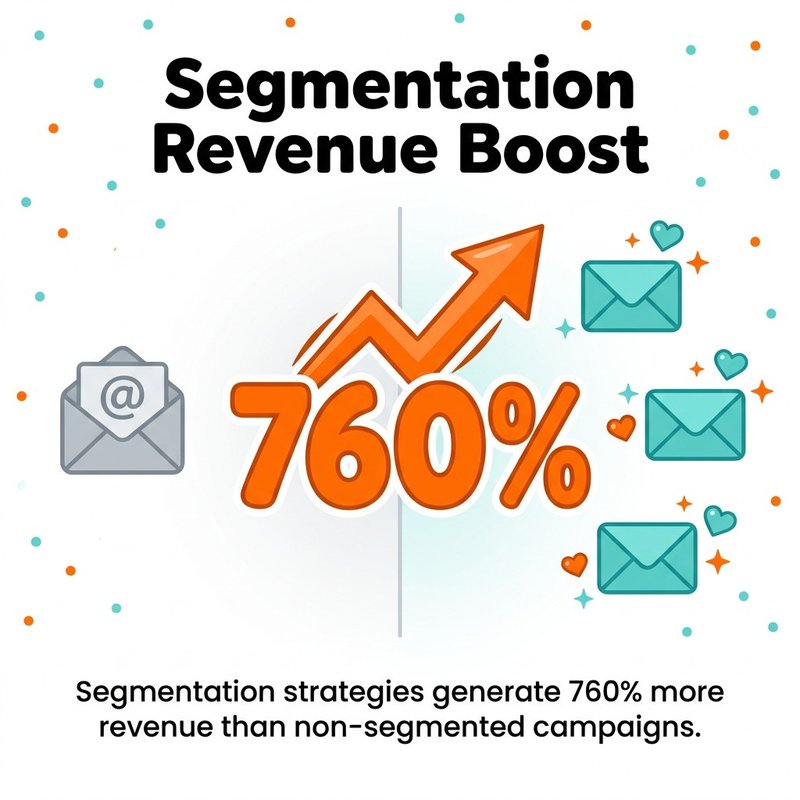
Segmented campaigns can generate up to 760% more revenue than non-segmented emails.
By the end, you'll have a clear implementation plan for automating your email performance optimization, complete with tool recommendations, workflow templates, and troubleshooting tips we've learned from helping thousands of businesses clean their lists and improve deliverability.
What Email Performance Automation Actually Means
Email performance automation combines three distinct systems working together. First, you need marketing automation software that sends emails based on triggers and workflows. Second, you need list management automation that removes invalid addresses and maintains deliverability. Third, you need performance tracking that monitors metrics and adjusts campaigns based on results.
Most people think automation just means scheduling emails in advance. That's batch sending, not automation.
Real email automation responds to subscriber behavior in real time. Someone abandons their cart? The system sends a recovery email three hours later without you lifting a finger. A new subscriber joins your list? They immediately enter a welcome series designed to turn cold leads into engaged customers.
The difference shows up in the numbers. Automated emails achieve 332% higher click rates than standard non-automated emails, and automated emails drive 320% more revenue than non-automated emails.
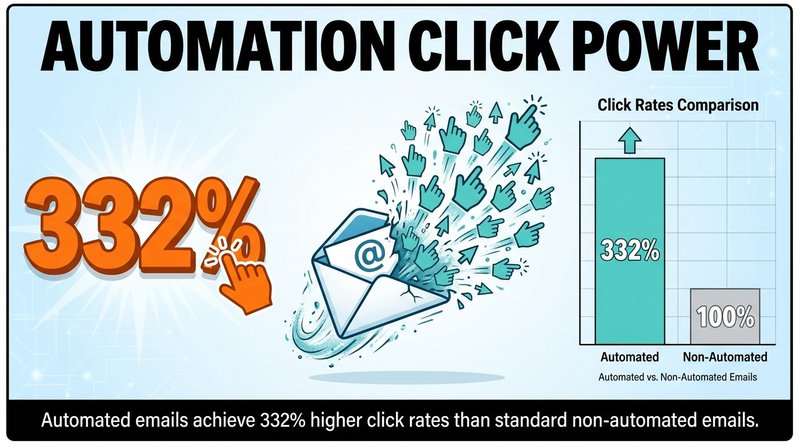
Automated emails see 332% higher click rates than standard non-automated emails.
Here's how the three automation layers work together:
Marketing Automation Layer
This is your workflow engine. Tools like ActiveCampaign, Klaviyo, or Drip let you create if-then sequences that respond to subscriber actions.
Someone clicks a link about running shoes in your newsletter? Tag them as interested in running and send them running-specific content for the next month. They purchase? Move them to a post-purchase nurture sequence and remove them from the sales emails.
The system runs 24/7 without manual intervention.
List Hygiene Automation Layer
This is where tools like mailfloss come in. Invalid email addresses kill your sender reputation faster than almost anything else. Hard bounces signal to inbox providers that you're not maintaining your list properly.
Automated list cleaning runs daily checks on your entire database, removes addresses that will bounce, fixes common typos like "gmial.com" or "yaho.com", and flags risky addresses before they damage your deliverability.
We integrate with over 35 email service providers. The setup takes 60 seconds, then it runs quietly in the background while you focus on creating great content.
Performance Optimization Layer
Modern email platforms track opens, clicks, conversions, and revenue per email. The automation part comes when you set rules that adjust campaigns based on performance data.
If someone hasn't opened an email in 90 days, automatically move them to a re-engagement sequence or suppress them from daily sends. If a particular subject line format consistently gets 30% higher opens, use AI to generate similar variations for future campaigns.
Performance automation means your campaigns get smarter over time without you manually analyzing every report.
Why Email Marketing Automation Delivers Measurable ROI
We're going to be direct about this: email automation works because it solves three expensive problems at once. It saves time your team would spend on manual tasks, it improves results through better targeting and timing, and it prevents revenue loss from deliverability issues.
The return on investment isn't theoretical. Email marketing generates $36 per $1 spent, making it one of the highest-ROI channels available to marketers.
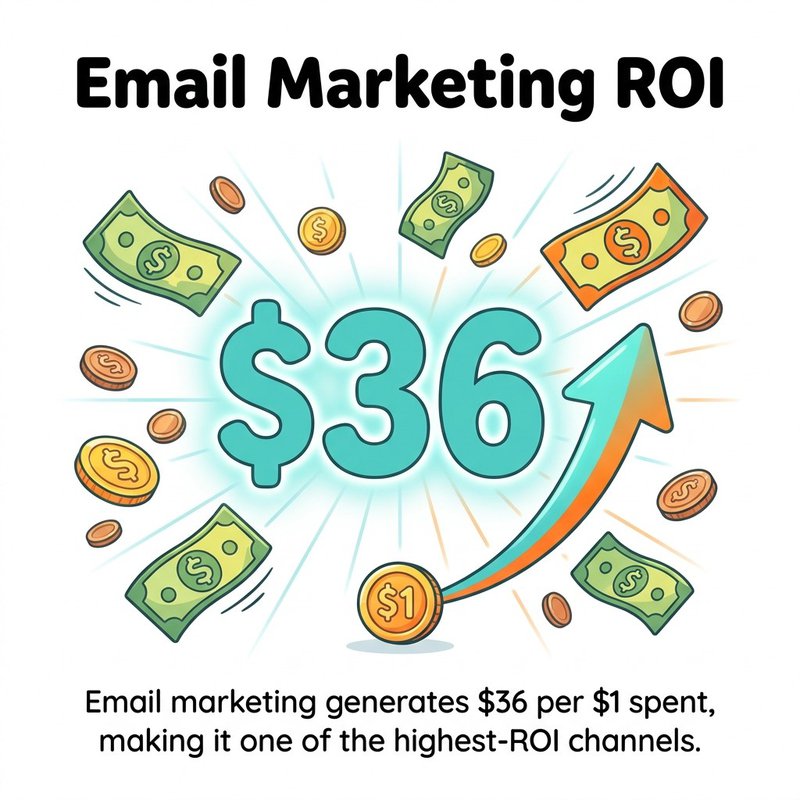
Email marketing averages $36 in revenue for every $1 spent.
Let's break down where that ROI comes from in practical terms.
Time Savings From Workflow Automation
Manual email marketing means someone on your team segments lists, writes individual campaigns, schedules sends, and monitors results for every single email. For a company sending 20 emails per month, that's 40-60 hours of work.
Email automation cuts that time dramatically. You build the workflow once, then it runs indefinitely. Marketing teams can reduce campaign production time by 40% with automation.
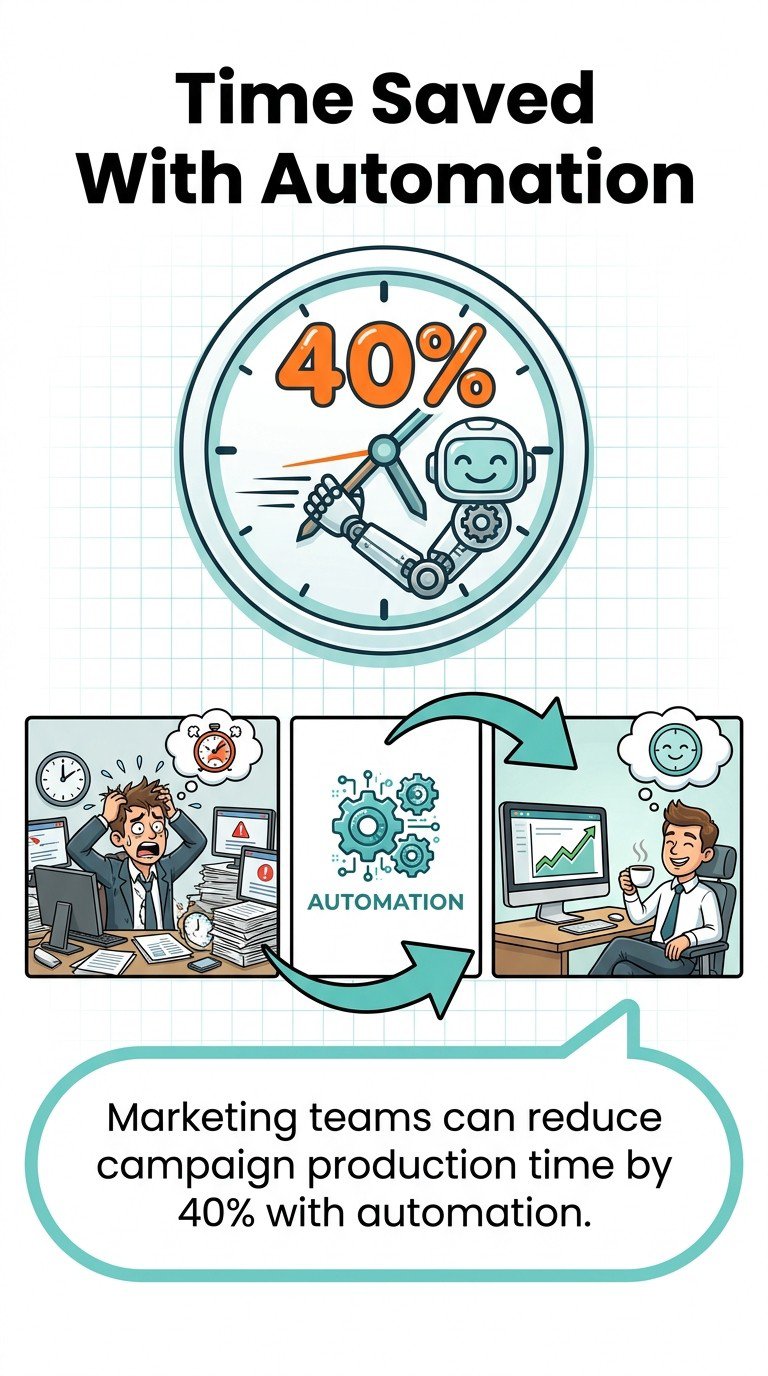
Automation can reduce campaign production time by about 40%.
One marketer we work with set up five core automated sequences in her first week. Those five workflows now generate 60% of her email revenue without ongoing manual work.
Revenue Increase From Better Targeting
Generic batch emails sent to your entire list perform worse than targeted messages sent to specific segments. Automation makes segmentation practical at scale.
You can create segments based on purchase history, browsing behavior, email engagement, demographic data, or any combination of factors. Then trigger specific messages when people enter those segments or take particular actions.
The revenue impact is substantial. Segmented campaigns dramatically outperform one-size-fits-all emails because they address specific customer needs and interests rather than blasting everyone with the same message.
Deliverability Protection Through List Hygiene
Here's what most marketers miss: a single email campaign sent to a list with 10% invalid addresses can damage your sender reputation for months. Inbox providers like Gmail and Outlook track your bounce rate, spam complaint rate, and engagement metrics.
High bounce rates signal that you're not maintaining your list properly. Low engagement rates suggest your emails aren't valuable. Both hurt your ability to reach the inbox.
Automated list cleaning prevents this damage before it happens. mailfloss runs over 20 verification checks on each address, catching invalid emails, obvious spam traps, disposable addresses, and common typos that would otherwise bounce.
Clean lists mean better deliverability. Better deliverability means more emails actually reach your subscribers. More emails in the inbox means higher revenue from your existing campaigns.
Conversion Optimization Through Behavioral Triggers
Timing matters enormously in email marketing. An abandoned cart email sent three hours after someone leaves your site converts much better than one sent three days later. A welcome email sent immediately after signup engages new subscribers before they forget who you are.
Behavioral triggers make perfect timing automatic. Automated emails deliver 4x better conversion rates than traditional email campaigns because they reach people when they're most interested.
Automated welcome emails have a 3% conversion rate, while cart abandonment emails have a 2% conversion rate. Those might seem like small percentages, but they represent pure incremental revenue from emails that would never get sent manually.
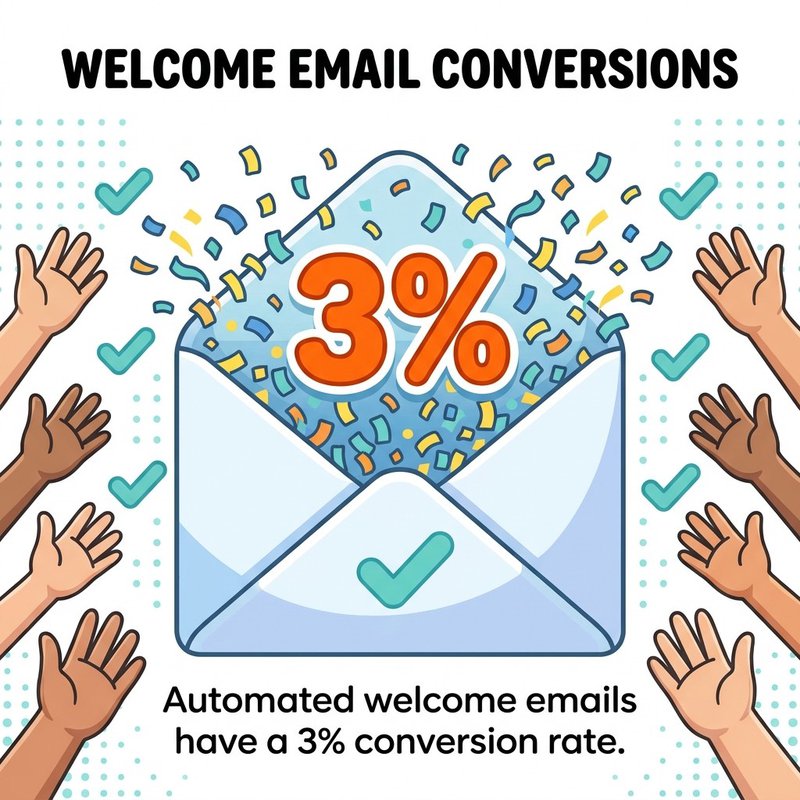
Automated welcome emails average a 3% conversion rate.
Top Email Automation Tools for 2026
Choosing email automation software comes down to four factors: your business size, technical complexity needs, budget, and existing tech stack. A small business selling physical products needs different capabilities than a B2B SaaS company or a content creator building an audience.
We've tested dozens of platforms. These eight cover the most common use cases, from simple newsletter automation to enterprise marketing automation with full CRM integration.
Each tool excels in specific scenarios. We'll tell you exactly who should use what.
1. ActiveCampaign for Advanced Automation Workflows
ActiveCampaign offers the most powerful visual automation builder we've seen in the mid-market price range. You can create complex if-then workflows with multiple branches, goals, and actions without writing code.

The platform combines email marketing automation, CRM, and sales automation in one system. This integration matters because your email workflows can trigger CRM tasks, update deal values, or notify sales reps when hot leads take specific actions.
Best for: Small to medium businesses that need sophisticated automation without enterprise pricing. Particularly strong for B2B companies with longer sales cycles.
Pricing starts at $29/month for 1,000 contacts. The Plus plan at $49/month adds CRM and deeper automation features most businesses need.
Key automation features: Split testing within automations, goal tracking, conditional content blocks, attribution reporting, predictive sending based on engagement patterns.
Integrates with mailfloss for automated list cleaning. Connect once, and invalid addresses get removed before they damage your sender reputation.
2. Klaviyo for Ecommerce Email Automation
Klaviyo was built specifically for ecommerce businesses. The platform excels at product recommendation emails, abandoned cart recovery, post-purchase sequences, and customer winback campaigns.

What sets Klaviyo apart is the depth of ecommerce data it tracks. You can segment customers based on predicted lifetime value, products purchased, categories browsed, average order value, purchase frequency, or dozens of other behavioral signals.
Then you can use those segments in automated workflows that feel personally tailored. Someone who bought running shoes gets emails about running gear. Someone who browses winter coats but doesn't buy gets a cart abandonment email with a small discount.
Best for: Online stores on Shopify, WooCommerce, BigCommerce, or Magento. Works particularly well for businesses with 50+ products and decent monthly order volume.
Pricing is based on contacts: free up to 250 contacts, then $20/month for 500 contacts, scaling up from there. Most active ecommerce stores pay $100-300/month.
Key automation features: Pre-built ecommerce flows, dynamic product recommendations, predictive analytics for customer lifetime value, SMS automation alongside email, Facebook Custom Audience sync.
The abandoned cart automation alone pays for the platform. Many Klaviyo users report recovering 10-15% of abandoned carts through automated email sequences.
3. HubSpot for All-in-One Marketing Automation
HubSpot offers complete marketing automation across email, social media, landing pages, forms, CRM, and sales tools. If you want one platform that handles your entire go-to-market strategy, HubSpot delivers.

The email automation capabilities sit within a larger marketing automation context. You can trigger emails based on form submissions, page visits, CRM property changes, or manual actions by sales reps.
HubSpot's strength is the unified database. Every contact interaction across every channel lives in one place. Your email workflows can reference website behavior, past purchases, sales conversations, support tickets, or any other data point in the system.
Best for: Growing companies ready to invest in a complete marketing and sales platform. Works well for B2B companies with multiple products and longer customer journeys.
Pricing starts with a limited free tier, then Marketing Hub Starter at $45/month for basic email automation. Most businesses need Professional at $800/month for full workflow automation and advanced features.
Key automation features: Lead scoring, lifecycle stage automation, attribution reporting, A/B testing, smart content personalization, integration with HubSpot CRM and Sales Hub.
The learning curve is steeper than simpler platforms, but you get enterprise-grade capabilities once you master the system.
4. Drip for Content Creators and Course Sellers
Drip focuses on visual workflow automation for creators, consultants, and digital product sellers. The interface makes complex automation sequences easy to build and understand.

The platform excels at tag-based automation. Subscribers get tagged based on their interests, actions, and engagement. Then you trigger different email sequences based on tag combinations.
Someone interested in Facebook ads and beginner at email marketing? They get a specific nurture sequence. Someone advanced at email but new to Facebook? Different sequence addressing their actual knowledge gaps.
Best for: Course creators, membership sites, consultants, and digital product businesses that rely heavily on email nurture sequences to build trust before selling.
Pricing starts at $39/month for 2,500 contacts. Scales based on subscriber count, with most creators paying $50-150/month.
Key automation features: Visual workflow builder, event tracking, custom fields and tags, revenue attribution, workflow split testing, Facebook Custom Audience integration.
The analytics clearly show which automation workflows generate revenue, making it easy to optimize your highest-performing sequences.
5. ConvertKit for Newsletter Creators
ConvertKit keeps email automation simple and focused on creators who make money through newsletters, courses, and digital products. If you don't need complex CRM features or ecommerce integrations, ConvertKit delivers clean automation without overwhelming options.

The automation builder uses sequences and rules. Sequences are linear email courses that go out over time. Rules are triggers that tag subscribers, move them between sequences, or subscribe them to different content based on their actions.
Best for: Bloggers, YouTubers, podcasters, and solo creators who want powerful automation without technical complexity. Perfect if your primary business model is building an audience and selling to them directly.
Pricing starts free for up to 300 subscribers with basic features. Creator tier at $9/month for 300 subscribers adds automation. Creator Pro at $25/month adds advanced features like subscriber scoring.
Key automation features: Visual automation builder, link triggers, tag-based segmentation, custom fields, landing page builder, digital product delivery integration.
The interface prioritizes simplicity, which means less power than tools like ActiveCampaign but also less time spent learning the system.
6. Mailchimp for Small Business Simplicity
Mailchimp offers straightforward email automation with a focus on small business owners who want results without becoming email marketing experts. The pre-built automation templates handle common scenarios like welcome emails, abandoned cart recovery, and customer re-engagement.

Recent updates added more sophisticated automation capabilities. You can now build custom workflows with branching logic, though the interface isn't as visual as ActiveCampaign or Drip.
Best for: Small businesses, local businesses, and freelancers who need basic automation without complexity. Works well if you send newsletters plus a handful of automated sequences.
Pricing starts free for up to 500 contacts and 1,000 monthly sends. Essentials at $13/month adds automation features. Standard at $20/month adds advanced audience segmentation and custom-coded templates.
Key automation features: Pre-built automation templates, customer journey builder, segmentation tools, basic A/B testing, integration with ecommerce platforms.
Mailchimp integrates with mailfloss, so you can automate list cleaning alongside your email campaigns without manually exporting and importing lists.
7. Brevo for Budget-Conscious Automation
Brevo (formerly Sendinblue) offers surprisingly capable marketing automation at lower price points than most competitors. If budget is your primary constraint, Brevo delivers essential automation features without the premium price tag.

The platform includes email marketing, SMS marketing, marketing automation workflows, CRM, and transactional email in one system. Most small businesses can run their entire email and SMS strategy through Brevo.
Best for: Price-sensitive small businesses that need automation but can't justify spending $100-500/month on email marketing. Also strong for businesses that want SMS and email in one platform.
Pricing starts with a generous free tier including unlimited contacts and 300 daily sends. Starter at $25/month adds automation workflows and removes the daily send limit. Business at $65/month adds advanced automation and A/B testing.
Key automation features: Visual workflow builder, behavioral targeting, lead scoring, predictive sending, landing pages, Facebook ads integration, SMS automation.
The automation workflows aren't as sophisticated as ActiveCampaign, but they cover 80% of what most small businesses need at 40% of the cost.
8. Moosend for Affordable Advanced Features
Moosend delivers enterprise-level email automation features at small business prices. The visual workflow builder rivals platforms costing three times as much.

What stands out is how much power you get in the lower-priced tiers. Features that other platforms restrict to premium plans come standard in Moosend, including website tracking, custom automation recipes, and advanced segmentation.
Best for: Growing businesses that need powerful automation on a modest budget. Particularly good for ecommerce stores and SaaS companies that want sophisticated workflows without enterprise pricing.
Pricing starts at $9/month for 500 subscribers, with unlimited emails. Most businesses pay $40-80/month depending on list size.
Key automation features: Drag-and-drop automation builder, ecommerce automation recipes, website event tracking, real-time personalization, A/B testing, detailed analytics and reporting.
The platform includes landing page and form builders, so you can capture leads and nurture them through automated sequences without additional tools.
Essential Email Automation Workflows Every Business Needs
You could build hundreds of different email automation workflows. Most businesses only need six core sequences to see substantial performance improvements.
These workflows work across industries because they respond to universal customer behaviors: joining your list, considering a purchase, completing a purchase, going quiet, and needing support.
Start with these six. Get them working well. Then expand based on your specific business model and customer journey.
Welcome Series for New Subscribers
The welcome series is your highest-impact automation. New subscribers pay more attention to your emails in the first week than they ever will again. Use that attention wisely.
A strong welcome series does three things. First, it sets expectations about what subscribers will receive and how often. Second, it delivers immediate value that justifies their decision to subscribe. Third, it moves new subscribers toward your core conversion goal, whether that's a purchase, booking a call, or consuming your content.
We recommend 3-5 emails over 7-10 days. Email one goes immediately and confirms their subscription while delivering a promised lead magnet or discount. Email two arrives 1-2 days later with your best content or product. Email three comes 3-4 days after that with social proof and a clear call to action.
The metrics speak for themselves on welcome emails. They drive consistent engagement when done properly.
Tag subscribers based on which links they click in your welcome series. Someone who clicks content about topic A gets added to a segment that receives more topic A content. This early segmentation improves long-term engagement because people receive emails matching their demonstrated interests.
Abandoned Cart Recovery for Ecommerce
Cart abandonment emails recover revenue that would otherwise disappear. Someone adds products to their cart, gets distracted, and leaves. Without automation, that sale is lost. With automation, you send targeted recovery emails that bring them back.
The typical abandoned cart sequence includes three emails. First email at 1-3 hours reminds them what they left behind and removes friction by linking directly back to their cart. Second email at 24 hours adds urgency or addresses common objections like shipping costs or return policies. Third email at 48-72 hours might include a small discount if needed to close the sale.
Cart recovery emails perform well because they reach people who already demonstrated purchase intent. They just need a reminder or a small push to complete the transaction.
Don't over-discount in cart abandonment emails. Test reminder emails without discounts first. Many customers will complete their purchase with just a simple reminder. Save discounts for the third email in your sequence, and only for customers who still haven't purchased.
Post-Purchase Follow-Up Sequences
Most businesses stop emailing after someone purchases. That's a mistake. Post-purchase emails build relationships, prevent buyer's remorse, encourage reviews, and drive repeat purchases.
The post-purchase sequence starts immediately after the transaction. Email one confirms the order and sets delivery expectations. Email two arrives after the product should have been delivered and asks for feedback or a review. Email three comes a week or two later with complementary product recommendations or educational content about getting more value from their purchase.
For service businesses or digital products, the post-purchase sequence focuses on onboarding and success. Help customers get value from what they bought, reducing refund requests and increasing lifetime value.
Segment post-purchase emails by product category or price point. Someone who bought a $30 product needs different follow-up than someone who spent $500. Tailor your messaging and recommendations accordingly.
Re-Engagement Campaigns for Inactive Subscribers
Subscribers who haven't opened an email in 90-180 days hurt your deliverability metrics without contributing to revenue. Re-engagement campaigns attempt to win them back before you remove them from your list entirely.
The re-engagement sequence acknowledges the lack of engagement directly. Email one asks if they still want to hear from you and reminds them why they subscribed. Email two offers a compelling reason to re-engage, like exclusive content or a special offer. Email three is the final notice before you remove them from active campaigns.
Make unsubscribing easy in re-engagement campaigns. It feels counterintuitive, but keeping unengaged subscribers damages your sender reputation. Better to have a smaller, engaged list than a large, unresponsive one.
After the re-engagement sequence, suppress non-responders from regular campaigns but don't delete them entirely. Move them to a quarterly or annual check-in instead. People's circumstances change, and someone uninterested now might be interested six months from now.
Browse Abandonment for Ecommerce
Browse abandonment automation triggers when someone views products but doesn't add anything to their cart. These visitors showed interest but needed more information, better timing, or additional motivation to proceed.
The browse abandonment sequence differs from cart abandonment. These people didn't commit by adding items to their cart, so your messaging needs to be softer and more educational.
Email one reminds them about the products they viewed and might include reviews or additional product details that answer common questions. Email two could showcase complementary products or offer a limited-time incentive. Email three might feature social proof from customers who purchased similar items.
Track which products trigger browse abandonment most frequently. This data reveals which products interest people but fail to convert. You might need better product pages, more reviews, or clearer pricing rather than more emails.
Lead Nurture Sequences for B2B
B2B purchases rarely happen after one interaction. Lead nurture sequences educate prospects over weeks or months, building trust and demonstrating expertise before asking for a sale or demo request.
The nurture sequence varies by industry, but the pattern stays consistent. Email one establishes credibility and delivers immediate value. Email two addresses a specific pain point and shows how you solve it. Email three provides social proof through case studies or testimonials. Subsequent emails continue education while gradually increasing the ask.
Branch your nurture sequences based on engagement. Someone who clicks multiple links and downloads resources is warmer than someone who opens but doesn't click. Move engaged prospects to a more sales-focused sequence while keeping less-engaged leads in educational content.
Integrate lead scoring with your nurture sequences. Assign point values to different actions like email opens, link clicks, content downloads, or website visits. When someone crosses a score threshold, alert your sales team or move them to a conversion-focused sequence.
Email Segmentation Strategies That Improve Performance
Sending the same email to everyone on your list is leaving money on the table. Segmentation means dividing your audience into groups based on shared characteristics, then tailoring messages to each group's specific interests and needs.
The challenge isn't understanding that segmentation works - everyone knows that. The challenge is implementing segmentation in ways that actually improve results without creating so many segments that managing campaigns becomes impossible.
These six segmentation approaches balance effectiveness with manageability.
Behavioral Segmentation Based on Actions
What people do matters more than what they tell you. Behavioral segmentation divides your list based on actual actions: which emails they open, which links they click, which pages they visit, and which products they buy.
Someone who clicks every link about topic A gets tagged as interested in topic A. When you send emails about topic A, they receive a variation highlighting that topic. When you send emails about topic B, they might receive a different variation or skip the email entirely.
Most email platforms track link clicks automatically. Use those clicks to build behavioral segments. Create tags or custom fields that update based on content engagement, then reference those tags in your automation workflows and campaign targeting.
Purchase behavior is the strongest behavioral signal. Segment customers by product category purchased, total spent, purchase frequency, or average order value. Someone who spends $500 every month is more valuable than someone who spent $20 once. Your email strategy should reflect that difference.
Engagement-Based Segmentation
Not all subscribers are equally engaged. Some open every email, click multiple links, and purchase regularly. Others haven't opened an email in six months. Treating these two groups the same makes no sense.
Create engagement tiers based on recent activity. High-engagement subscribers opened at least one email in the past 30 days. Medium-engagement opened in the past 60-90 days. Low-engagement hasn't opened in 90+ days.
Send your most aggressive promotional campaigns to high-engagement subscribers. They're already paying attention and more likely to convert. Send medium-engagement subscribers less frequent promotions mixed with valuable content. Send low-engagement subscribers to re-engagement sequences or suppress them entirely.
This approach protects your deliverability. Inbox providers track how many recipients engage with your emails. Sending to unengaged subscribers lowers your overall engagement rate, which can hurt deliverability even for your engaged segments.
Demographic and Firmographic Segmentation
Basic information about who your subscribers are enables simple but effective segmentation. B2C businesses might segment by age, gender, location, or income level. B2B businesses segment by company size, industry, role, or revenue.
Location-based segmentation works well for businesses with physical locations, region-specific inventory, or location-dependent messaging. Someone in New York doesn't care about your San Francisco store opening.
Role-based segmentation matters for B2B. The CEO cares about different things than the marketing manager. Your emails should reflect those different priorities and decision-making authority levels.
Collect demographic data through signup forms, progressive profiling, or integration with your CRM. Don't ask for too much information upfront - that kills conversion rates. Start with email address only, then gather additional data over time through email preferences or behavior tracking.
Lifecycle Stage Segmentation
Where someone sits in their customer journey determines which messages they need. New subscribers need welcome content and basic education. Active customers need product updates and upsell opportunities. Churned customers need win-back campaigns.
Common lifecycle stages include subscriber, lead, marketing-qualified lead, sales-qualified lead, customer, active customer, at-risk customer, and churned customer. Your business might have different stages based on your sales process.
Automate lifecycle stage progression based on specific actions or time periods. A subscriber becomes a lead when they download a resource. A lead becomes marketing-qualified when they reach a certain engagement score. A customer becomes at-risk when they haven't purchased in twice their average purchase frequency.
Each lifecycle stage should trigger different automated sequences designed to move people to the next stage. The goal is progression toward becoming an active, repeat customer.
Predictive Segmentation Using AI
Advanced email platforms now use machine learning to predict subscriber behavior. The system analyzes historical data to identify which subscribers are most likely to purchase, most likely to churn, or most likely to engage with specific content types.
87% of businesses use AI for email marketing workflows, and adoption continues accelerating rapidly. One analysis suggests 61% of enterprise programs will be using AI by late 2026.
Predictive segments might include high lifetime value potential, high churn risk, or likely next purchase category. You can then target high-value prospects more aggressively while focusing retention efforts on high-churn-risk customers.
The accuracy improves as the system processes more data. Start using predictive segmentation even if early results seem modest. The models get smarter over time as they learn from your specific audience behavior patterns.
RFM Segmentation for Purchase Behavior
RFM stands for Recency, Frequency, and Monetary value. This segmentation approach divides customers based on how recently they purchased, how often they purchase, and how much they spend.
Your best customers purchased recently, purchase frequently, and spend a lot. Your worst customers haven't purchased in a long time, rarely purchase, and spend little when they do. Most customers fall somewhere between these extremes.
Create RFM scores by assigning points for recency, frequency, and monetary value, then combining those scores. Someone who purchased yesterday gets maximum recency points. Someone who purchased six months ago gets fewer points. Sum the three scores to create overall RFM segments.
Target your highest RFM segments with VIP treatment, early access, and premium offerings. Target low-RFM segments with win-back campaigns or basic promotional emails. The middle segments get standard campaigns designed to increase purchase frequency or average order value.
Personalization Tactics That Actually Work
Personalization goes beyond adding someone's first name to your subject line. Real personalization means changing email content based on what you know about each recipient's interests, behavior, and preferences.
Done well, personalization makes every subscriber feel like you're speaking directly to them. Done poorly, it feels creepy or broken when you get their information wrong.
These personalization tactics deliver results without requiring massive technical implementations.
Dynamic Content Blocks
Dynamic content changes sections of your email based on subscriber data. The headline might change based on their industry. The product recommendations might change based on browsing history. The call-to-action might change based on their lifecycle stage.
Most email platforms support basic dynamic content through conditional logic. If subscriber industry equals healthcare, show healthcare case study. If subscriber industry equals retail, show retail case study. Same email, different content blocks.
Start with simple dynamic content like changing the featured product based on past purchases or browsing behavior. Someone who bought running shoes sees running-related content. Someone who bought winter coats sees cold-weather gear.
Dynamic content works particularly well in newsletters and product recommendation emails where you want core structure to stay consistent but specific content to vary by recipient.
Send Time Optimization
The best time to send emails differs for each subscriber. Some people check email first thing in the morning. Others check during lunch breaks or evening. Sending at their peak engagement time increases open rates.
Send time optimization analyzes when each subscriber typically opens emails, then automatically schedules sends to coincide with their most active periods. Someone who always opens emails at 7 AM gets your campaign at 7 AM. Someone who opens at 9 PM gets it at 9 PM.
This feature requires enough historical data to identify patterns. New subscribers won't have optimized send times until they've received and opened several emails. The system builds send time profiles over weeks or months.
For campaigns with time-sensitive content like flash sales or event registrations, you might override send time optimization to ensure everyone receives the email simultaneously. Use optimization for evergreen content and regular newsletters where timing flexibility exists.
Product Recommendations Based on Behavior
Amazon's recommendation engine drives enormous revenue by showing each customer products they're likely to buy based on their browsing and purchase history. You can implement similar logic in your email campaigns.
Basic product recommendations use purchase history. Someone who bought product A receives recommendations for products frequently purchased alongside product A. Someone who browsed category B receives emails featuring bestsellers from category B.
More advanced recommendations use collaborative filtering. If customers similar to person X typically buy products Y and Z, recommend Y and Z to person X even if they haven't browsed those products yet.
Most ecommerce platforms integrate with email tools to share product recommendation data. Klaviyo and Omnisend offer particularly strong product recommendation engines for Shopify and WooCommerce stores.
AI-Generated Subject Lines
AI can analyze your past subject line performance and generate new variations optimized for your specific audience. The system learns which words, lengths, and styles work best for your subscribers.
AI-generated subject lines increase open rates by up to 22%, though results vary based on your industry and audience.
The AI doesn't replace human creativity - it augments it. You still review and approve suggested subject lines. Think of it as having a copywriting assistant that knows your audience's preferences and can generate multiple options quickly.
Test AI-generated subject lines against your manually written ones. Some audiences respond better to AI optimization than others. Run A/B tests comparing AI suggestions to your standard approach to determine which performs better for your specific list.
Personalized Landing Pages
When someone clicks a link in your email, the landing page they reach should match the email content and their specific interests. If your email promises a guide about topic A, the landing page should prominently feature that guide without making them hunt for it.
Advanced personalization creates unique landing pages for each campaign or segment. Someone from the healthcare segment sees healthcare testimonials and case studies. Someone from retail sees retail examples.
Use URL parameters to pass information from your email to your landing page. The landing page can then display dynamic content based on those parameters. This ensures message consistency from email to landing page to conversion.
Platforms like Unbounce and Instapage specialize in personalized landing pages that integrate with email platforms. The connection between your email content and landing page experience dramatically impacts conversion rates.
Critical Email Performance Metrics to Track
Too many businesses track vanity metrics that look impressive but don't connect to business outcomes. Open rates feel good when they're high, but they don't pay the bills unless they lead to clicks, conversions, and revenue.
Focus on metrics that directly impact your business goals. These seven metrics actually matter.
Revenue Per Email Send
This is the ultimate email performance metric. You sent 10,000 emails and generated $5,000 in attributed revenue? Your revenue per email is $0.50. Track this metric over time and by campaign type to understand which emails actually drive business results.
Revenue per email varies enormously by industry, list size, and product price points. Don't compare your numbers to industry averages - compare them to your own historical performance. The goal is improvement, not hitting arbitrary benchmarks.
Calculate revenue per email for different segments to identify your highest-value audiences. You might discover that one small segment drives disproportionate revenue. That segment deserves more frequent, higher-quality campaigns.
Track revenue per email by automation workflow too. Your welcome series might generate more revenue per send than your weekly newsletter. That data should inform where you invest optimization effort.
Click-Through Rate for Engagement
Click-through rate measures how many recipients clicked at least one link in your email. Unlike open rates, which can be inaccurate due to privacy changes, click-through rates represent genuine engagement.
Someone who clicked demonstrated active interest beyond just opening the email. They wanted to learn more, see the product, or take action. Clicks are the bridge between email sends and actual conversions.
Track click-through rate by link to understand which content resonates most. Your CTA button might get 5% click-through while a secondary link gets 8%. That secondary content is more interesting to your audience than your primary offer.
Improve click-through rates by making links obvious, using clear benefit-driven copy, and including multiple click opportunities throughout your email. Don't rely on a single CTA at the bottom. Some people will want to click after reading the first paragraph.
Conversion Rate for Business Impact
Conversion rate tracks how many email recipients completed your desired action, whether that's making a purchase, booking a demo, downloading a resource, or registering for an event.
This metric directly ties email performance to business outcomes. A 10% conversion rate on a purchase email means one out of every ten recipients bought something. That's actionable data you can use to calculate campaign ROI and forecast future performance.
Conversion tracking requires proper integration between your email platform and your website or ecommerce system. Use UTM parameters to track which emails drove which conversions, then import that data back into your email platform for proper attribution.
Compare conversion rates across segments to identify which audiences convert best. You might need different strategies for high-converting and low-converting segments rather than treating everyone the same.
List Growth Rate
Your email list naturally decays over time as people change jobs, abandon email addresses, or lose interest. List growth rate measures whether you're adding new subscribers faster than you're losing old ones.
Calculate list growth rate by taking new subscribers minus unsubscribes and bounces, divided by total list size, expressed as a percentage. A positive growth rate means your list is expanding. A negative rate means it's shrinking.
Healthy list growth requires ongoing subscriber acquisition efforts. Optimize signup forms, offer compelling lead magnets, promote your email list on social media, and consider paid acquisition if organic growth stalls.
Quality matters more than quantity. A list of 1,000 engaged subscribers is more valuable than 10,000 unengaged contacts. Focus on attracting subscribers who match your target audience and actually want to hear from you.
Deliverability Rate and Inbox Placement
Your deliverability rate measures what percentage of emails successfully reach recipient inboxes. A 95% deliverability rate means 5% of your emails bounced or were rejected by receiving servers.
Inbox placement goes deeper, measuring whether delivered emails land in the primary inbox, promotions tab, or spam folder. An email delivered to spam technically counts as delivered, but it won't get opened.
Monitor both metrics closely. Declining deliverability suggests list hygiene problems or sender reputation issues. Declining inbox placement suggests content or engagement problems triggering spam filters.
Maintain high deliverability through regular list cleaning with tools like mailfloss, proper authentication with SPF and DKIM records, low spam complaint rates, and consistent sending patterns. Sudden spikes in send volume trigger spam filters.
We've helped thousands of businesses improve deliverability by removing invalid addresses before they bounce. One hard bounce might seem harmless, but inbox providers track your bounce rate over time. Consistent high bounce rates damage your sender reputation for months.
Email List Engagement Decay
Engagement decay measures how quickly subscribers lose interest over time. Track what percentage of subscribers remain engaged 30, 60, 90, and 180 days after subscribing.
Most lists show natural decay. Someone highly engaged in month one might be less engaged by month six. Understanding your decay rate helps you plan re-engagement campaigns and forecast long-term list value.
Calculate cohort retention by grouping subscribers who joined in the same month, then tracking their engagement over subsequent months. You might discover that subscribers from certain sources stay engaged longer than others.
Slow engagement decay by delivering consistent value, varying content to prevent fatigue, and segmenting to ensure relevance. Someone who signed up for topic A shouldn't receive emails exclusively about topic B.
Attribution and Multi-Touch Tracking
Most customer journeys involve multiple touchpoints before conversion. Someone might see a Facebook ad, visit your website, subscribe to email, receive a welcome series, click a promotional email, and then purchase.
Which channel deserves credit for that sale? Email was the final touchpoint, but the Facebook ad started the journey. Multi-touch attribution assigns partial credit to each touchpoint based on its role in the conversion path.
Common attribution models include first-touch (Facebook ad gets 100% credit), last-touch (email gets 100% credit), and linear (each touchpoint gets equal credit). More sophisticated models use position-based or data-driven attribution.
Implement attribution tracking through your analytics platform or CRM. Connect email engagement data with website behavior and purchase data to understand email's true contribution to revenue, not just last-click conversions.
Advanced Workflow Automation Strategies
Once you've mastered basic automation workflows, these advanced strategies unlock additional performance improvements. They require more setup effort but deliver results that justify the investment.
Each strategy builds on core automation capabilities by adding complexity that creates more relevant, timely customer experiences.
Lead Scoring and Automated Sales Alerts
Lead scoring assigns point values to different subscriber actions. Opening an email might be worth 5 points. Clicking a link is worth 10 points. Visiting your pricing page is worth 50 points. Requesting a demo is worth 100 points.
As subscribers accumulate points, they demonstrate increasing purchase intent. Once someone crosses a threshold score, your automation triggers an alert to your sales team or moves the lead to a high-intent nurture sequence.
This approach prevents sales teams from wasting time on cold leads while ensuring hot prospects get immediate attention. Marketing automation identifies sales-ready leads automatically based on actual behavior rather than subjective judgment.
Configure scoring rules to reflect what actually predicts purchases for your business. Not all actions signal equal intent. Adjust point values based on historical conversion data to make scores as predictive as possible.
Platforms like HubSpot, ActiveCampaign, and Marketo offer built-in lead scoring with customizable rules and automated alerts to sales teams when scores hit specified thresholds.
Multi-Channel Automation Sequences
Email doesn't exist in isolation. The most effective automation sequences coordinate messages across email, SMS, push notifications, direct mail, and retargeting ads to create cohesive customer experiences.
Someone abandons their cart? Send an email after three hours, an SMS after 24 hours, and a retargeting ad after 48 hours. Each channel reinforces the message through the customer's preferred communication method.
Multi-channel sequences require integration between your email platform, SMS provider, advertising accounts, and customer data platform. Tools like Omnisend and Klaviyo include native SMS and push notification capabilities alongside email.
Coordinate channel usage based on urgency and message importance. Time-sensitive promotions work well for SMS. Detailed educational content suits email better. Use each channel for its strengths rather than duplicating identical messages everywhere.
Predictive Send Frequency Optimization
Some subscribers want daily emails. Others prefer weekly. Sending too frequently annoys people and triggers unsubscribes. Sending too infrequently means missed revenue opportunities.
Predictive send frequency uses AI to determine the optimal email cadence for each subscriber. The system analyzes their engagement patterns and adjusts send frequency to maximize engagement without triggering fatigue.
Someone who opens every email might receive daily messages. Someone who only opens occasionally gets emails twice per week. The frequency adapts automatically based on ongoing engagement behavior.
This approach maximizes total email revenue by increasing frequency for highly engaged subscribers while reducing frequency for those at risk of unsubscribing due to email fatigue.
Several enterprise email platforms now offer predictive send frequency. Salesforce Marketing Cloud calls it "Einstein Send Frequency Optimization." Oracle Eloqua offers similar capabilities.
Event-Triggered Transactional Sequences
Transactional emails are triggered by specific events: order confirmations, shipping notifications, password resets, account updates. These emails get opened at much higher rates than marketing emails because recipients expect and need them.
Smart automation layers marketing content into transactional emails without overwhelming the primary message. An order confirmation includes the essential transaction details, then adds related product recommendations below.
The key is maintaining the transactional nature while adding value. Don't turn order confirmations into promotional catalogs. Keep the focus on the transaction, with marketing content as a secondary element for interested customers.
Transactional emails bypass many spam filters because they're expected and requested by the recipient. Use this advantage responsibly by providing genuine value rather than exploiting the high deliverability for pure promotion.
Progressive Profiling Through Email Engagement
You can't ask 20 questions on your signup form - conversion rates plummet. But you need subscriber information to enable advanced segmentation and personalization.
Progressive profiling solves this by gathering data over time through email engagement rather than requiring it upfront. Track which links people click, which content they engage with, and which products they browse. Use that behavioral data to build detailed profiles.
Someone who consistently clicks content about topic A gets tagged as interested in topic A. Someone who browses your B2B product pages gets tagged as a business buyer. You're building rich profiles through observation rather than asking questions.
Supplement behavioral profiling with occasional preference center updates. Email subscribers asking them to update their interests, but make it optional and incentivized. Offer early access or exclusive content in exchange for profile updates.
The richer your subscriber profiles, the more relevant your automation becomes. Relevance drives engagement, engagement drives revenue.
Email List Hygiene and Deliverability Protection
The best email automation in the world fails if your messages don't reach the inbox. Deliverability depends on maintaining a clean list, strong sender reputation, and proper technical setup.
Most deliverability problems stem from preventable issues: sending to invalid addresses, ignoring engagement signals, or misconfiguring email authentication. Fix these foundational elements before optimizing advanced tactics.
We see this every day at mailfloss. Businesses invest thousands in email automation software while ignoring the basics of list hygiene. Then they wonder why their carefully crafted emails end up in spam.
Why Invalid Email Addresses Kill Performance
Every invalid email address on your list damages your sender reputation. When you send to addresses that don't exist, receiving servers register hard bounces. High bounce rates signal to inbox providers that you're not maintaining your list properly.
Gmail, Outlook, and other major providers track your sender reputation across multiple factors. Bounce rate is one of the most important. Consistently high bounce rates can land even legitimate emails in spam folders.
Invalid addresses come from multiple sources. People mistype their email during signup. They abandon old email accounts. They use disposable addresses for one-time access to content. Companies close, taking employee email addresses with them.
Without active list cleaning, your bounce rate increases over time as more addresses go invalid. This is why we built mailfloss to run automated daily checks. We catch invalid addresses before you send to them, preventing bounces that damage sender reputation.
Our system runs over 20 verification checks on each address. We catch syntax errors, non-existent domains, inactive mailboxes, known spam traps, and disposable addresses. Plus we automatically fix common typos like "gmial.com" or "yaho.com" so you keep those subscribers instead of losing them.
Automated List Cleaning Integration
Manual list cleaning is tedious and easy to forget. You export your list, upload it to a verification service, wait for results, download the clean list, and import it back into your email platform.
By the time you finish that process, new invalid addresses have joined your list.
Automated list cleaning solves this by integrating directly with your email platform. mailfloss connects to over 35 email service providers including Mailchimp, HubSpot, ActiveCampaign, Klaviyo, and Constant Contact.
The integration takes 60 seconds. Connect your email platform, choose your cleaning preferences, and the system runs automatically. We check your entire list daily, removing invalid addresses and fixing typos without you thinking about it.
You can configure exactly what happens with different types of invalid addresses. Automatically delete hard bounces. Unsubscribe risky addresses. Tag questionable addresses for review. The control is entirely yours.
This "set and forget" approach ensures your list stays clean continuously rather than depending on you remembering to run manual cleaning every few months.
Email Authentication Setup
Proper email authentication proves to receiving servers that you're authorized to send from your domain. Without authentication, your emails look suspicious and are more likely to land in spam.
Three authentication protocols matter: SPF, DKIM, and DMARC. SPF specifies which servers can send email from your domain. DKIM adds a digital signature proving your emails haven't been tampered with. DMARC tells receiving servers what to do with emails that fail SPF or DKIM checks.
Setting up authentication requires adding DNS records to your domain. Most email platforms provide detailed instructions and the exact DNS values to add. The process takes 15-30 minutes for someone with domain access.
Many businesses skip authentication setup because it seems technical. This is a mistake. Major inbox providers increasingly require proper authentication for good deliverability. Gmail and Yahoo now enforce stricter authentication requirements for bulk senders.
Check your current authentication status using tools like MXToolbox or Dmarcian. These free tools verify whether your SPF, DKIM, and DMARC records are properly configured.
Engagement-Based List Suppression
Sending to people who never open your emails hurts deliverability even if their addresses are valid. Inbox providers track engagement rates. Consistently low engagement signals that recipients don't value your emails.
Automatically suppress subscribers who haven't opened or clicked in 90-180 days. Don't delete them entirely, just stop sending regular campaigns. Move them to a quarterly check-in or re-engagement sequence instead.
This approach improves your overall engagement metrics by removing non-engaged recipients from the calculation. If 20% of your list never opens emails, your engagement rate is artificially depressed. Remove that 20% from regular sends and your engagement rate improves immediately.
Better engagement rates lead to better deliverability. Inbox providers see that a high percentage of recipients engage with your emails and conclude your messages are valuable. This improves inbox placement for everyone on your list.
Set up engagement-based suppression through automation rules in your email platform. Create a segment of subscribers who haven't engaged in X days, then exclude that segment from regular campaigns while including them in special re-engagement sequences.
Monitoring Sender Reputation
Your sender reputation is a score inbox providers assign based on your sending behavior, bounce rates, spam complaints, and engagement metrics. Good reputation means your emails reach the inbox. Poor reputation means they go to spam.
Monitor your sender reputation using tools like Sender Score, Google Postmaster Tools, and Microsoft SNDS. These free tools show how major inbox providers view your sending reputation.
Sender Score provides a numerical reputation score from 0-100. Scores above 90 are excellent. Scores below 70 indicate problems that need immediate attention.
Google Postmaster Tools shows your domain reputation, IP reputation, spam rate, and authentication status specifically for Gmail delivery. Since Gmail represents such a large percentage of email addresses, this data is particularly valuable.
If you notice reputation problems, focus on the fundamentals: reduce your bounce rate through list cleaning, lower spam complaints by sending more relevant content, improve engagement through better segmentation, and ensure proper authentication.
Measuring Email Automation ROI
Email automation requires investment in software, setup time, and ongoing optimization. You need to know whether that investment generates positive returns.
Calculating email automation ROI is straightforward when you track the right metrics and attribute revenue properly. These calculations show whether automation is working and where to invest further optimization effort.
Direct Revenue Attribution
Track revenue directly generated by automated email sequences. Your email platform should connect to your ecommerce system or CRM to attribute sales to specific campaigns and workflows.
Calculate total revenue from each automation workflow over a specific period. Your welcome series generated $50,000 last quarter. Your abandoned cart sequence generated $30,000. Your post-purchase upsell workflow generated $15,000.
Compare automated email revenue to manual campaign revenue. If automated workflows generate 60% of your total email revenue while requiring minimal ongoing work, they're delivering strong ROI even before calculating time savings.
Use UTM parameters and conversion tracking to ensure accurate attribution. Every link in your automated emails should include tracking parameters that identify the source campaign when someone clicks through and purchases.
Time Savings Calculation
Email automation saves time by eliminating repetitive manual tasks. Calculate how many hours per week your team spent on tasks that automation now handles.
Before automation, someone might spend 10 hours weekly creating campaigns, segmenting lists, scheduling sends, and monitoring results. After implementing automation, those tasks require 2 hours weekly for optimization and maintenance.
That's 8 hours saved per week, or roughly 400 hours per year. Multiply saved hours by your team's hourly cost to calculate financial value. If your email marketer costs $50/hour fully loaded, 400 saved hours equals $20,000 in annual time savings.
Time savings have dual value. The direct cost savings from needing less staff time, plus the opportunity cost of what your team can accomplish with those freed-up hours. They might use saved time for strategy, content creation, or additional optimization that generates more revenue.
Deliverability Improvement Value
Poor deliverability costs you money every time an email goes to spam instead of the inbox. Calculate the value of deliverability improvements from proper list hygiene and sender reputation management.
If your inbox placement rate improves from 75% to 90%, you're reaching 15% more people with every campaign. For a list of 100,000 contacts, that's 15,000 additional inbox placements per send.
Apply your average conversion rate and average order value to calculate revenue from improved deliverability. If 1% of inbox placements convert at $100 average order value, those 15,000 additional placements generate $15,000 in incremental revenue per campaign.
Track inbox placement using seed list services like GlockApps or Email on Acid. These services show exactly where your emails land across different inbox providers.
Customer Lifetime Value Impact
Email automation affects customer lifetime value by improving retention, increasing purchase frequency, and raising average order values through upsells and cross-sells.
Compare lifetime value metrics before and after implementing automation. If average customer lifetime value increases from $500 to $650 after you launch post-purchase nurture sequences and win-back campaigns, automation contributed to that $150 improvement.
Apply that lifetime value increase to your annual new customer acquisition numbers. If you acquire 5,000 new customers per year, a $150 lifetime value increase represents $750,000 in additional customer value annually.
This is often the largest ROI component from email automation, yet it's frequently overlooked because it's less direct than campaign revenue attribution. Track cohort retention and lifetime value over time to quantify this impact.
Cost Comparison Framework
Build a complete cost comparison showing total investment versus total returns from email automation.
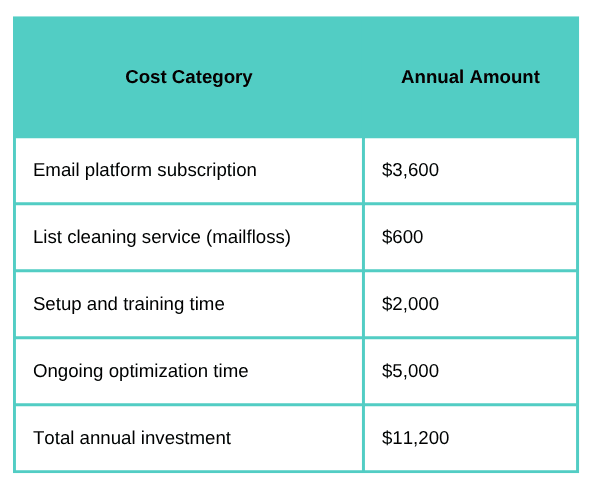
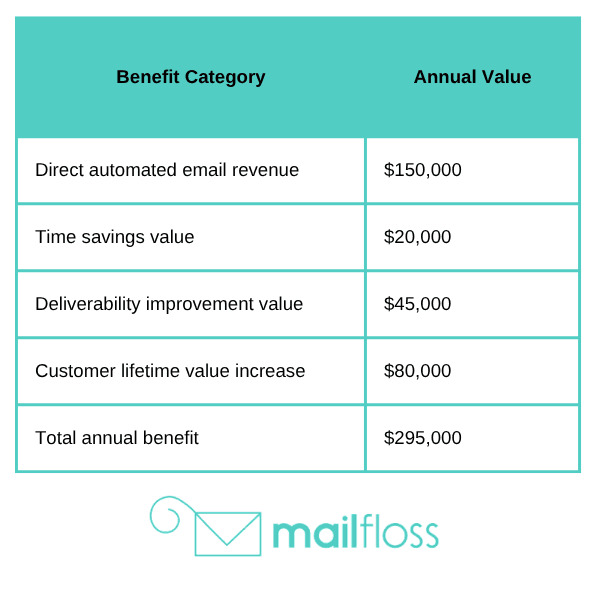
Net ROI equals total benefit minus total investment, divided by total investment. In this example: ($295,000 - $11,200) / $11,200 = 2,434% ROI.
Your numbers will differ based on your business model, list size, and automation sophistication. The framework remains the same regardless of scale.
Common Email Automation Mistakes to Avoid
We've seen thousands of businesses implement email automation. Certain mistakes appear repeatedly, causing poor performance and wasted effort.
Avoid these common pitfalls and you'll skip months of trial and error.
Over-Automating Everything
Automation is powerful, but not every email should be automated. Some messages benefit from personal timing, current events, or human judgment that automation can't replicate.
Your CEO's quarterly update to customers shouldn't be automated. Coverage of breaking industry news needs human timing. One-to-one relationship emails shouldn't come from workflows.
Find the balance between automation efficiency and personal touch. Automate repetitive, predictable emails triggered by specific actions. Keep human control over strategic, timely, or relationship-focused communications.
Start with 5-7 core automated workflows. Get those working well before automating everything. It's better to have five excellent automated sequences than 30 mediocre ones.
Ignoring Mobile Optimization
Over 50% of emails are opened on mobile devices. If your emails aren't optimized for small screens, you're frustrating half your audience and losing engagement.
Mobile optimization means single-column layouts, large text (at least 14px body copy), finger-friendly buttons (minimum 44px tall), and minimal scrolling to reach the main message and CTA.
Test every automated email template on actual mobile devices before launching. Desktop preview doesn't show rendering issues that only appear on phones. Send test emails to yourself and view them on iPhone and Android.
Most modern email platforms include responsive templates that automatically adapt to screen size. Use these rather than building fixed-width emails that require zooming and horizontal scrolling on mobile.
Setting Up Workflows and Forgetting Them
Email automation isn't truly "set and forget." Performance decays over time as market conditions change, customer preferences shift, and competitors adjust their strategies.
Review automated workflow performance monthly. Check open rates, click rates, conversion rates, and revenue. Compare current performance to historical baselines to spot declining effectiveness.
When performance drops, investigate why. Is the offer no longer compelling? Has the discount amount fallen behind competitor promotions? Does the content feel outdated? Has your audience grown tired of repetitive messaging?
Update automated email content quarterly even if performance looks stable. Refresh examples, update screenshots, revise copy to reflect current trends, and test new subject line approaches. Small iterative improvements compound over time.
Poor Segmentation Implementation
Segmentation only improves performance if you actually send different content to different segments. Many businesses create elaborate segment structures but send identical emails to everyone.
Start with simple, actionable segmentation. Engaged versus not engaged. Customers versus prospects. High value versus low value. These basic segments enable obviously different messaging strategies.
Don't create segments you won't use. Ten carefully chosen segments you actively use beats 50 segments that sit unused. Complexity without action wastes time without improving results.
Document what makes each segment unique and what messaging approach suits them best. Someone should be able to read your segment documentation and understand exactly how to communicate differently with each group.
Neglecting List Hygiene
We saved the most critical mistake for last. Sending to dirty lists damages everything else you do in email marketing. Your carefully crafted automation workflows fail if half your emails bounce or land in spam.
List hygiene isn't optional. It's the foundation that everything else builds on. Clean lists mean better deliverability. Better deliverability means more emails reach inboxes. More inbox placement means higher revenue from every campaign and workflow.
At mailfloss, we've seen businesses double their email revenue just by implementing automated list cleaning. Same automation workflows, same email content, same sending strategy - but clean lists meant emails actually reached subscribers.
The setup takes one minute. Connect your email platform, choose your preferences, and we handle the rest. We check every address daily, remove invalid ones, fix typos automatically, and keep your sender reputation protected.
If you don't see deliverability improvement within 30 days, cancel for a full refund. We're confident in the results because we've helped thousands of businesses clean their lists and improve performance.
Your Email Performance Automation Action Plan
You now understand email performance automation from software selection to workflow design to deliverability protection. The question is what to do first.
Start with these four foundational steps. Get them right, and everything else becomes easier.
First, audit your current email setup. What's working? What's not? Where are you losing revenue to poor deliverability or unengaged subscribers? Run your list through a verification check to see how many invalid addresses you're carrying. Look at your sender reputation score. Review engagement metrics by segment.
This baseline assessment shows where you'll get the biggest performance improvements. If your bounce rate is 8%, list cleaning should be your first priority. If you have good deliverability but poor conversion rates, focus on segmentation and personalization instead.
Second, choose your email automation platform based on your business model and technical needs. Small ecommerce stores should look at Klaviyo. B2B companies need something like ActiveCampaign or HubSpot. Content creators will find ConvertKit or Drip easier to use.
Don't overthink this decision. Most platforms offer free trials. Pick one that matches your needs, try it for 30 days, and switch if it doesn't fit. The best platform is the one you'll actually use, not the one with the most features.
Third, set up automated list cleaning alongside your email platform. Clean lists are non-negotiable for good performance. mailfloss integrates with over 35 email platforms and takes 60 seconds to connect. Your list gets checked daily, invalid addresses get removed, typos get fixed automatically.
Fourth, build your first three automation workflows. Start with a welcome series for new subscribers, an abandoned cart sequence if you sell products, and a re-engagement campaign for inactive subscribers. These three workflows deliver immediate results and teach you how automation works in your business.
Get those three workflows performing well before adding more complexity. It's better to have three great workflows generating consistent revenue than ten mediocre workflows creating minimal value.
Email performance automation works when you focus on fundamentals: clean lists, strong deliverability, relevant segmentation, and well-designed workflows. Master those basics, and the advanced tactics become natural extensions rather than confusing complications.
Start today. Your email list is either getting cleaner or getting dirtier. Your automation is either generating revenue while you sleep or sitting unused. Your deliverability is either improving or declining.
The tools exist. The strategies are proven. The only question is whether you'll implement them or watch competitors pull ahead while you manually manage campaigns that could run automatically.

No comments:
Post a Comment