Monday, April 26, 2021

How to Choose an Email Marketing Platform
Do you need help choosing an email marketing platform? With a seemingly infinite number of options, this simple guide will help narrow down your choices and find the perfect email marketing platform for your needs. Not all email marketing platforms are created equal. Find out which ones might be right for you.
The post How to Choose an Email Marketing Platform appeared first on mailfloss.
source https://mailfloss.com/how-to-choose-an-email-marketing-platform/
How to Choose an Email Marketing Platform
How are your email marketing campaigns going? Imagine Don Draper saying this, looking right at you with that humorless face. Only, it’s 2021, and mail marketing is done online. And we no longer use typewriters or faxes.

(If you don’t know who Don Draper is, it’s about time you’ve watched Mad Men).
Yes, that’s supposed to be menacing. Why? Because people are still ignoring email marketing and complaining about the fact that they aren’t generating enough leads when, uh, email marketing is a lead generation winner.
Not investing in email marketing is the equivalent of cutting your own throat. You don’t want that.
But your pain is understandable. Trying to choose an email marketing platform is often harder than doing email marketing itself.
You’re presented with countless options. Which is better, which one to choose? You seem to be faced with “all-in-one marketing tools” that apparently do the same thing under different brand names.
Instead of making it harder, we’ll do it this way:
We’ll tell you exactly what you should look for in an email marketing platform (no matter the size of your business). Then, we’ll list platforms that meet that criteria. And you go with the one that suits your fancy (or your wallet, if that’s the case). Deal?
Here we go. Here are the most important features you should look for in any email marketing service.
Handy Support
Email marketing isn’t everybody’s cup of tea. In fact, there are three types of people:
- Those who don’t have enough time to learn email marketing, so they need most (if not all) of the work done for them.
- Those who have enough time to learn about it, but have difficulty doing it--so they need a hand most of the time
- Those who don’t feel like learning and need someone to do the job.
If email marketing is still a concept you can’t grasp, you’ll need a comprehensive support team, available around the clock. A lot of platforms have 24/7 support, but not all of them boast it like these three:

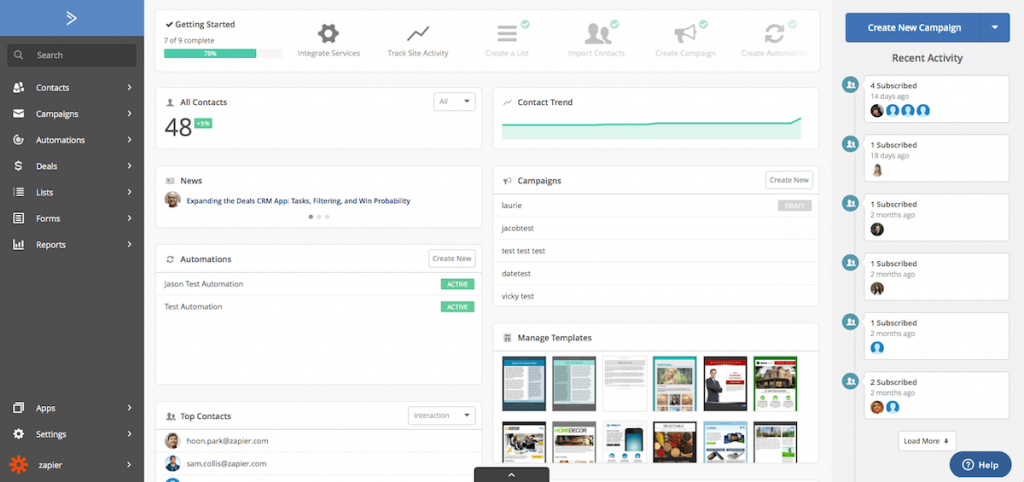
Active Campaign offers one-on-one video chats with its Customer Success Commitment promise. Legend has it you won’t find these promises anywhere else. From getting you all set up to building advanced automation, each session is hosted by experts from the support team. They even host in-person events worldwide, year-round by skilled members with in-depth instructions. These guys really do care.
By the way, if you’d like, they can teach you how to become an automation expert in no time with their pre-built recipes and automation flows. Great stuff.

MailUp’s landing page begins with the following sentence: “At your side, every step of the way”.
That’s powerful because it brings a sigh of relief to the marketer who’s just getting started, as well as the one who needs just a little bit of direction. You’ll have every single tool you need to achieve your email marketing goals, whatever they are.


Wishpond is for the business owners whose hair is already on fire. They don’t have time for BS. They want someone to grab their hand and even do the work for them whenever possible.
With this platform, you’ll get a dedicated executive to guide you through every step of the campaign process. How fancy is that? Wishpond manages everything, from page setup to getting your campaigns live. All so you can focus on other areas of your business without losing any sleep.
A Clean and Uncluttered User Interface
Any marketing service you subscribe to is supposed to make your life easier. Trouble is, many of them make it harder in essential aspects. In simple words, you can barely use some of them because of their terrible interface.
What makes a bad interface, per se? A bad interface is hard to look at. You can’t find what you need in it. You don’t know the meaning of several things. So you eventually give up on them.
Here’s an example:

Good luck trying to decipher that, whatever that is.
Now that you’ve looked at this cluttered excuse of a page, time to rest your eyes with delightful interfaces from two email platforms that promise smooth sailing. Here they are.

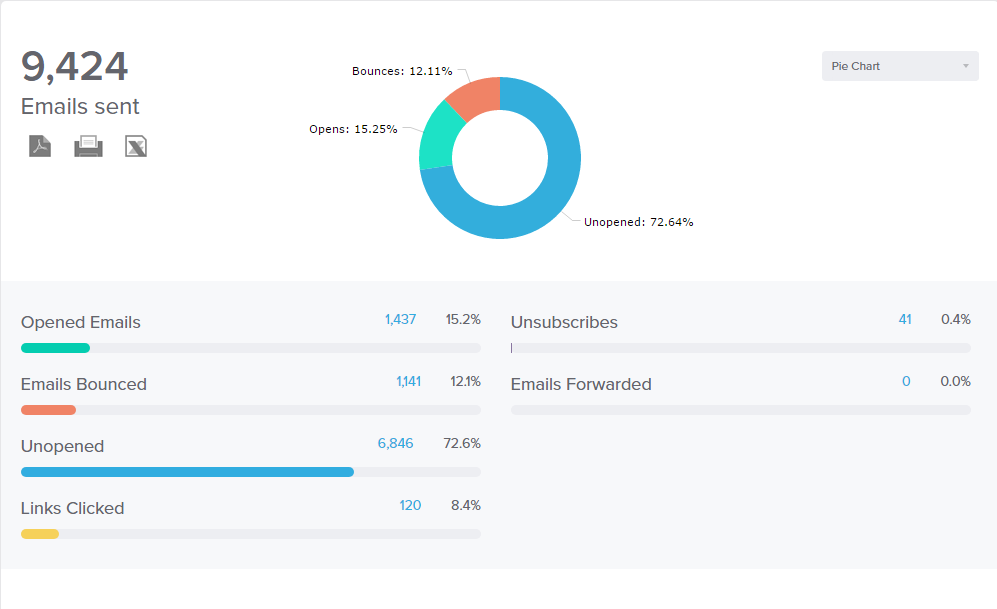
Benchmark is all about saving you time. It deeply touches on a valuable pain point of frustrated customers, which is spending days to figure out how things work. That’s not why they subscribed to a service that’s supposed to help them, duh.
Benchmark simplifies all tools and breaks the long-held belief that email marketing is hard. It’s made for the growth of business of all sizes and frees you from spending long hours on setup and customization. With this one, you’ll drag and drop your way towards success.


If you look at the reviews, you’ll come across what you’re here for. An almost angelic “it’s not a difficult tool, so anyone can use it”. In one single place, your team can keep tabs on notifications, messages, and customer contacts. No more ping-ponging between apps. Great for small businesses who will start a funnel for the first time ever.
One thing that’s funny is that the URL is GetGist.com which sounds like get the gist, and that’s pretty awesome.
Moving on.
Free-Forever Plans
You don’t have that many subscribers yet. Slowly but surely, you’re getting there. Until then, you don’t have to pay a dime to get your message across with free-forever plans. The great thing about it is: you can still use a lot of features.
You’ve probably heard about the following:

MailChimp is arguably one of the most famous email marketing platforms out there. It’s also been nominated one of the Best Software Companies of 2020 by G2, so it has to be good. Not only for its iconic logo of a smiley chimp with a cap but also because of its starting free plan that covers a lot of cool stuff like:
- Marketing CRM
- Creative Assistant New
- Website Builder New
- Mailchimp Domain
- Forms & Landing Pages
If you have up to 2,000 subscribers or 12,000 emails, rejoice. It’s yours for free.

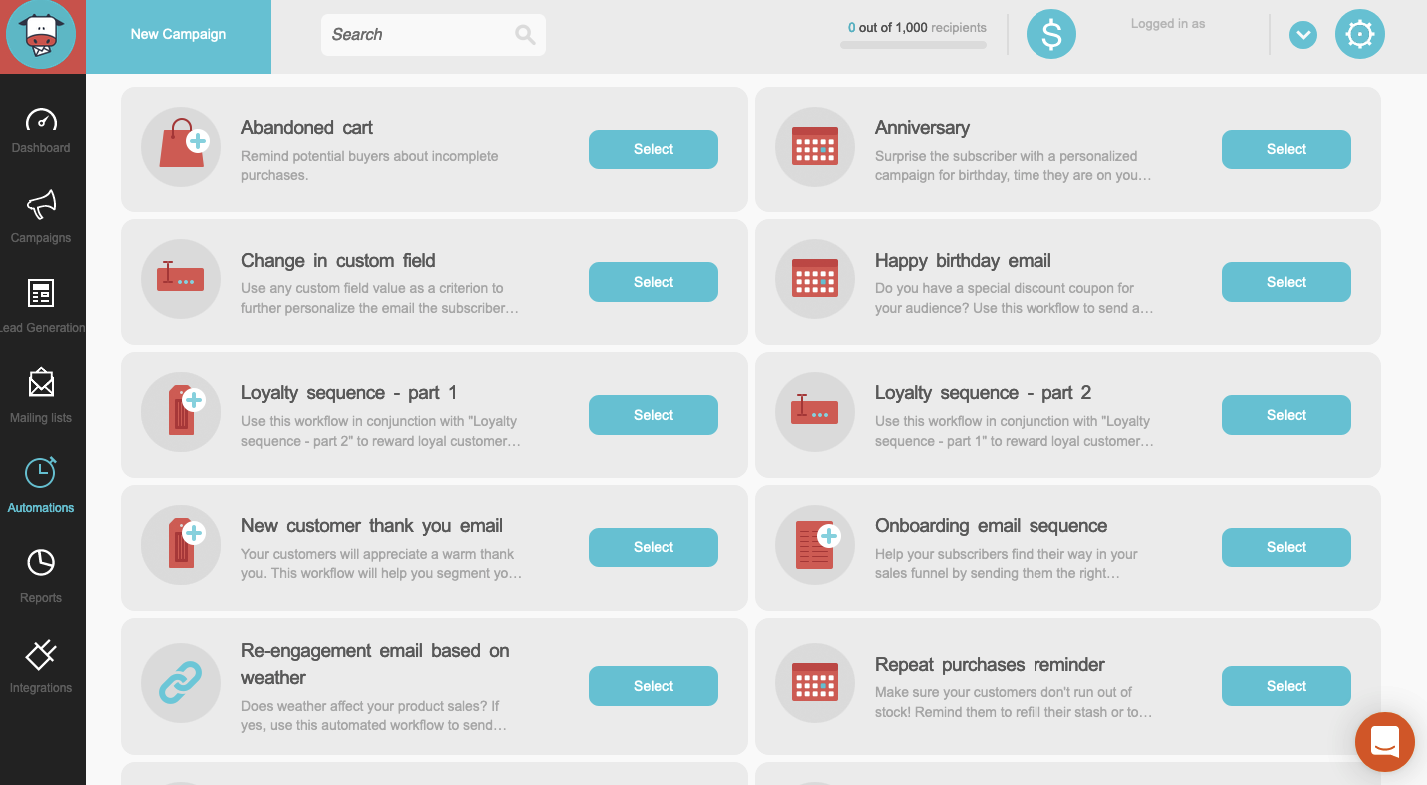
Cute how we have two completely different animals with the same purpose here. Anyway.
Moosend’s cool tagline is “from beginning to pro, destined to grow”. Huge promise here: emails that get opened and clicked every time. Want to see for yourself? For FREE?
If you have up to 1,000 subs, you can. You’ll still get...
- Unlimited Emails
- Sign-up & Subscription Forms
- Reporting & Analytics
...and that’s awesome. Their pro plan is only $8--no wonder it’s the most popular one. It’s well worth it paying this little if your business skyrockets, which it probably will after you’ve subscribed to Moosend.
Powerful Personalization
Some emails sound like they’ve been copied and pasted all over again. That’s insulting to your subscribers, you know? Every sub needs a personalized experience--or at least something that sounds and looks like one.
You can’t possibly do it without platforms that will give your subscribers a feeling that you’re talking to them, and to them only. Drip and Vertical Response will give it to you.


Drip’s goal is to help you create campaigns that will send your customers straight to their windows, wondering if someone is stalking them. In other words, it’s designed to help you understand what your shopper wants, what they’re clicking on, what they're buying, and so on. You can then create tailor-made campaigns based on their recent activity.
Engage with them at the most convenient times. Namely, at important customer touchpoints (a heartwarming welcome, when they’ve forgotten something in their cart, or when they’ve purchased something).
And of course, when you make a campaign that looks like it was made for them, they won’t want to buy from anywhere else.

You start noticing Vertical Response will be a breeze to use just by reading the instructions on their landing page. Even the most beginner of marketers will know how it works in a heartbeat.
Keeping your audience engaged means building relationships with them until, eventually, they decide to buy something and go from warm leads to loyal customers.
That’s why Vertical Response goes beyond welcome emails. It allows you to send your emails at the perfect time when your customers are more likely to see them. It also comes with a follow-up feature to let them know if they’ve missed anything. This way, they’ll know how much they mean to your business.
Keep subscribers re-checking their inboxes thanks to Vertical Response’s segmented and personalized automation tools.
Fast Automation
Good automation should give you the least possible amount of work. Outstanding automation should do the same--but sound human and personal while doing it.
Most automated messages we see sound robotic as if Siri is reciting them. The following platforms, however, take a stand against machine-like communication and save you tons of time.


iContact used the word “clairvoyant” to describe the automated email campaigns it allows you to create. If that’s not badass, nothing else is.
Customers not only like it speedy--they like it personalized. And iContact gives it to them by launching automated campaigns that fire up once a subscriber interacts with a landing page, buys something, or meets certain standards you’re looking for. This is great to confirm purchases, say a cheery thank you, or guide them through upcoming steps.


To learn everything you can about your audience, you need to follow them. Not in a creepy way, though. Emma does it by expertly targeting your audience in and outside of the inbox. And by tying every email to essential steps of the customer journey.
Emma makes it personal. Emma won’t bother your subscribers with annoying emails that pop up when they’ve received one just yesterday. This would eventually make them grow tired of your brand). Emma knows what’s up.
For instance, it segments your email in an attractive way, in interesting intervals. It can greet subscribers with a warm welcome, followed by a laser-targeted offer a few days later. And then it can send a catchy, informative email at the right time. Very powerful.
Comprehensive Analytics
To measure your results, you need to first understand your ROI. What’s the point of having a cutting-edge--as marketers love to call it--platform if you understand nada of what’s going on? (Cough, hence the importance of 24/7 support, cough.)
Knowing whether your campaigns are driving results is essential so you can fine-tune your campaigns, and generate more leads, and acquire more customers. You live and you learn it. What you can’t measure, you can’t change.
Here are two platforms that basically draw it for you (no offense).

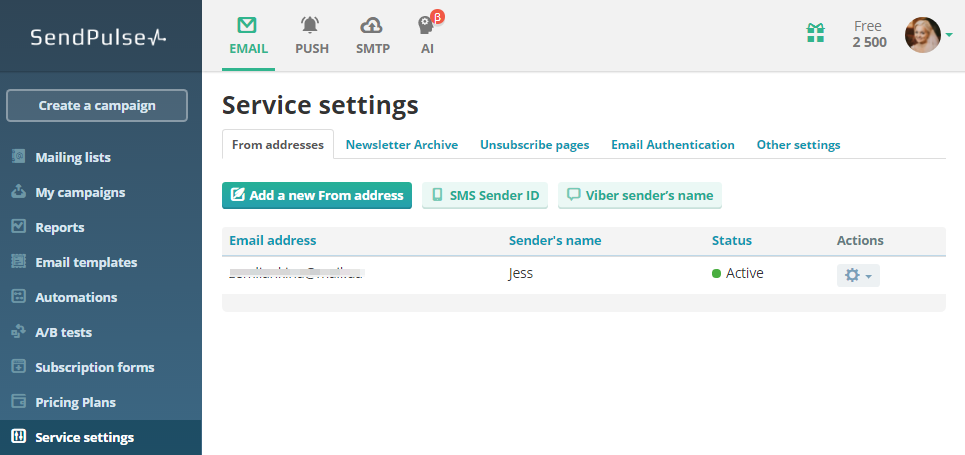
Sendpulse uses something called “predictive analytics”, which tells you the right time to reach out to your customers based on their behavior. Another cool feature is, you can measure your form results accurately by seeing which channels bring you new subscribers--and focus on them. Staying on top of those things will let you create even better campaigns down the road.
What’s more, you can use SendPulse on-the-go, anytime. View all email campaign statistics from your phone or tablet in the iOS and Android app.


GetResponse is easy to manage thanks to a bunch of tracking options. One of them being the knowledge of which emails didn’t reach a certain subscriber, and for what reason.
Additional data includes number of unsubscribers, viewers, and even those who have a few words to say about your business (an euphemism for complainers, if that’s a word). And by the way, if you’re one of those people who absolutely can’t stand data because you’ve had horrible experiences trying to understand it, GetResponse saves the day by giving you pie charts and graphs that are easy to digest. Yes, it’s literally drawn out, and to be honest, we all needed this.
Summing up
To sum it up, nothing is perfect. Not even the best email marketing platforms out there--although the above are pretty close to it. Of course, they all have different costs and benefits, and that’s why we gave you a lot of options to choose from.
What email marketing platform is your favorite? And what’s one you’d never use again? Comment below to save lives (and businesses).
Tuesday, April 13, 2021
The 5 Keys to Maximizing Opens, Clicks, and Engagement
Email can be painful.
Most of our inboxes are compilations of stuff we don’t bother looking at. Almost every email sounds and looks just like the last one you opened. Which reminds you why you never open any of them in the first place.
For months you’ve been collecting spam from that one website, though all you wanted was a free e-book. “I’ll unsubscribe later”, you thought. But you never did, because, well, you forgot. You always do.
Still, you kept doing it for every newsletter you subscribed to. And now your inbox is littered with emails that would be reeking of mold if you could get a whiff.
Among those hundreds of emails are special offers, actually interesting stuff, and blogs you’ll never read. And it’s all thanks to one reason: they don’t look interesting enough. They don’t grab your attention. They don’t make you think “hey, that could be something that won’t waste my time”.
You don’t click something that looks uninteresting. If you don’t click it, you won’t open it. If you don’t open it, it can’t engage you. If it doesn’t engage you, you won’t read it (or buy it). Simple enough, right?
The same happens to your subscribers. They, too, have hundreds if not thousands of festering emails just waiting to be noticed. Some of them could be yours. That newsletter you worked hard on? It’s no use if no one’s interacting with it.
If you’re determined to maximize your open rates, your clicks, and engage your readers to the point they’ll not only see your email but read it all the way through and take action, you must do a few things differently.
All of the following key tips go with real-life examples from successful emails. Use them in your own newsletters, and keep your eyes on the analytics to see magic.
Let’s get started.
Tantalize Subscribers With a SHORT, Enticing Subject Line
“Short” is in caps for a reason.
Let’s venture to guess it hasn't been long since you last saw a subject line along the lines of:
This is your LAST CHANCE to make SIX-FIGUR…
Aaaand you’ll never know what the rest says. Of course it has something to do with making six-figures. But dozens of other emails you’ve seen featured LAST CHANCE warnings (when it wasn’t really the last chance). Your audience is smart, treat them as such.
And let’s be honest here. Have you ever opened any “make six-figures” email? Probably not. And if you did, here’s to hoping you’ve made it.
Anyway.
If you’re going to do it, at least do it better.
Look at this email subject line from a Motley Fool campaign. All it says is:
Sorry, you missed your chance.
What chance? Did I lose something? Let me check what this is about…
Even if you ask yourself “what website is this from, anyway?”, this line gives you a curiosity itch. And that’s what it’s supposed to do.
This type of subject line works for promotions your subjects have been warned about, but missed. In the body text, you can always let your subscribers know when their next chance will be. Or if there will, hopefully, be another chance. Make it interesting, and they won’t miss it the next time around.
You can also swipe Early To Rise’s example:
Did you miss this?
This line is great for weekly article roundups, leading subscribers to go over the week’s latest topics, and encourage them to read your blog. You can even throw a few offers in there, but make it subtle.
Now, for another catchy example.
Ryan Deiss’s “The Death of the Sales Letter” subject line is a thing of beauty. If you’re a marketer, you’d certainly want to know if sales letters are obsolete, and why exactly. Plus, a powerful word such as “death” piques interest.
A subject line should get the message across without dot dot dot. It should be the one thing in your subscriber’s inbox that doesn’t make them want to delete Gmail once and for all.
Start With a Bang
This is a rule for every single email. You don’t necessarily have to begin by saying “dear reader”. Not even “hey”, if you don’t feel like it. Sometimes, unfollowing the rules is bliss.
In the words of master copywriter Eugene Schwartz, the goal of the first sentence is to get the reader to read the second one, and so on.
But what does “starting with a bang” really mean?
No need to dramatize every first line of every email. But write it with the purpose of leading the reader down the page.
Remember Motley Fool’s “missed your chance” email above? Here’s how it starts:

It sounds as though someone really needs to talk to you. And that your attention is really important to them. Notice how an enticing subject line paired with a banging first line can make a huge impact. They guarantee an open and the beginning of reading. We’ll talk about the rest in a minute.
The other example is from an email campaign from Dan Kennedy.

“This will be short”.
Well, thank goodness.
A simple guarantee you won’t be wasting your precious time can do wonders. Think about it: when scrolling down and seeing lots of text, the result would probably be a resounding “nahhh”, followed by a back click.
If the text really is short as you (and Dan) have promised, you’ve got a reader.
But what about longer emails? Does that mean they won’t work? Not at all. In fact, there are successful techniques you can use to make sure your longer emails have a higher chance of being read from top to bottom. Here they are.
Don’t Write in Huge Blocks
Use one-sentence paragraphs. One-word paragraphs, even.
And yes, in high school English you were told you weren’t supposed to use bullets, write sentences that are way too short, yadda yadda. Here’s the place to say it: that’s bullsh*t. Unlearn it. At least if you’re going to be writing emails from now on.
There’s a reason authors like Ernest Hemingway and Nora Ephron are so easy and delightful to read. Their sentences are minimal. Short. Crisp. Like this. They vary in length, giving rhythm to the writing. You can do it, too. Train yourself to write sentences that read as crisp as the first bite on a buffalo wing.
Use bullet points and fascinations where applicable (especially if you’re listing the lessons on a webinar, course, or e-book).Also, don’t be afraid to make your emails look like a poem at times.
Would you rather read a fluid poem or an academic essay? You don’t have to answer.
Here’s an example from Webinar Jam.

One-sentence paragraphs. Lots of them. There’s even an isolated “or” hanging around.
If that sounds far different from the way you currently write your emails, give it a try. This technique will increase readability. Promise.
Tell a Relatable Story
If words like “storytelling make you feel like abandoning your career in marketing, you’re not alone.
Sometimes, storytelling is one of those things some of us hear often but never quite grasp. So we start hating it.
Truth is, storytelling isn’t about writing full-fledged stories with made-up characters. It could be as easy as writing about a funny incident that happened the other day. Or telling people about the current book you’re reading.
Storytelling is essentially about painting pictures in people’s minds. Because when you activate people’s imagination, they pay attention.
Of course, these stories shouldn’t be told without a context--they should tie into the subject of your email.
Say you had a great chat with your co-worker Jim over the weekend, from whom you extracted a few precious marketing insights. Writing about marketing in your email? Score. Talk about those insights, and how they can help your audience. But give Jim some credit, will ya?
It doesn’t have to be all about YOU, though (this one’s for you, introvert). Storytelling can also be as simple as citing interesting facts. Look how AWAI grabs the reader’s attention by talking about the Big Mac.

Not only it keeps us reading, but it makes us wonder: what the hell does a Big Mac have to do with writing? And wait, 550 MILLION BIG MACS?!
So you keep reading...
Use Visuals
In some emails, interesting visuals like images and GIFs can (and should) be used to break down text. In others, they are the content itself.
For example, GIFs are excellent to display various products such as clothes and makeup without taking much space. Plus, you get to show one product from various angles, and they look amazing! If good copy and kick-ass CTAs accompany, you can get that click. Lookie here:

Let’s see another example--this time with static visuals.
We don’t need to get political here. But here’s a great example from Hilary Clinton’s campaign. It’s an e-mail featuring a list of 5 things you could do to elect her. It was quick to read, had a colorful and catchy background, and photos to illustrate.

Five things, in five minutes or less. Again, this reassures the reader that it will be quick, so she doesn’t have to worry.
This list wouldn’t be remotely as interesting if it was written in plain text. If you get the chance, give your lists and informational content a bit of a zing by making it look great. You don’t even need a designer for it.
Now, if your email is on the plain side but you’ve got a lot to say, use images and GIFs to give your reader something to look (or laugh) at besides text.

Blend Your Content Into the email, Seamlessly
Seamlessly is such a graceful word. It sounds just like what it means: it blends itself in in a smooth flow. It doesn’t sound terrible, like moist.
Anyway.
If you want to flee from the usual “here are this week top blog posts” you have a seamless alternative. It’s easier to lead people into reading your content on another page when you give subscribers interesting tidbits.
Chances are, if they only see a link pointing to it, they might not be so sure they will find what they need. So it’s your job to tell them.
Peep what Cole Schafer wrote before linking to his post about writing badass newsletters.

He was already talking about his own cool newsletter and how starting it was a great thing. So why not drop a link to his post talking about how to write a cool newsletter yourself?
He blended it in, seamlessly.
Alright, enough of that word. Soon it will start sounding like moist.
Don’t Be Afraid to Throw in a Few Jokes and Humorous Reflections
If a situation applies, of course. If you’re giving news about a hiatus due to your grandmother’s passing, you probably wouldn’t want to joke about that. Unless you’re a sick f*ck.
See what was done with seamless up there? This article doesn’t necessarily need that. It won’t add anything to knowing how to maximize opens, clicks, and engagement. But it was funny, right? Right?
Emails are supposed to sound casual. Laid-back. Above all, they’re supposed to make readers relate to you, in some way. Find you interesting and cool. Laugh a bit, even if through their noses.
If you have a reflection or something funny pop in your head that's relevant to what you have to say, type it in.
In The End, Give Them More Than Just One Option
You’ve reached the end of this article, and your subscriber reached the end of your email.
Time for the grand finale. Time to tie everything up with a link and a click-worthy CTA. You’ve given them one link to interact with. Trouble is...
They could just say “nah, I don’t want to buy that” or “I don’t feel like clicking this right now” and call it a day. They did read your email, but at what cost?
Giving your subs more than one option will increase their chances of converting--one way or another.
If you give them the option to download your E-book
or
Buy one (or more) products
or
Hire you
or
Redirect them to your blog posts because they’re so awesome
or
Just let them do whatever they want to do without being pushy about it…
...Then you’ve catered to multiple needs.
In this instance, if they don’t click it, it wasn’t meant to be. But your chances to get a click and potentially a conversion? Higher than Mount Everest (which, if you don’t know, is the highest mountain in the world).
How do YOU Maximize Your emails?
Share your wisdom in the comments. Reply to this post with your infallible email techniques to help a few readers out, c’mon. (Or not. Keep your secrets.)
Otherwise, just follow along with this article, do the work, and reap the rewards.
Wednesday, March 24, 2021
How To Write Really Good Sales Emails

According to DMA’s “Marketing Email Tracker 2020” report, the average estimated return on each £1 spent on email marketing is £34.56.
Yes, you read it right, it’s an astonishing 3456% return on investment. And that’s only the average.
Presumably, you could get an even better ROI if you mastered email copywriting.
Want to learn how to write really good sales emails?
Continue reading…
Clearly Define Your Target Audience
You can’t be effective at selling if you don’t know who you are selling to. That’s why you need to clearly define your target audience.
Here’s the bare minimum that you should know about your ideal customer:
- Their gender.
- Their age.
- Their nationality.
- Their job title.
- Their marital status.
You may also want to narrow it down even more based on additional characteristics such as interests, hobbies, aspirations, political beliefs, religious beliefs, etc.
Knowing who you are writing to will help you craft a message that truly resonates with your ideal customers.
Conduct Proper Customer Research
Do you know who are the best copywriters?
It’s not the people who are most talented at writing, it’s the ones who do the most in-depth customer research.
You see, clearly defining your target audience is not enough. You need to go out there and learn everything you can about your customers. Become the customer. Think like them. Dream like them. Hangout where they do.
For example:
Let’s say that you want to sell online weight lifting coaching to American men between the ages of 18 and 30. How can you learn more about them?
Go where they hang out online and observe the discussions happening there. Let's look at where those places might be.
YouTube
You can find a ton of popular YouTube fitness channels oriented towards young men by simply searching for related terms.

Go to those channels, sort the videos by popularity, then watch the most popular ones.

Also, pay attention to the comments, they can help you understand what your ideal customers are struggling with.

Reddit is another great place where you can find plenty of discussions about weight lifting.
The most popular relevant subreddit is r/fitness that has 7.8 million members, but there are also smaller, weight lifting specific subreddits like r/weightlifting (over 98,700 members) or r/lifting (over 17,500 members).

You can sort the threads by popularity by clicking on the “Top” button and then choosing a time frame.
You can also use the search bar to search for a specific term on a particular subreddit or the entire Reddit.
Online Forums
There are also various online forums that focus on weight lifting, gaining muscle, bodybuilding, etc.
The most popular of these is probably the Bodybuilding.com forum.

You can read the frequently asked questions section, go through the popular threads in various subforums, use the search function to find information on specific topics, etc.
What Do Your Customers Really Want?
This general customer research process of going through YouTube videos, Reddit threads, and online forums apply to most niches.
The primary aim of all this work is to uncover what your customers really want.
For example, if you sell online weight lifting coaching to young men, then your customers obviously want to gain muscle. But what is the underlying motivation behind that goal?
Hanging out in places where young men discuss weight lifting will show you that they want to feel more confident, be more attractive to women, and gain the respect of other men.
Additionally, you should aim to gain an in-depth understanding of the psychology of your customers, including things like their hopes, fears, and dreams.
Moreover, you want to also pay attention to the specific language that your target audience uses.
Throwing in jargon that is familiar to them will make your message more compelling. For example, you should know what “natty”, “juicing”, etc. mean in weight lifting context.
Once you know all that, you can incorporate it into your copywriting, which will make your copy much more persuasive.
Of course, if you belong to your target audience, then understanding your ideal customers is that much easier.
However, you should still do proper customer research, because observing a group you belong to from the outside may lead to valuable insights.
Craft an Attention-Grabbing Subject Line
There’s a famous quote that is attributed to David Ogilvy, one of the best copywriters who ever lived:
"On the average, five times as many people read the headline as read the body copy. When you have written your headline, you have spent eighty cents out of your dollar."
An email subject line is its headline. It’s what determines whether the recipient will open it or archive it immediately.
That’s why you need to make sure that the subject line grabs people’s attention, piques their curiosity, and makes them open the email to learn more.
Get a free copy of Jon Morrow’s “52 Headline Hacks” ebook. You want to master these headlines formulas. It will give you a solid foundation for writing subject lines.

You should also experiment with the three timeless subject line formulas from GrowthLab’s “Ultimate Guide to Email Copywriting”.

GrowthLab explains how you can use this template as a starting point and then improvise to make the subject line even more compelling.
For example, you can take the first subject line, then make it more casual:
“So you wanna wake up productive, huh?”
Or you can make it more powerful by using a real example of what “waking up productive” means:
"Get more done by noon than most people do all day"

The power of this formula lies in how specific these subject lines are. Concrete claims with numbers tend to work better than vague claims.
That being said, you need to be careful here, you don’t want to promise something that you can’t deliver.

This subject line formula is even more dangerous than the previous one because it relies on outrageous claims (no, you are not going to get arms like Arnold Schwarzenegger without any training, sorry).
You can avoid trouble by either toning down the claims or relying on true stories about people your target audience is familiar with.
The balancing act here is that you need to create a subject line that is click-baity enough to get the recipient to open the email, but not so click-baity that you can’t deliver what you promised.
Once you have mastered both Jon Morrow’s headline formulas and GrowthLab’s subject line formulas, you can get creative and experiment with some more “out there” subject lines.
For example, Bushra Azhar got great results with her “Nothing like the smell of piss & horse sh*t to start the day” subject line. It had a 69% open rate and a 28% click-through rate.
“People don’t think of these things when talking about starting a day. It’s unusual and disruptive — and that’s why it worked so well,” she explains.

Her advice for writing attention-grabbing subject lines is to disrupt the recipient’s mental patterns. How can you get them to do a double-take?
You want to give people something unexpected. It can be uncommon word combinations, new twists on popular expressions, shocking statements, etc.

Of course, you need to exercise common sense here, you don’t want subject lines that are so risqué that you end up alienating your readers.
Sell On Benefits, Not Features
There’s an old copywriter saying:
“Features tell, benefits sell.”
What’s the difference between features and benefits?
- A feature is a quality or a feature of a product. For example,” waterproof” is a feature. When you say “These shoes are waterproof” you are selling on features.
- A benefit is something that the customer will get out of using your product. For example, “keeps your feet warm and dry” is a benefit. When you say “These shoes will keep your feet warm and dry” you are selling on benefits.
It’s important to understand that people don’t buy features, they buy the benefits that they get from those features.
That’s why your sales email should be focused on the benefits that people will get by using your product.
This is where all that customer research comes in. What do people in your target audience really want? That’s the benefit(s) that you should focus on in your copy.
Of course, you need to mention the most important features as well, but you should use them to support the benefits that you are emphasizing.
Provide Social Proof
People are more likely to buy products that others vouch for.
Moreover, they are more likely to trust you if they see that other people hold you in high regard.
That’s why you want to add social proof to your sales emails whenever possible.
You can do that by including customer testimonials, referencing the results people got by using your product, mentioning that your product was featured in a prominent media outlet, etc.
For example, Brian Dean of Backlinko recently launched his premium business training program, SEO That Works 4.0.
One of his sales emails had a simple subject line “New Case Studies”.
In that email, he shared three case studies of his previous students, told the reader that SEO That Works 4.0 comes with a 30-day satisfaction guarantee, and reminded them that the program was closing at midnight the next day.


When you click on one of the case study links, you are taken to a case study page where you can learn more about how that particular student benefited from the SEO That Works program.

As you can see, Brian Dean doesn’t come off as salesy at all in his email, it’s a really soft sell. Why?
Because he is an established authority in the SEO industry, his training program is widely acknowledged as one of the best out there, and his results speak for themselves.
The truth is that the more social proof you can provide, the easier it is to persuade people to buy from you.
You may not have the same amount of social proof as Brian Dean, but you probably have something, so make sure to include it in your sales email.
End With a Compelling Call To Action
You can’t just say “Here’s my offer” and leave it at that.
You need to tell people what they should do next.
That’s why all good sales emails end with a call to action.
For example, in the previously discussed email Brian Dean used a simple “Join SEO That Works 4.0 today” link as his call-to-action:

This is the most basic call to action, but it can work well.
You can make it more persuasive by mentioning bonuses like Nick Stephenson did in his “Open now: Self Publishing 101” email:

Another way to make your call to action more compelling is mentioning the main benefit of your product. What will the customer get out of it? Include that in your call to action.
Of course, you can also get creative, like Wesley Atkins did in his email “When writing your book feels like “pulling teeth”, in which he introduced Joshua Sprague’s 30-day email challenge program:

What’s important is that you tell people what they should do next if they are interested in buying your product.
The aim here is to get them to click through to your sales page.
Conclusion
Email marketing can be incredibly effective.
However, if you want to get the most out of it, you need to learn copywriting.
Sure, it’s a skill that takes time to acquire, but once you do, you will be able to create persuasive sales emails that make people want to buy your product.
So study copywriting. Practice it. Master it.
You won’t regret it.
Subscribe to:
Posts (Atom)