Marketers need to up their game in 2019. To do that, we need inspiration. And for email marketing, what better place to learn about effective email marketing campaigns than our own inboxes. Here's what we've learned from studying our own.
You know what they say… Your email list is the only marketing channel you really own.
Social media is prone to constant algorithm changes, PPC campaigns may or may not work depending on your copy and your competition, and you can always put up a billboard – but there’s no guarantee your potential customers will see it.
That’s where email marketing comes in. Everyone checks their inbox a few times a day so it’s the perfect place to get their attention. Preferably with a good offer right after they’ve read a boring work message.
Since 2019 is going to be the year of email marketing, we’ve taken a look at our inboxes to show you what you can learn from your own inbox to up your email marketing game.
Here’s what we learned:
1) Email Deliverability: They Have to See It to Believe It
To paraphrase Dita Von Teese, “Your email can be the ripest peach in the orchard, but there’s always going to be someone who didn’t get it.”
Email deliverability seems like an issue for your tech department, but it’s really not.
More and more marketing emails are going straight to the spam folder of your subscribers’ inboxes, and your goal as a marketer is to stop that from happening.
Here’s why emails usually aren’t delivered, and what you can do about it:
Situation no. 1: Too many emails
Some subscribers just love sending emails straight to spam. Especially if you’re flooding them with messages. If enough subscribers do this, all of your emails will be marked as spam in all of your subscribers’ inboxes.
Avoid this by capturing email addresses at the right stage (e.g. after a customer shows the intent to buy from you, or downloads your lead magnet, etc.) and having a straightforward email opt-in & onboarding process.
Warm up your email subscribers, and show them the value of receiving your emails.
After that, stick to a consistent schedule and if your audience is diverse, segment them according to behaviour and intent (more on that later in a bit).
Situation no. 2: I bought an email list, and I regret it.
Email lists are a dime a dozen today, which is exactly why we get spam emails like:
Ronald here has a good offer, but there was no formal opt-in process and we never subscribed to get this email. Our address was either scraped from a website somewhere, or sold as a part of a mailing list.
Fortunately, this email was already in our Spam folder, which leads us to our next point…
Situation no. 3: I’m on a blacklist, and I have no idea what’s happening.
ISPs are trying very hard to fight against spam, so your email IP address could’ve been added to a blacklist somewhere down the line (here’s how to check). It happens. And even if it’s an honest mistake, it’ll harm your email marketing efforts.
To stop this from happening, you can use an email verification service like mailfloss that will automatically remove invalid email addresses from your mailing list. Over time, this will help improve your email reputation and deliverability.
2) In a Sea of Statements, Be a List
The key to successful email marketing may be writing good copy, but no one’s going to read your copy if your headline doesn’t catch attention from the very start.
Take a look at this example:
Your subscriber sees a lot of statements, a lot of plain text, and then a headline with numbers catches their attention.
WordStream’s “6 Huge Mistakes I Made with a $4 Million Ad Budget” is pretty flashy and attracts attention on its own, but the number stands out in a sea of statements found in a regular inbox.
You can do the same thing with emojis. 🚀
Don’t overuse them and get caught in the spam filter, but if it fits your industry (especially if you’re B2C), you can add in a tasteful emoji. It’s chic, everyone in Paris does it.
Personalizing the headline can boost your email opens, as well.
You can start off the email by addressing the subscriber, and honestly starting a conversation.
3) Message Previews: Show Them the Goods
Once you’ve optimized your headline, it’s time to make use of the second most important thing: the message preview.
A lot of email marketers seemingly forget about the message preview, or they use them like they use SEO meta descriptions. In either case, message previews tend to be boring and just reiterate the same thing subscribers grasped from the headline.
If you want to up your email marketing game, stop doing that. Use message previews to their full capacity.
Take a look at these 3 email message previews:
Which one caught your attention?
The first one clearly announces what’s happening, and tries to start off with a question, but is cut off by the limit.
The second email’s headline starts with an emoji and has numbers in it. They use the message preview to (quite shockingly) address us and say that “this marketing thing we do has to change.”
The third has a number in the headline, and uses the message preview to reiterate what had already been said in the headline.
It’s clear that the second email is the winner. It has a lot going on for it, but “This marketing thing we do? It has to change” both addresses us, and stirs up emotion.
It baits clicks, without being clickbait.
It’s a wild ride from the start to finish, which makes us click and see that…
4) Email Copy Follows Suit
After that whirlwind of a headline and message preview, we excitedly click… only to see that there’s a valuable course involved!
They provide value with their email marketing by:
· Keeping the copy short
· Explaining the “why”
· Showing a way to achieve the mission (getting better at marketing/changing marketing)
In contrast, if this was an email calling subscribers to donate to Kickstarter, this copy wouldn’t have worked.
As subscribers, we’d want to know more. Why should we support that Kickstarter, what’s the vision, and what do we get out of it?
This all shows us the importance of the tone and the style. And we determine those by determining the purpose of each email we send.
5) Know Your Why, and You’ll Know Your Everything
We talked about why the previous example worked, and it only serves to show us the importance of email marketing having a clear purpose.
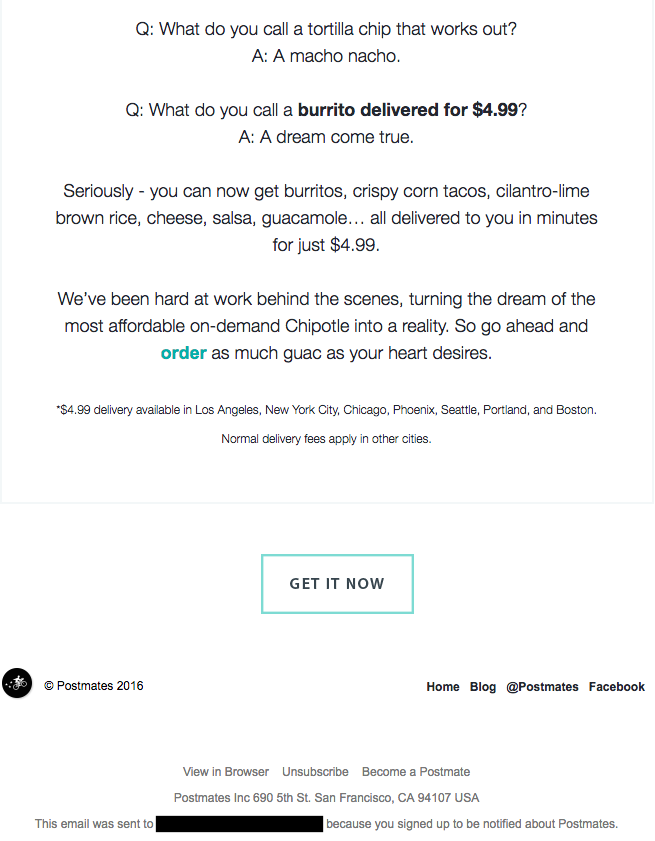
In this example, Chipotle uses an animated gif to let us know they’ve got a new product. They joke around with their subscribers, and create an all-around good atmosphere.
The CTA at the end is: “GET IT NOW” and this is as straightforward as it gets.
Chipotle knows what it wants to do with this email: announce a new product, and motivate customers to get it.
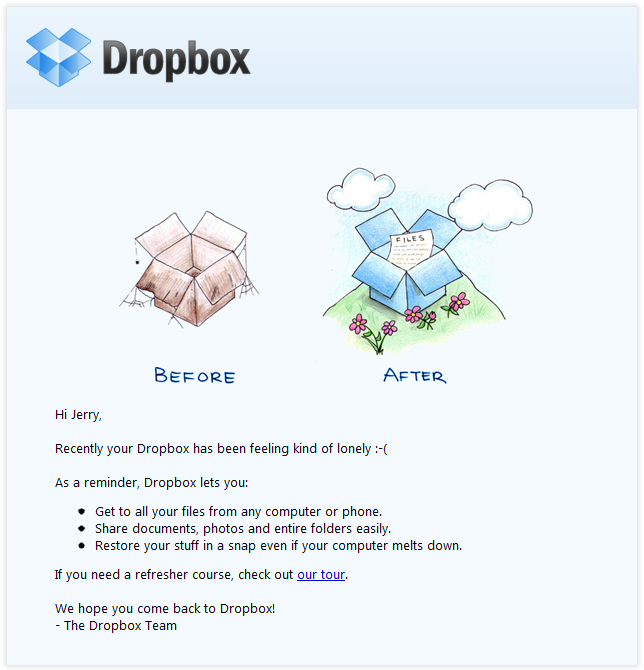
Our second example comes straight from Dropbox, and this email is sent with the purpose of user re-engagement.
Okay, the guilt-tripping isn’t very tasteful, but it can be a good way to show the personality behind the product.
Dropbox doesn’t avoid the subject; you haven’t been using their service, but they think you should be. To prove this, they add a quick bulleted list with the main three Dropbox benefits.
In case a subscriber isn’t using Dropbox because they don’t know how, they link to a tutorial.
Dropbox could’ve woven a story about the human effort that goes into the service, or provided ten examples of using Dropbox (sentimental stories included), but they didn’t. They kept it short, sweet, and full of value.
So if you want to up your email marketing game, know your purpose, and make your emails serve it. Keep the subscriber’s behaviour (and motivations) in mind, and single-mindedly guide them towards the final, clear (and just one) CTA.
If you don’t show your subscribers what to do, they won’t do it.
6) No-Reply? Heck no, YES REPLY!
If your intention is to stimulate as much engagement as you can from your (potential) customers, don’t send email from don’t-reply addresses.
Instead, write an email that shows that you want to keep the conversation going. Ask the subscribers about their experiences, and reply to them.
This is especially great at the onboarding stage, where you want to warm-up leads and convert them into customers.
Brian Dean of Backlinko does this well. This is the first email subscribers get (no matter if they sign up through the opt-in pop-up or through a lead magnet).
He uses phrasing that creates a sense of urgency: “Reply to this email right now.” And then follows on to explain that you should tell him what you’re struggling with (because he can help).
It’s a very down-to-earth approach that stimulates engagement, but the main prerequisite is understanding the buyer/subscriber journey. What does this subscriber want to do next?
Then help them do it.
7) Email Quantity: Toeing the Line between Too Few and Too Many
Only one of the following statements is true:
We love the smell of fresh coffee in the morning, and a bunch of emails from the same sender in our inbox.
Can you guess which one it is?
Even though we know that email marketing is the best way to directly get to your customers, sending too many emails will get you on the spam list.
However, you shouldn’t send too few emails because your customers will forget about you (inboxes are crowded). It’s a thin line, and it may seem like you have to be a pro dancer to tap your way along it.
A good starting point is asking yourself:
Am I providing value with this email?
Are you sending a special offer, or educating your subscribers on a topic that’s related to your business?
If you’ve been using email marketing for a while, you should take a look at relevant metrics, but if you haven’t, start off slow and modify your pacing.
But no matter what you do, your pacing should be defined by the email’s value to the subscriber.
Also, avoid duplicate emails. This is where proper audience segmentation comes into play. You don’t want to send a subscriber the same email just because they’re in two audience segments.
8) Seasonal and Special Offers in Email Marketing
Using seasonality in email marketing is great if you’re actively selling a product, but just because you’re selling a service doesn’t mean you can’t use it.
Always adapt to the season and add something extra to your regular email marketing to follow suit.
For example, you can do as little as modifying the headline like AdWeek:
They’re a media company, so they can’t really do much – but they’re getting right into the holiday spirit.
eCommerce stores take seasonal offers to a whole ‘nother level, but even plumbers and handymen can send out helpful emails preparing their customers and subscribers for a flood/hurricane/fire season.
9) Let Me Read My Emails on My Phone!
A shockingly high number of email marketers don’t make sure that emails can be read on mobile devices.
Making emails compatible with mobile browsers and apps is a priority, and will continue to be a priority in 2019.
If your emails are graphic-heavy, make sure that they’re equally as visible for subscribers who’ll consume them on their phones as for those who read them on desktop.
There’s nothing like catching up on your Promotions tab during the commute, and as always – email marketing is used here to keep subscriber behaviour in mind, and adapt for maximum ROI.
10) In the Right Place at the Right Time
Finally, know your subscribers.
We don’t know why we’re receiving a National Geographic photography email on a Monday, at 8am when we’re at work. It’ll just stay unopened (forever).
Great email marketing arrives exactly when customers need it.
Yes, this can require a lot of testing. But don’t forget about the serendipity effect that your subscribers will feel:
Wow, this email is exactly what I needed right now.
If email marketing were a video game from the 90s, deliverability would be the side quest you’re forced to deal with before saving the princess. It’s not entirely irrational to think you’d need swords and at least three white knights to deal with it.
It’s the demoralizing “wait - I just spent a week creating a killer drip email campaign, and I’m getting spam-trapped? Isn’t that why I'm paying my email service provider out of my first born’s college fund?" side quest fail.
The truth is: it’s not. If you want to increase your email marketing ROI, you’ll need to take ownership of your email deliverability.
Your average company is losing ~2% of their emails to hard bounces. That’s a 2% sinkhole on an advertising channel that might give you as high as a 40x ROI. On a $1000 email marketing budget, the average business is leaving over $800 in profits on the table for what often amounts to not having the right infrastructure and tools in place.
To put it simply: fixing deliverability increases profitability.
Let’s demystify email deliverability and see how you can leverage it to make your marketing efforts less unsuccessful (we’re glass-half-empty kind of people).
Understanding Email Deliverability
In a nutshell, email or inbox deliverability is the ability to deliver emails to the inboxes of people subscribed to your mailing lists.
Email deliverability should ideally be at 100%, but is usually less than that due to problems such as:
Your emails are getting caught in the spam filter
Your emails are getting blocked by the user’s ISP
You’re sending emails to invalid addresses
If your emails are flagged as spam often enough, they’ll stop appearing to the rest of your mailing list subscribers – not just to the people with ISP problems, or the people who are flagging them as spam.
Think about that for a second. You’re being punished by ISPs and you might not even know it.
This is a problem because undelivered emails cut back on your ROI. The more undelivered your emails, the greater the effect. It's like a leaky bucket but instead of water that's leaking, it's your profits. You can get a more accurate measurement of your ROI by using this calculator.
Non-profits, for instance, lose around $15,000/year in donations just because spam filters are blocking their fundraising emails - that’s absurd. Even breast cancer awareness is getting spam-trapped.
The usual suspects behind undelivered emails are:
Your email reputation
Authentication
Your technological infrastructure
Email reputation
If you’re familiar with SEO, you know that search engine algorithms punish or reward certain behaviours.
Email reputation is kinda like that, but primarily anchored around your sending practices. Your practices over the long-term are then evaluated by ISPs to determine whether you’re spamming your subscribers, or providing them with valuable information.
Here’s how you can improve your email reputation:
1) Consent
Make sure that your email subscribers opted in through an opt-in form and that you didn’t get their email addresses without their consent. Similarly, clearly state where they can opt out of your emails.
This is especially important when it comes to complaints users make when they see a strange email in their Promotions folder, and click “Mark as spam.” A significant number of these complaints will get you permanently thrown into the junk folder with magic pills, Nigerian princes and phishing scams.
Even if you were just selling socks.
2) Consistency
Don’t deviate from a normal sending schedule of your emails. High-volume and mass-sending in short or inconsistent timespans will catch the attention of ISPs, and can be flagged as spam.
Instead, keep your email volume scheduled and consistent, and adjusted to your subscribers’ preferences.
3) Bounce rate
Email bounces happen when subscriber emails are no longer active (their inboxes can’t receive your messages), and this gives a signal to the ISP that you’re not taking care of your mailing list and obtaining email addresses through sketchy methods.
Monitor your email campaigns and remove all the hard-bounced email addresses to decrease your bounce rate. Any good email service provider worth paying for will likely do this for you automatically.
Authentication
We live in a connected world where bad information, fake news, fake accounts spreading fake news, spam, phishing attacks, and so on and so forth runs rampant. For ISPs to determine you're not one of the bad guys, they want you to setup authentication.
Authentication proves that your email is coming from you, not someone impersonating you. Think of it as calling your bank and verifying your personal data before making changes to your account; you’re confirming that you’re the person you’re claiming to be.
The main two authentication policies you can implement are DKIM (Domain Keys Identified Mail), and SPF (Sender Policy Framework). Yes, go get the techie person from your marketing team for that.
The good thing is you only need to set it up once. ISPs will verify that the email is coming from you, so it’s less likely your email will be mistaken for spam.
Infrastructure
The infrastructure you need when you’re sending 1 email a week is not the same as when you’re sending 10 emails a day to thousands of accounts.
If you’re investing in your email marketing efforts, you should invest in your email infrastructure and a good email service provider (ESP).
Of course, if you’re running a small business and have an email list of about 200 subscribers, you can keep using free third-party newsletter providers. However, when you reach a certain point (and when email marketing starts bringing in serious revenue), you’ll need a dedicated program or a high-volume ESP.
Here’s what you should look for in your email infrastructure and ESP to improve your ROI:
1) Dedicated IP addresses
If you’re sharing an email IP address with other email senders, their behaviour will affect your reputation. This is especially important if you send a lot of emails. You want a dedicated IP address for your email, so it’s connected to you and only you.
Think of it as living in a building vs living in a house: If your neighbour floods their bathroom above you in a building, you’ll have water damage, too. But if you live in a house (have your own IP address), there’s no neighbour to cause a flood above you.
2) ISP feedback
Feedback is important, and so is the feedback your subscribers give to their ISPs.
Most ISPs offer a way of connecting with them so you can see who flagged your email as spam, allowing you to remove them and reduce the undelivered email rate.
Email Deliverability Tips
As you can see, email deliverability is all about pleasing the ISPs and your subscribers.
People are bombarded by almost 105 billion emails sent every day. Even reputable companies with opt-in newsletters are starting to lose ground to the swarm - and ultimately, email deliverability depends on your emails standing out and actually being read.
The trick is in cutting through the noise. And if you’re producing quality content your subscribers enjoy (and which turns them into customers), you should be ensuring they can get it and read it.
How?
1) Opt-in and preferences
If you send emails once or twice a week, you should be good. But if you send them more often, and tailoring newsletters to audience segments, it’s good to have a preference centre.
Your preference centre should list all your available email campaigns for the segment (e.g. Promotions and offers, Weekly newsletter, Tips & Tricks, etc.), and show the subscribers which campaigns they’re subscribed to.
If they want to unsubscribe, they can do it through your preference centre.
In return, you’ll get less bounces and spam flags.
2) Welcome emails
These days, if we don’t get a welcome email, we think the service we just subscribed to hates us.
It’s also a great way to warm up your subscribers and convert them into customers from the get-go. After all, welcome emails generate 320% more revenue than other promotional emails.
We’re not saying to send cupcakes through email, too, but heck, welcome emails matter.
3) High volume is not always the right volume
Like we already said, there are 105 billion emails sent every day. Your subscribers can, and will get oversaturated if you send them emails five times a day.
The content is key so when you’re deciding on your frequency, make available content the deciding factor. If you can send quality emails three times a week, go for it, and test how your subscribers react.
If you see your open and click-through rate going down, it’s time to stop, drop, and reassess.
4) Spruce up your mailing lists
Depending on your marketing activities, you may have acquired subscribers who clicked ‘count me in’ just because they thought they were going to win something.
You may also have subscribers who decided they wouldn’t buy fur coats from your super exclusive store anymore because they’ve turned vegan after a trip to Thailand. Who knows?
But these aren’t the quality subscribers you should be focusing on when it comes to email deliverability. They often don’t open your emails, or they flag them as spam.
So it’s best to go through your mailing list once in a while, and remove everyone who no longer seems interested.
That’s what keeps the ISPs interested, and your emails delivered.
Your Email Life-hack: Email Verification
Ignore ROI for a second - it’s no secret that email addresses cost money to store, particularly on the most popular ESP vendors. Bounced emails alone can move you up an entire spend quartile to a higher paid plan. The last thing you want to do is waste money on emails that aren’t even valid.
Email verification is your secret weapon for pruning your list of bad actors. There’s a lot you can do to ensure the emails you’re getting are legit, but the best bang for your buck, by far, is to invest in an automated system that does it for you.
mailfloss does it for you automagically, for as low as $17/month.
The Mystical Email Deliverability
Ultimately, email deliverability isn’t all that mystical. It’s the unsexy chore & maintenance exercise you need to work on to keep your revenue engine choo-choo-ing, but once you’ve got the fundamentals down, it becomes pretty routine.
Great email deliverability is ultimately the simple byproduct of writing good emails, and sending it to solid lists of people who actually want them.
Ever watch the show ‘Kitchen Nightmares’? Where Gordon Ramsey goes and fixes restaurants? He always focuses on the simple things - clean kitchens, simple menus, organized furniture. The marketing equivalent of that is email deliverability - get your house in order.
Once you put a few of the foundations in place, and actually worry about writing good emails, your deliverability will become industry leading and it’ll reflect in your ROI. Ultimately, the single best rule of thumb for email deliverability is the same advice your grandma would give you (if she happened to be an email marketing wiz): send emails people give a damn about.
mailfloss handles your email verification automatically
mailfloss has a good set of defaults in terms of what it cleans and does not clean. However, if you are looking for more find grained controls then you can go ahead and add your blacklist and whitelist options here. Remember to click on the link “Toggle whitelist/blacklist” as they are hidden by default. Blacklist options […]